
Neve MCP Abilities
The Neve theme and Neve Pro provide WordPress Abilities API tools that AI assistants can use to read and configure a Neve site. The free Starter Sites & Templates by Neve plugin also provides abilities for browsing, importing, checking, and cleaning up starter sites. This guide covers connection, prerequisites, available abilities, safe usage order, and important safety notes.
In this article
Requirements
- The Neve theme must be active on your site.
- WordPress 6.9 or later.
- You also need a compatible connector, such as Easy MCP AI, and an AI client connected to your WordPress site. For setup instructions, see Getting Started with Easy MCP AI.
- Neve Pro is required only for abilities or fields that manage Pro features. Starter-site abilities are provided by Starter Sites & Templates by Neve and do not require Neve Pro.
- The authenticated user must have the capability required by each ability:
- Most design and Customizer abilities require
edit_theme_options. - Site operations such as module toggles and performance settings require
manage_options. - Starter-site abilities require both
manage_optionsand access to the Starter Sites screen: theinstall_pluginscapability, oractivate_pluginsif Neve uses its dedicated dashboard menu.
- Most design and Customizer abilities require
Connect your AI client and enable Neve's abilities
In your WordPress dashboard, open Easy MCP AI > Dashboard. In the Connect your AI client area, choose your AI client and follow the on-screen steps to connect it to your site. If you use another compatible connector, follow its connection instructions.
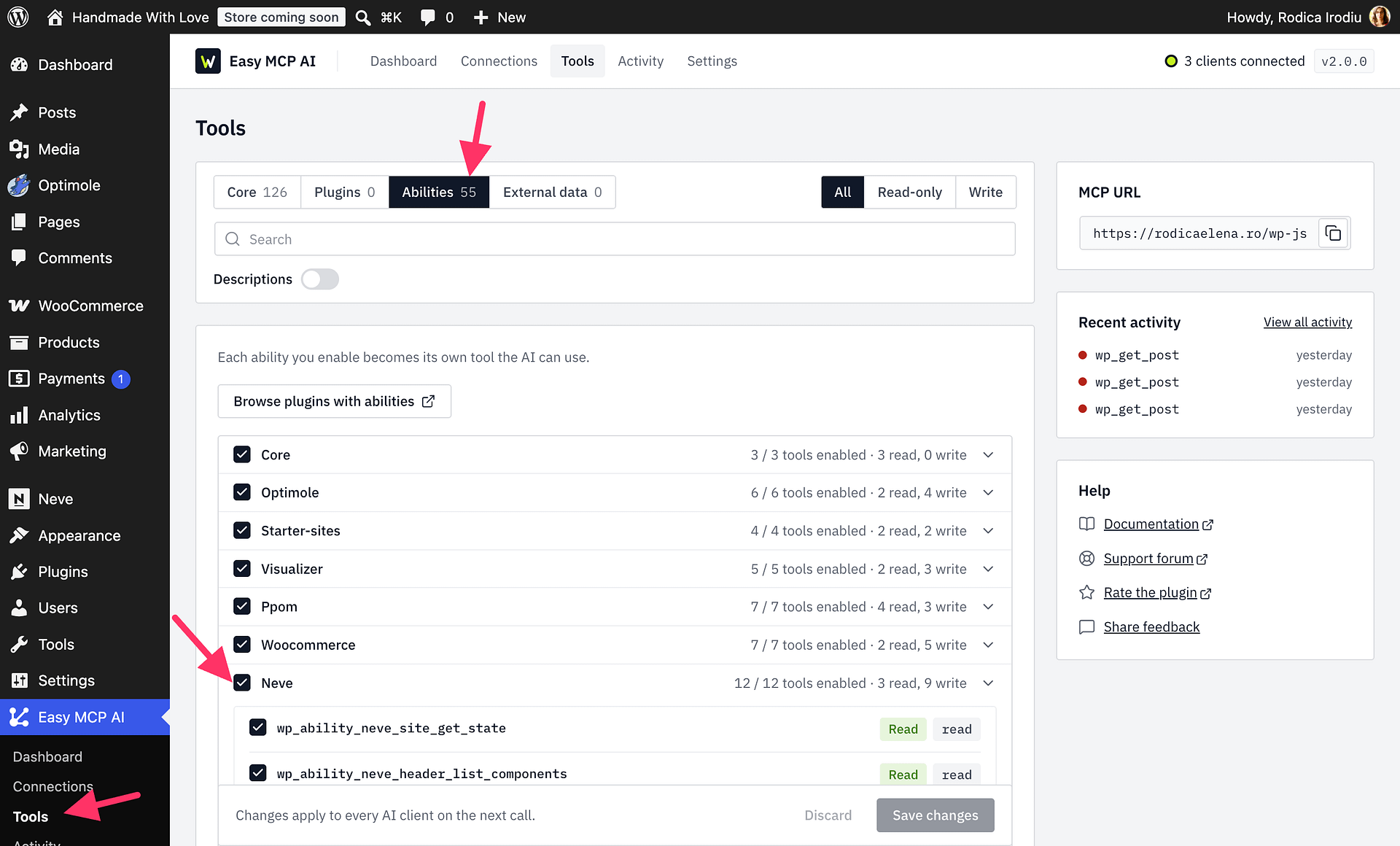
Open Easy MCP AI > Tools, then select Abilities.
All abilities are off by default. In the Neve group, enable all abilities that you need.
Click Save changes to make them available to connected clients.
Recommended Workflow
Follow this order to avoid unintended changes:
- Call
neve/site-get-stateto inspect the current site configuration before making any changes. - Use read-only helpers such as
neve/header-list-components,neve/custom-layout-list,neve/custom-layout-get-condition-schema,starter-sites/list(also available asneve/starter-site-list), andneve/pro-module-listto gather information before writing. - Use write abilities only after confirming the target state from the read step.
- Treat abilities marked as destructive — such as starter site import/cleanup, menu deletion, custom layout deletion, and site mode changes — as operations that require explicit confirmation before executing.
Ability Groups
Core Neve Abilities
These nine abilities are included with the Neve theme. Read-only abilities can be called at any time.
Site State and Discovery
| Ability | Description |
|---|---|
neve/site-get-state | Returns a full snapshot of the current site configuration. Call this first. |
neve/header-list-components | Lists all available header and footer builder components. |
Appearance and Layout
These abilities write to Customizer settings. They require the edit_theme_options capability. Per-page updates also require permission to edit the selected post, page, or product.
| Ability | Description |
|---|---|
neve/appearance-update | Updates one or more Customizer appearance settings. |
neve/appearance-apply-preset | Applies a predefined appearance preset. |
neve/header-configure | Configures the header builder layout and component settings. |
neve/footer-configure | Configures the footer builder layout and component settings. |
neve/site-set-theme-mod | Sets an individual theme mod value. |
neve/page-layout-update | Reads or updates the Neve layout settings for a post, page, or product. |
neve/site-set-performance | Updates site performance settings such as emoji removal, oEmbed, and local Google Fonts. |
Some fields within shared abilities require Neve Pro and return a Pro-required error when the addon is unavailable.
Neve Pro: Menus and Custom Layouts
Neve Pro adds the following abilities for menus and custom layouts. Menu deletion and custom layout deletion are destructive and cannot be undone.
| Ability | Description |
|---|---|
neve/site-configure-menu | Creates or updates a navigation menu and its assignments. |
neve/site-delete-menu | Destructive. Permanently deletes a navigation menu. |
neve/custom-layout-list | Lists all existing custom layouts. |
neve/custom-layout-get | Returns the content and settings of a specific custom layout. |
neve/custom-layout-get-condition-schema | Returns the schema of conditions that can be applied to custom layouts. |
neve/custom-layout-upsert | Creates or updates a custom layout. |
neve/custom-layout-set-status | Publishes, drafts, or changes the status of a custom layout. |
neve/custom-layout-set-site-mode | Destructive. Changes the site-wide layout mode used by custom layouts. |
neve/custom-layout-delete | Destructive. Permanently deletes a custom layout. |
Starter Sites and Neve Pro Modules
The free Starter Sites & Templates by Neve plugin provides the starter-site abilities in this table. The first three also have neve/* compatibility aliases; starter-sites/import-status has no alias. Listing and import-status checks are read-only. Import and cleanup change site content, require confirm: true, and must be enabled by the site owner before an AI agent can use them. Neve Pro is required for the module abilities.
| Canonical ability | Compatibility alias | Description |
|---|---|---|
starter-sites/list | neve/starter-site-list | Lists available starter sites, with optional search and page-builder filters. |
starter-sites/import | neve/starter-site-import | Destructive. Imports one starter site in cursor-based steps. Supports dry_run to preview the plan and requires confirm: true to make changes. |
starter-sites/cleanup | neve/starter-site-cleanup | Destructive. Reverts the recorded starter-site import and requires confirm: true. |
starter-sites/import-status | — | Reports resources created or changed by the latest import, cleanup availability, and recent importer errors. |
neve/pro-module-list | — | Lists all Neve Pro modules and their current status. |
neve/pro-module-toggle | — | Enables or disables a Neve Pro module by slug. |
Example Payloads
Read the current site state:
{
  "sections": ["colors", "typography", "layout", "modules", "license", "integrations", "buttons", "menus", "performance"]
}
Preview a starter site import without applying changes:
{
  "slug": "your-starter-site-slug",
  "dry_run": true
}
Update performance options:
{
  "remove_emoji": true,
  "remove_oembed": true,
  "local_google_fonts": true,
  "content_visibility": true
}
Toggle a Neve Pro module:
{
  "module": "custom-layouts",
  "action": "enable"
}
Safety Notes
⚠️ Destructive operations: Some abilities permanently change menus, custom layouts, starter site content, or the whole-site layout mode. Review each ability's schema and annotations in your MCP client before executing any write or destructive operation.
📝 Note: Always call neve/site-get-state before making changes so you have a baseline snapshot to compare against or restore from if needed.
💡 Tip: Use the dry_run option on neve/starter-site-import to preview what would change before committing to a full import.