
Performance Module Documentation
The Performance module in Neve PRO provides site-speed optimizations you can enable or disable individually from the Neve dashboard, including local font hosting, emoji and embed script removal, and lazy rendering.
For more details check out the full Neve documentation and Neve PRO documentation.
⚠️ Warning: Emoji Removal, Embed Removal, and Lazy Rendering are available with Neve PRO only. Enable Local Fonts Hosting is available in both the free and Pro versions.
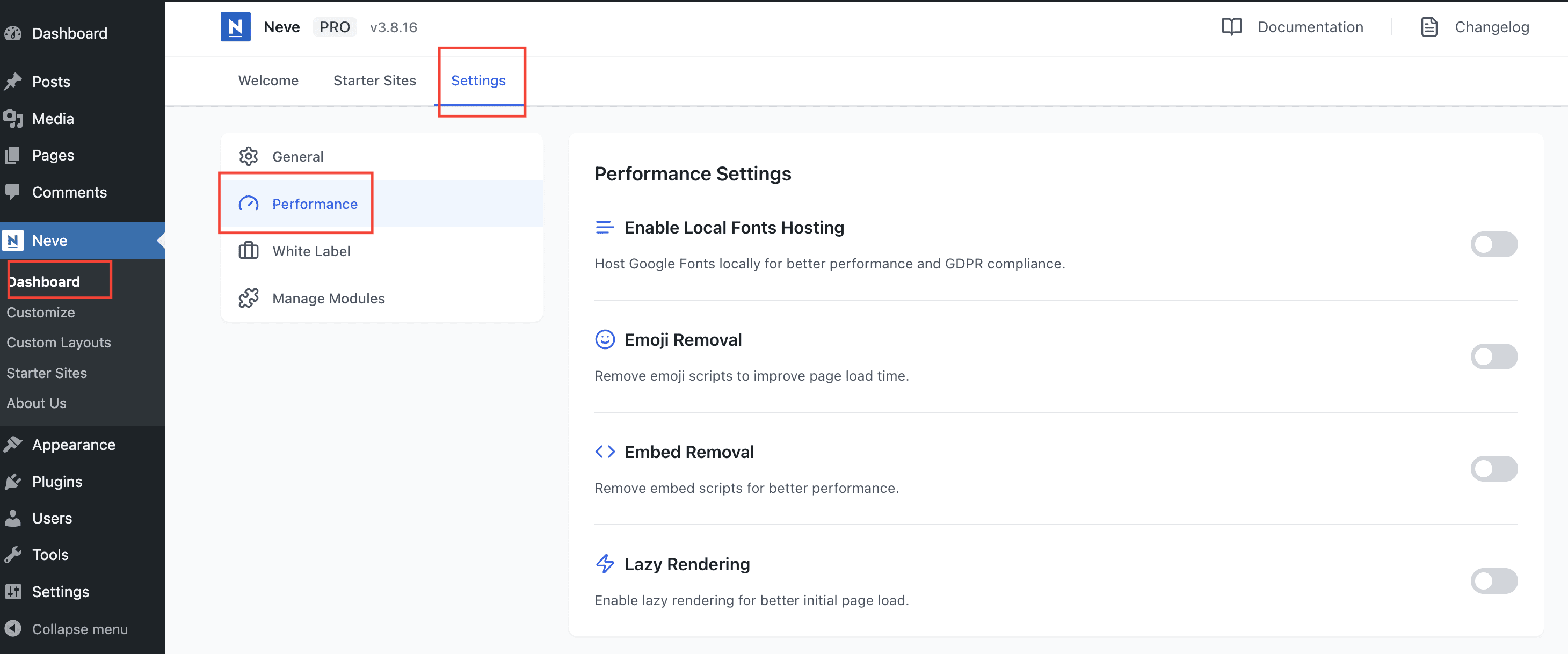
Navigate to Neve > Dashboard > Settings > Performance to enable/disable multiple options that can boost your site performance.
- Enable Local Fonts Hosting - Host Google Fonts locally for better performance and GDPR compliance. It means the fonts used on the site will be loaded from the server instead of requesting them to Google Fonts. This approach applies to all Google fonts on your website, it's not only for Neve fonts but for the ones loaded by other plugins as well. For achieving the same result with a third-party font, from a custom library, you can adapt and add this code snippet at the end of the functions.php file of your child theme, or in a custom plugin:
/* Themeisle Support - the following code snippet needs to be adjusted with the font name and library that you want to use with the Neve theme and store it locally */
/** This would most likely be getting done by some font plugin **/
function neve_enqueue_custom_font(){
	wp_enqueue_style( 'font-library-datalegreya', 'https://fontlibrary.org//face/datalegreya');
}
add_action( 'wp_enqueue_scripts', 'neve_enqueue_custom_font' );

function neve_download_custom_font( $providers ){
	$providers[] = 'https://fontlibrary.org';
	return $providers;
}
add_filter('neve_font_providers', 'neve_download_custom_font');- Emoji Removal - Removes the core emoji scripts from WordPress to improve page load time.
- Embed Removal - Removes embed scripts for better performance.
- Lazy Rendering - Applies
content-visibility: autoto off-screen page elements, instructing the browser to defer rendering them until they approach the viewport. This reduces initial page load time, and recent Neve Pro updates preserve rendered block size to prevent disappearing content and incorrect anchor-link positions.
In this article
Lazy Rendering Troubleshooting
Troubleshooting
In older Neve Pro releases, lazy-rendered sections could disappear or anchor links could scroll to incorrect positions. If you encounter either issue, update Neve Pro, clear all caches, and test again before changing the setting.
⚠️ Important: If an unrelated layout issue remains after updating and clearing caches, temporarily disable Lazy Rendering to confirm whether this feature is involved.
Disabling Lazy Rendering
- Navigate to Neve > Dashboard > Settings > Performance.
- Toggle off Lazy Rendering.
- Clear all caches — your hosting-level page cache, any CDN cache, and your browser cache.
- Retest on the affected device and browser.