
How to cancel my subscription
Learn how to cancel your Themeisle subscription to stop automatic renewal at the end of your current billing cycle.
In this article
📝 Note: This guide covers how to cancel the subscription. Canceling disables auto-renewal and prevents future billing attempts after your current billing cycle ends. If you'd like to receive a refund for your charge, you need to contact us via email on this page.
Renewal timing and timezones
Subscription renewals are processed by the billing system timezone (UTC/server time), not by your local timezone. Because of this, a renewal can be processed while it is still the previous calendar day where you are.
To avoid being charged, cancel at least 24 hours before the renewal date shown in your ThemeIsle account / Stripe billing portal.
If you received a failed payment notification
If you received an email about a failed payment, unsuccessful charge, payment attempt failed, or renewal payment failed, what you can do next depends on whether the subscription is still active in your account.
A declined payment does not cancel the subscription on its own. The renewal invoice stays open, and the payment can still be attempted again — see How to manually renew your plan or subscription.
Open your ThemeIsle account and check the button shown next to the product:
- Manage Subscription — the subscription is still active. Use the steps below to disable auto-renewal and stop future renewal attempts.
- Renew Subscription — the subscription has already lapsed, and there is no cancellation option for it in your account. Because the renewal invoice can still be retried, contact support if you want to be sure no further payment attempt is made. Include your account email and the product name, and ask for the subscription to be cancelled.
What cancellation does and does not do
Canceling your subscription:
- Stops future renewal charges and payment attempts.
- Does not process a refund for previous charges automatically. If you were already charged, see How to request a refund and Unrecognized or Unexpected Charges.
- Does not restore access after an unpaid renewal.
If you cannot log in, cannot find the Manage Subscription button, or have multiple subscriptions and are not sure which one is active, please contact support on this page.
More details on how the product will continue to work without a valid license key are available in the following guide, What happens if I do not renew my license key.
Why can’t I remove my payment method?
If your subscription is still active, Stripe usually requires at least one valid payment method to remain on file until the current billing period ends.
This is expected billing-portal behavior, not an account error.
If you want to remove your card yourself, first cancel auto-renewal and wait for the subscription to fully end.
If you need immediate cancellation to remove your card
If you do not want to wait until the end of the current billing period, contact support and request immediate cancellation.
Include these details to help us process your request faster:
- Product or subscription name
- Account email used for purchase
- Transaction date and amount
Please also confirm in your message that you understand immediate cancellation can remove Pro access right away.
If you also want a refund
Canceling a subscription does not automatically create a refund.
If you want both cancellation and a refund, contact support and follow How to request a refund.
Refunds are returned to the original payment method and can take the processing time described in the refund guide.
If you want to resume after cancelling
Cancelling stops future renewals but lets you continue using the product until the current billing period ends.
If you change your mind while your subscription is still active, contact support to ask whether your subscription can be resumed.
If the billing period has already ended, or if the original plan is no longer available, you will need to purchase a new subscription from the ThemeIsle store. A new purchase generates a new license key, which you will need to activate on your site.
⚠️ Important: A new subscription will not carry over any legacy, loyalty, or introductory renewal rates from the original subscription. See Understanding Renewal Pricing before cancelling if you have a discounted renewal price you want to keep.
Cancel Subscription
1. Please navigate to your ThemeIsle account.
2. Next to the product that you don't want to renew anymore, click on the Manage Subscription button.
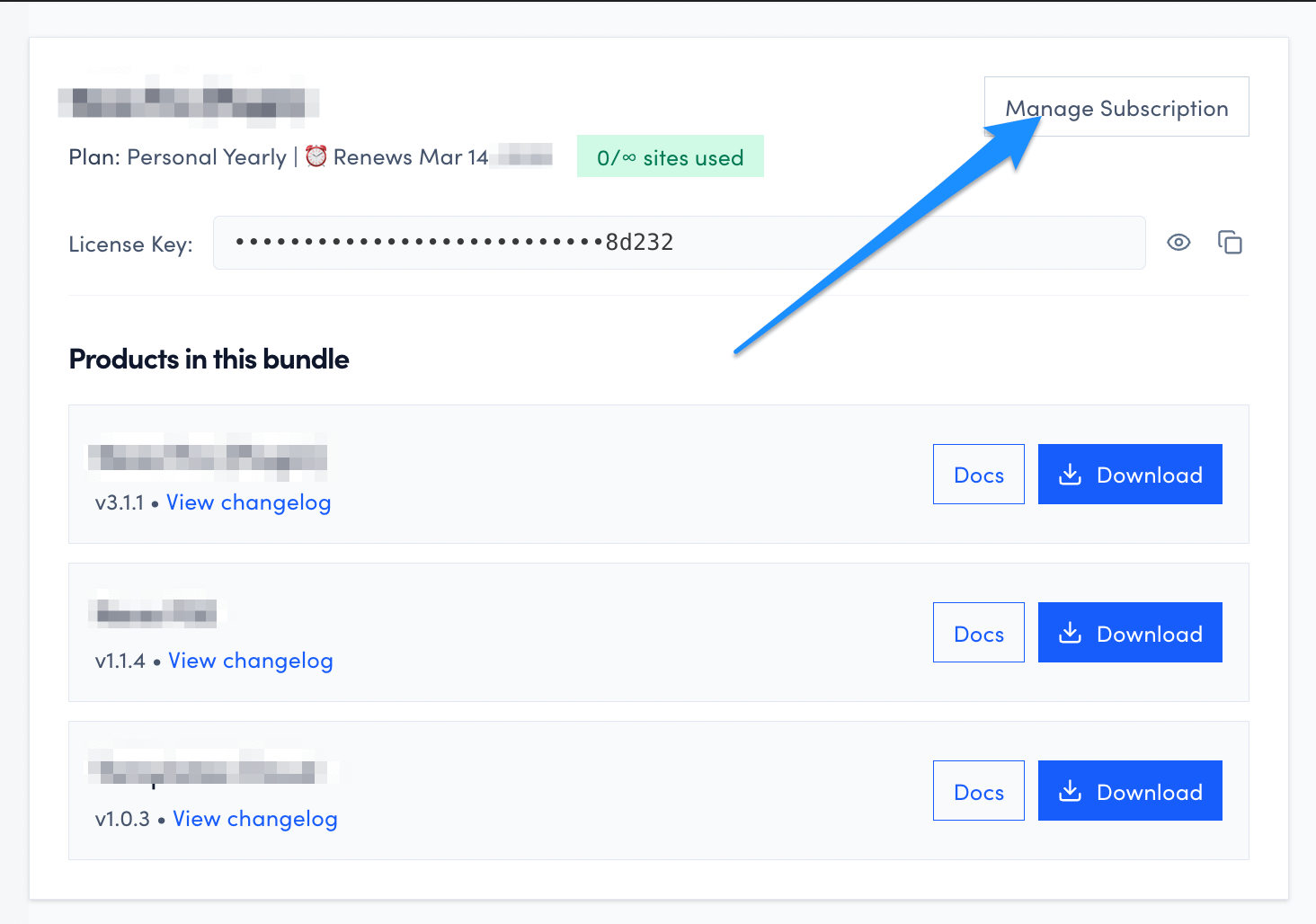
3. Once redirected to Stripe, click on the Cancel plan button. 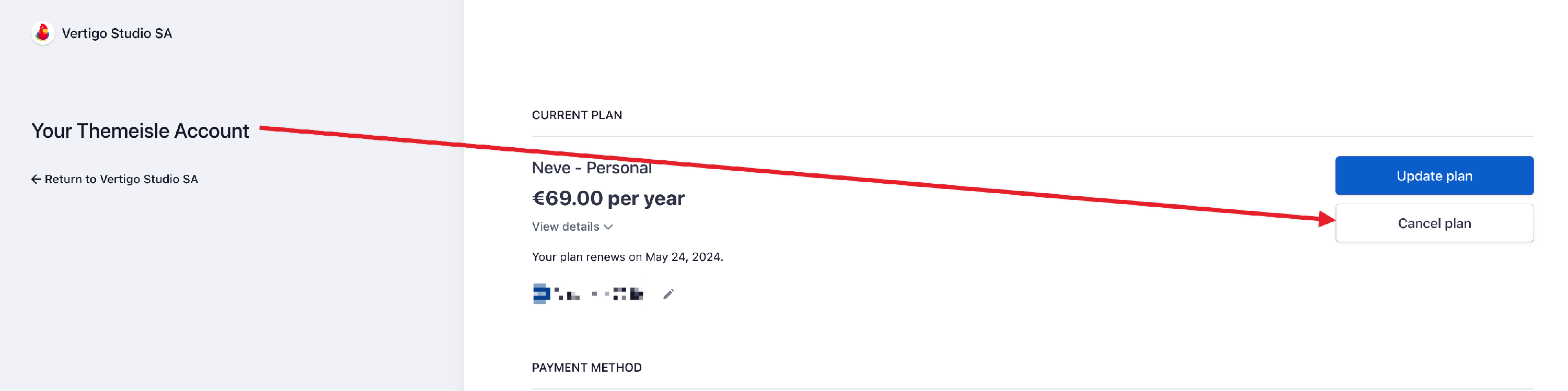
If Manage Subscription opens a 404 error, a blank page, or a page that does not load, you cannot complete self-service cancellation. This does not confirm that auto-renewal is disabled. Contact support with the product name, the account email used for purchase, and the date you attempted the cancellation. Ask support to verify your subscription status and disable auto-renewal if it is still active.
If the portal shows a control to stop or reverse cancellation instead of Cancel plan, your subscription is already scheduled not to renew. If the subscription status confirms it is cancelled or set not to renew, no additional cancellation action is required. Follow How to confirm your cancellation to check that no future renewal date or upcoming charge is listed.
How to confirm your cancellation
After you click Cancel plan, the billing portal updates the subscription so it will no longer renew. To confirm the cancellation went through:
1. Return to your ThemeIsle account and click the Manage Subscription button again next to the product to reopen the Stripe portal.
2. Check that the subscription shows as cancelled or set to not renew, and that no future renewal date or upcoming charge is listed.
Your access continues until the end of the current billing period, so the product can still appear active until that date even though it will not renew.
📝 Note: If the portal does not show a clear cancelled status after you complete the steps above, contact support with the product name, the account email used for purchase, and the date you attempted the cancellation, so we can verify the billing record for you.
If the renewal already happened
If the renewal charge has already been processed, canceling now will stop future renewals only. It does not automatically refund the latest charge.
To request a refund for a recent renewal, see How to request a refund.
If the charge looks unrecognized or unexpected, see Unrecognized or Unexpected Charges.
If you don’t see the subscription or Manage Subscription button
If you cannot find the cancellation option in your Themeisle account, this usually means one of the following:
- You are logged in with a different email address than the one used to purchase the subscription, or the subscription sits under a teammate's or company billing email. Log out and sign in again with the purchase email tied to your license and receipts.
- The subscription has already lapsed. Expired subscriptions show a Renew Subscription button instead of Manage Subscription and cannot be cancelled from your account — see If you received a failed payment notification above.
How to find the account email used for purchase
If you are not sure which email was used, check:
- Your Themeisle purchase receipt or invoice emails.
- Your license key / welcome emails from Themeisle.
- Any shared company or billing mailbox used for renewals.
- Other personal or team email addresses that may have been used at checkout.
Need help locating the subscription?
If you still cannot access the correct account, contact support and include:
- Product name (for example, Neve Pro Addon)
- Possible email addresses tied to the purchase
- Full name and company name used at checkout
- Invoice number, transaction ID, or receipt details
- Last four digits of the card or the payment method used (if available)