
How to add your company details at checkout
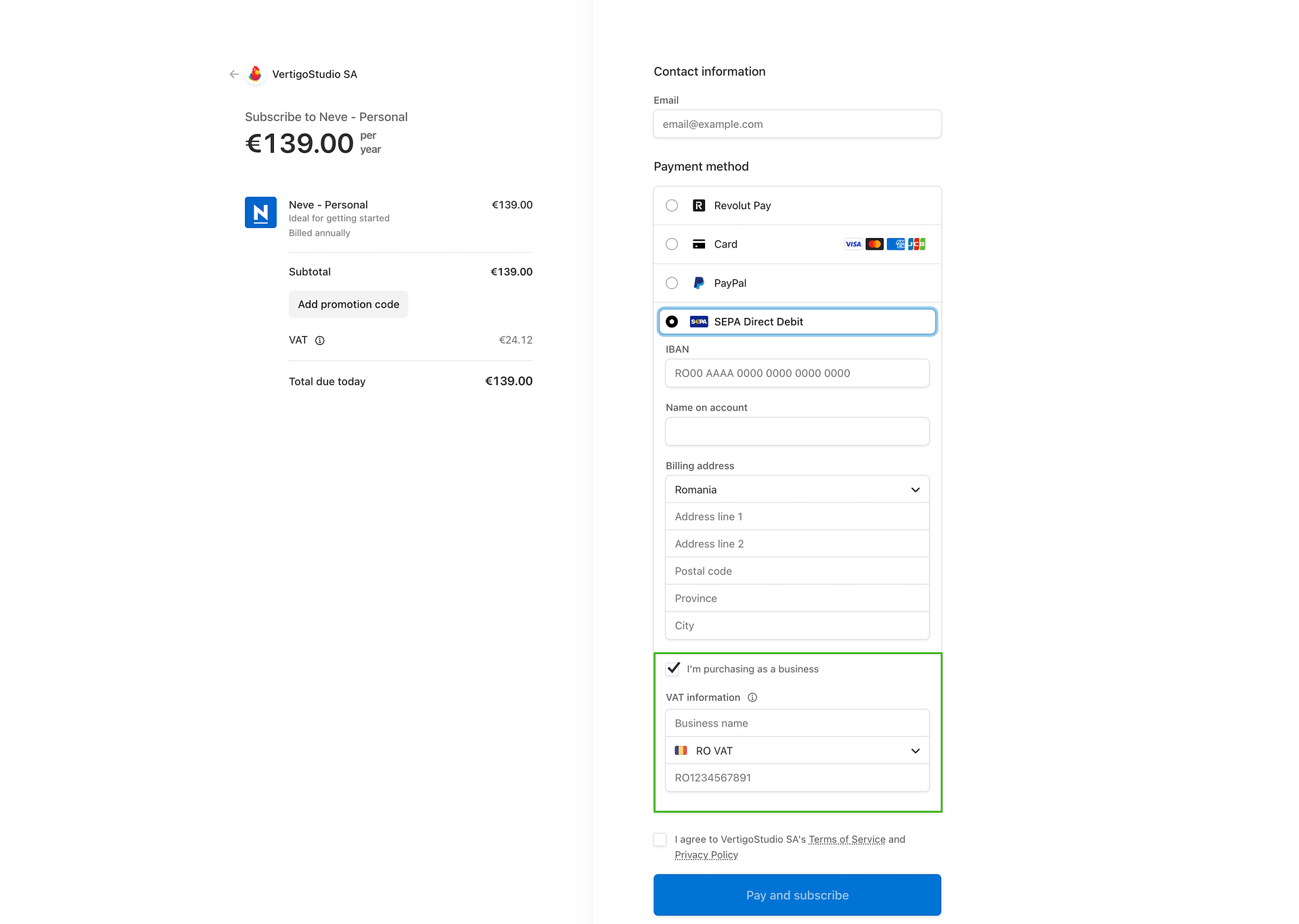
We use Stripe as the payment processor for all new subscriptions. After choosing the desired plan (for example, for the Neve theme, choose a plan on this page), the Stripe Checkout page will show the available payment methods for your country.
Choose the desired payment method and enable the option I'm purchasing as a business. This allows you to enter your Business name and VAT ID, which will be added to the invoice and used for tax exemption — if your VAT ID is valid for international purchases.
⚠️ Important: You must enter your VAT registration number at checkout before completing the payment. If your VAT ID is not provided at the time of purchase, VAT will be charged at the standard rate for your country. Entering a valid VAT ID at checkout is the only way to apply tax exemption or reverse-charge VAT treatment automatically. See VAT ID doesn't work if you have trouble entering your VAT ID correctly.
In this article
Updating your invoice after purchase
For active FastSpring subscriptions, payment method details and invoice billing details are separate records. Replacing your card updates how renewal payments are charged, but it does not automatically replace the personal or company details shown on future invoices. If you also need to change your card, follow How To Update or Remove Payment Details as a separate task.
To update company details for future FastSpring renewal invoices:
- Sign in to your Themeisle account.
- Click Manage Subscription.
- In the FastSpring portal, open Account Details.
- In Your Profile, click Edit.
- Update your legal company name, full billing address, and VAT number before the next renewal, then save the profile.
If your profile does not include the company or VAT field you need, open a billing ticket from your Themeisle account at store.themeisle.com/contact/billing-support/ so our team can review the subscription account details with the payment processor.
Updating this FastSpring billing profile affects future invoices only. It does not rewrite an invoice that was already issued.
If you need to correct an issued invoice, contact us within 30 days of the charge. After that, the tax declaration for the period has been filed and the issued invoice can no longer be changed. Open a billing ticket from your Themeisle account at store.themeisle.com/contact/billing-support/ and include the following details:
- Your order number or the email address used at checkout
- Company name and full company address
- VAT registration number
📝 Note: For Stripe purchases, Themeisle prices are tax-inclusive. If your invoice is updated to apply reverse-charge VAT or a tax exemption after purchase, the total amount charged will not change — only the tax treatment shown on the invoice will be corrected.
⚠️ Important: The same 30-day deadline applies to tax-correction requests on existing invoices. For Stripe purchases, entering your VAT registration number at checkout is still the only way to apply tax exemption automatically. For legacy FastSpring orders, request a tax review within 30 days and include your order reference and VAT details. Tax review outcomes depend on the order and payment processor.
Get our company tax certificate
In case you need the tax exemption certificate of our company, you can download it from here.
Still need help? Contact us before purchasing
If your query was not resolved yet, we can still help you. Contact us via Pre-Sales.