
What is the Difference Between Hestia and Hestia PRO?
Which product version is right for me, free or PRO?
In this article
1. Starter Sites Library
One of the most important differences between Hestia Free and Hestia PRO is that Hestia PRO has a Starter Sites Library, which is a great advantage. Those are templates similar to the front-page sections of the theme, however, they are built with a page builder plugin like Elementor.
The demos were designed for a dedicated website, separated according to the plans:
| Starter Sites | Hestia Pro (Personal) | Hestia Pro (Business) | Hestia Pro (Agency) |
|---|---|---|---|
| Hestia Original Demo | Yes | Yes | Yes |
| Lawyers Demo | - | Yes | Yes |
| Industrial Demo | - | Yes | Yes |
| Business Demo | - | Yes | Yes |
| Fitness Demo | - | Yes | Yes |
2. Header Options
Hestia can be easily configured, and the Header is one of the things that can be customized, with three available subpanels. Hestia Pro brings in extra features that can be used to develop more layouts, appearance enhances, fullscreen options.
| Features | Hestia | Hestia Pro |
|---|---|---|
| Very Top bar The Very Top Bar is the highest positioned section on the site, just above the navigation area. | Yes | Extra Layout option and Appearance Settings |
| Navigation The Navigation area is formed by the Logo (or Site Title), the Primary Menu, and the Navigation widget area. | Yes | Extra full screen menu, menu Mini Cart, Mobile Menu Icon Customization |
| Header Settings | Yes | Yes |
| Sticky Navbar | Yes | Yes |
3. Footer Options
Hestia Pro allows the layout customization to be shown in the Footer area.
| Features | Hestia | Hestia Pro |
|---|---|---|
| Footer Credits Here you can add an HTML code. | Yes | Yes |
| Number of widgets area Type the number of widgets that you want to be displayed. | - | Yes |
| Layout Three directions of alignment for widgets and copyright. | - | Yes |
| Color You can choose any color for the background and text color. | - | Yes |
4. Blog Settings
| Features | Hestia | Hestia Pro |
|---|---|---|
| Blog Settings | Yes | Extra Grid Layout |
| Edit/remove post meta on Blog page and single post pages | - | Yes |
| Authors Section Allows you to transfer the authors from your Team section to your blog pages, with Deselect and Background Image options. | - | Yes |
| Subscribe Section Hestia PRO allows for a Subscribe widget on the Blog page as well, using the same Brevo widgets. | - | Yes |
| Customize the header meta on Blog and Single Post pages Hestia PRO allows you to customize the meta in the header. (You can display the author name, published date, updated date in the format of your choice.) | - | Yes |
5. Frontpage Sections
The Frontpage Sections panel contains the names of the sections that appear on your homepage, with a visibility option, to turn them on / off. More than that, Hestia PRO brings in the rearrangement option, which allows you to change the order of the sections with a drag and drop movement.
| Features | Hestia | Hestia Pro |
|---|---|---|
| **Big Title Section ** | Yes | Extra video background and slide effect |
| Features Section In the features section, you can showcase an unlimited number of features or services in the form of a repetitive box. | With Orbit Fox | Yes |
| About Section Allows you to describe the website, by adding content and background. | Yes | Yes |
| Shop Section The Shop section on the homepage was designed to showcase your best products. | Yes | Extra Categories display and Products panel |
| Team Section Here you can showcase your team members on the homepage of the site, using the Team section. | With Orbit Fox | Yes |
| Pricing Section Hestia Pro comes with a beautiful set of pricing tables. It allows you to add unlimited options to your tables by separating them with a "\n". | - | Yes |
| Portfolio Section This is a section exclusive for the Hestia Pro theme, available after installing the Jetpack plugin. | - | Yes |
| Ribbon Section This section aims to get the public's attention, useful for subscribing to announcements. | With Orbit Fox | Yes |
| Testimonials Section You can beautifully display clients' words in your Testimonials section. | With Orbit Fox | Yes |
| Clients Bar Section This section works like a "wall of fame" with the customers. | With Orbit Fox | Yes |
| Subscribe Section Both Hestia versions come with a Subscribe section on the homepage. | Yes | Yes |
| Blog Section This section consists of the latest blog posts (articles) published on your site. | Yes | Extra Category display |
| Contact Section The contact section works with the WPForms plugin. | Yes | Yes |
6. Custom Layouts in Hestia PRO
Custom Layouts is one of Hestia's PRO features, which allows you to easily create custom sections that can be placed in various places of the theme, based on hooks.
Another important feature of this module is that you can make your own header/footer and replace the one from the theme.
📝 Note: Check this guide for getting started with your own layouts.
7. Shortcodes in Hestia PRO
Using the shortcodes attached to each Frontpage Section you can add any desired section.
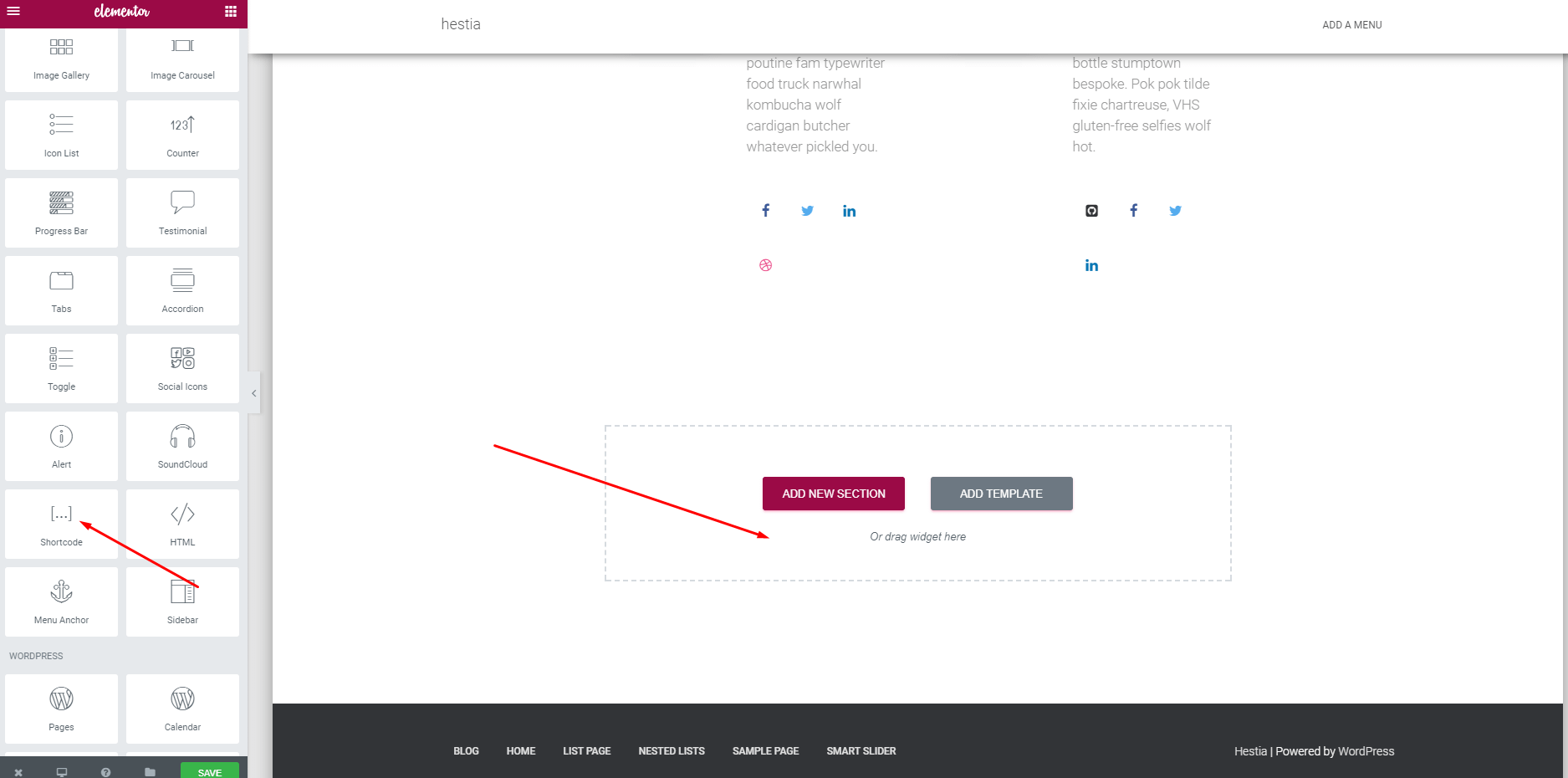
Step 1: Add the Shortcode element. This can be done easily with drag-and-drop options
Step 2: Paste the shortcode of the desired section and this will appear in the block.
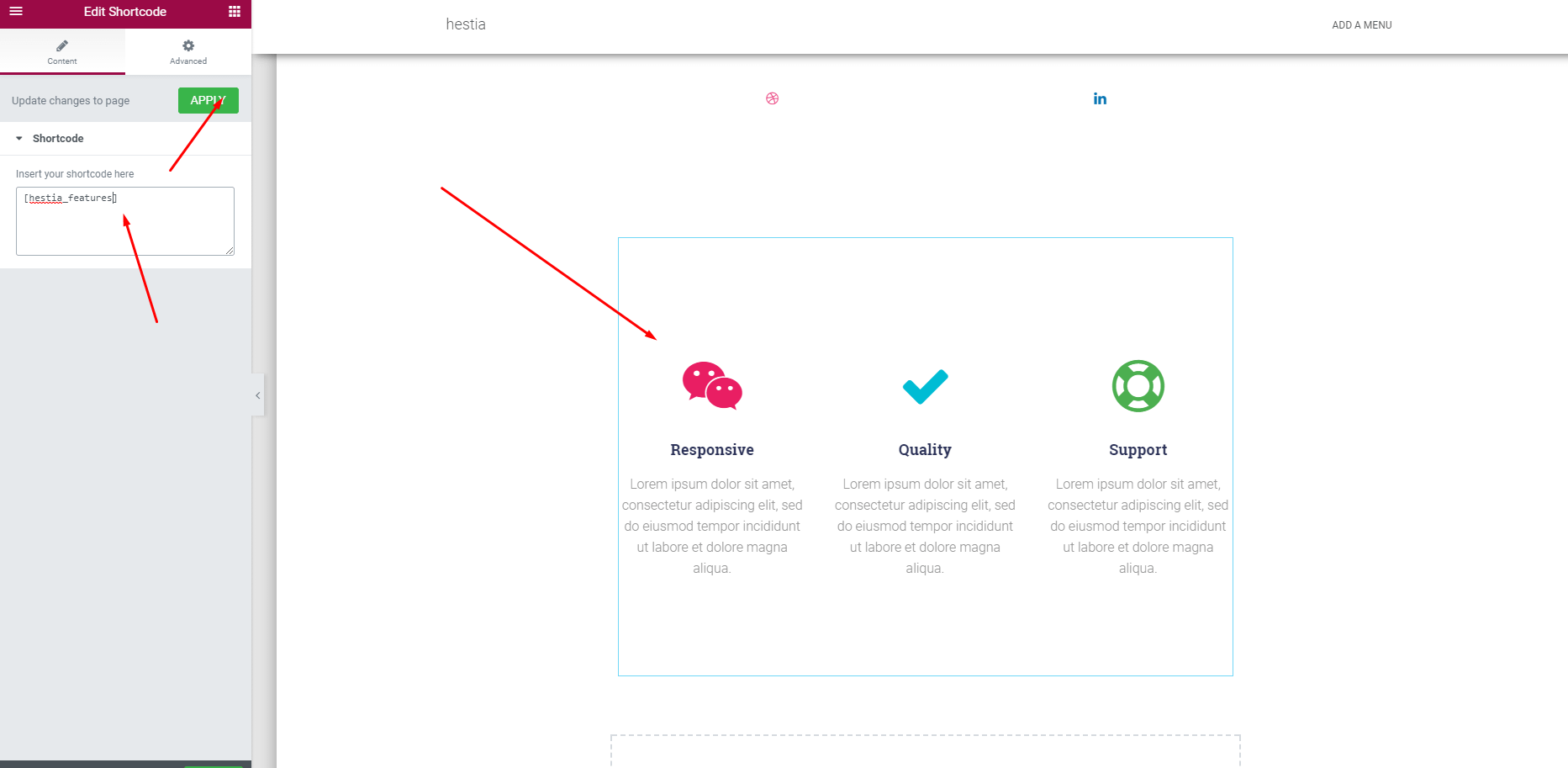
📝 Note: The theme sections are only displayed with this approach are not duplicated. On the pages where shortcodes are used, the section will have the same content as on the front page.
8. WooCommerce in Hestia PRO
| Features | Hestia | Hestia Pro |
|---|---|---|
| Store Notice | ||
| Text Will be shown site-wide. | - | Yes |
| Enable store notice If enabled, it will display a banner with the above text. | - | Yes |
| Product Catalog | ||
| Shop page display Choose what to display: Products / Categories / Products & Categories. | - | Yes |
| Category display Choose what to display on the product category pages: Products / Subcategories / Products & Subcategories. | - | Yes |
| Default product sorting Select how you want the products to be sorted: Default / Popularity / Average rating / Sort by most recent / Ascendant / Descendant. | - | Yes |
| Products per row Type how many products are to be displayed per row, maximum 6. | - | Yes |
| Rows per page Type how many rows of products are to be displayed per page. | - | Yes |
| Product Images | ||
| Thumbnail cropping With three available options: - 1:1 - will be cropped into a square. - Custom - will be cropped to a custom aspect ratio. - Uncropped - will display using the aspect ratio in which they were uploaded. | - | Yes |
| Checkout Page | ||
| Fields type Select the type of the fields - Optional / Hidden / Required. | - | Yes |
| Highlight required fields with an asterisk Enable / disable. | - | Yes |
| Privacy policy page Set a page from the list, add a text about the store privacy to show during the checkout. | - | Yes |
| Terms and conditions page Set a page from the list, add a text for the terms checkbox that customers must accept. | - | Yes |
| Single Product Page | ||
| Customize the order of the elements in the page | - | Yes |
| Enable/disable elements in the page | - | Yes |
9. Translate Hestia
The frontpage of the theme can be translated into the PRO version only.
| Features | Hestia | Hestia Pro |
|---|---|---|
| Translate Press A dedicated article on how to use this plugin with Hestia is available on this page. | Yes | Yes |
| Polylang A dedicated article on how to use this plugin with Hestia is available on this page. | Yes | Yes |
| Multiple Languages on the front page template | - | Yes |
10. Appearance Settings
| Features | Hestia | Hestia Pro |
|---|---|---|
| General Settings Mostly settings regarding layout. | Yes | Extra Slider effect, Sidebar / Container Width |
| Typography Includes settings regarding font family, font size. | Yes | Extra Generic options |
| Colors Changing colors for different locations. | 2 locations | 8 extra locations |
| Button Includes basic settings, like padding, border-radius. | Yes | Extra Hover effect |
| Scroll to Top | Enable default Scroll To Top button | Advanced options: colors, position, label, icon |
11. Hestia Patterns
The Hestia Patterns are reusable sections created in the blocks editor of WordPress. You can easily insert them into any page/post, even in custom layouts, edit and duplicate them.
| Patterns | Hestia | Hestia Pro |
|---|---|---|
| Call to action Ribbon section with a text and a call to action button. | Yes | Yes |
| Content with alternating image and text | Yes | Yes |
| Features Three different styles to present your features | Yes | Yes |
| Header Two layouts are available with a hero image. | Yes | Yes |
| Pricing plan columns Multiple pricing card layouts or one pricing option emphasized alongside a clean description. | Yes | Yes |
| Stats Display statistics or key numbers in a row of columns. | Yes | Yes |
| Team cards Present the members of your team, including a description of them and social media buttons (optional). | Yes | Yes |
| Testimonial columns Include customer testimonial cards with profile pictures and star icons, or insert one full-width testimonial section. | Yes | Yes |
12. White Label in Hestia PRO
This is an extra feature of the Hestia PRO version, available only on the Agency plan. This covers the traces of user's changes over the theme or plugin.
While navigating into the White Label panel, click on the White Label Settings button and you will be redirected to the Dashboard.
Example
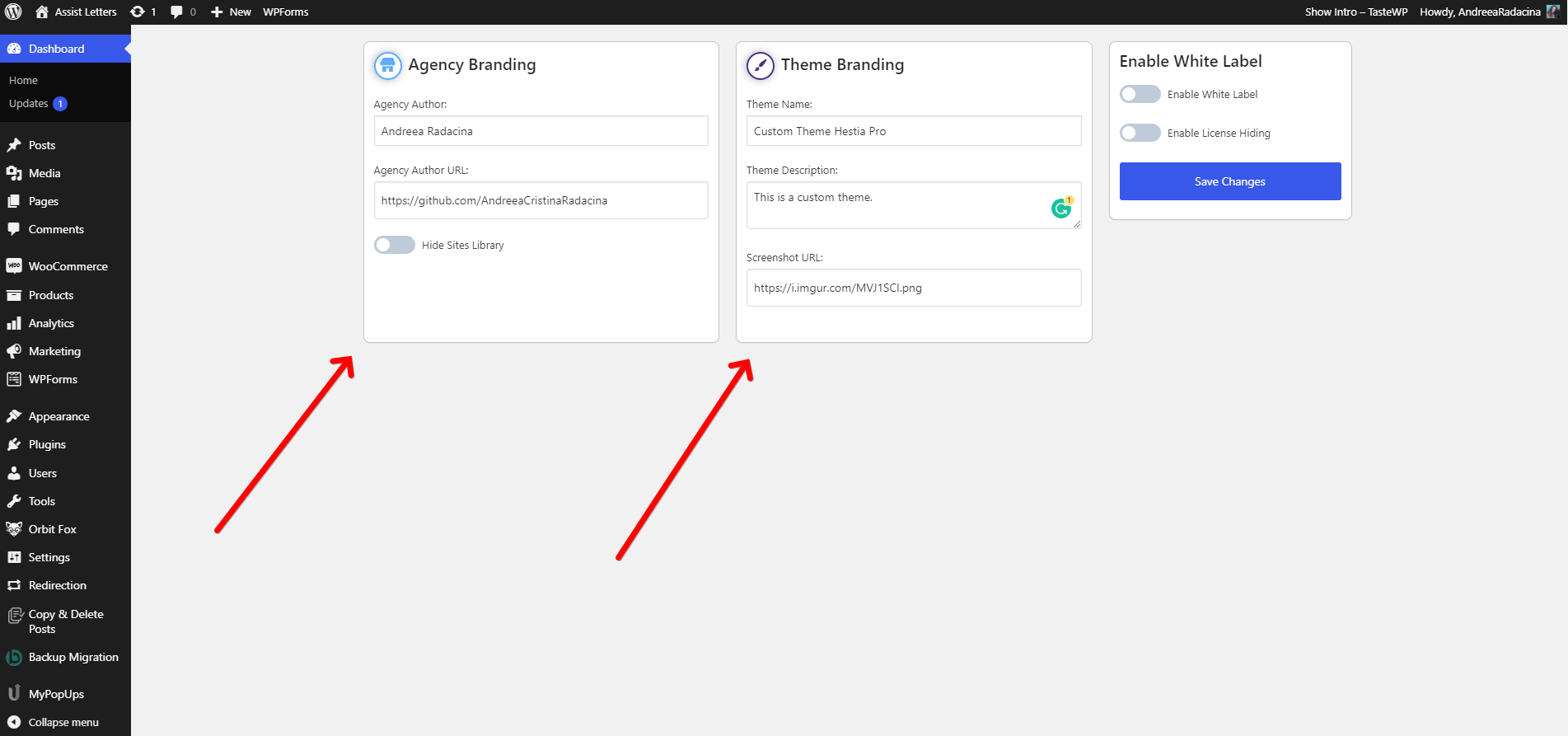
Click on the Save Changes button.
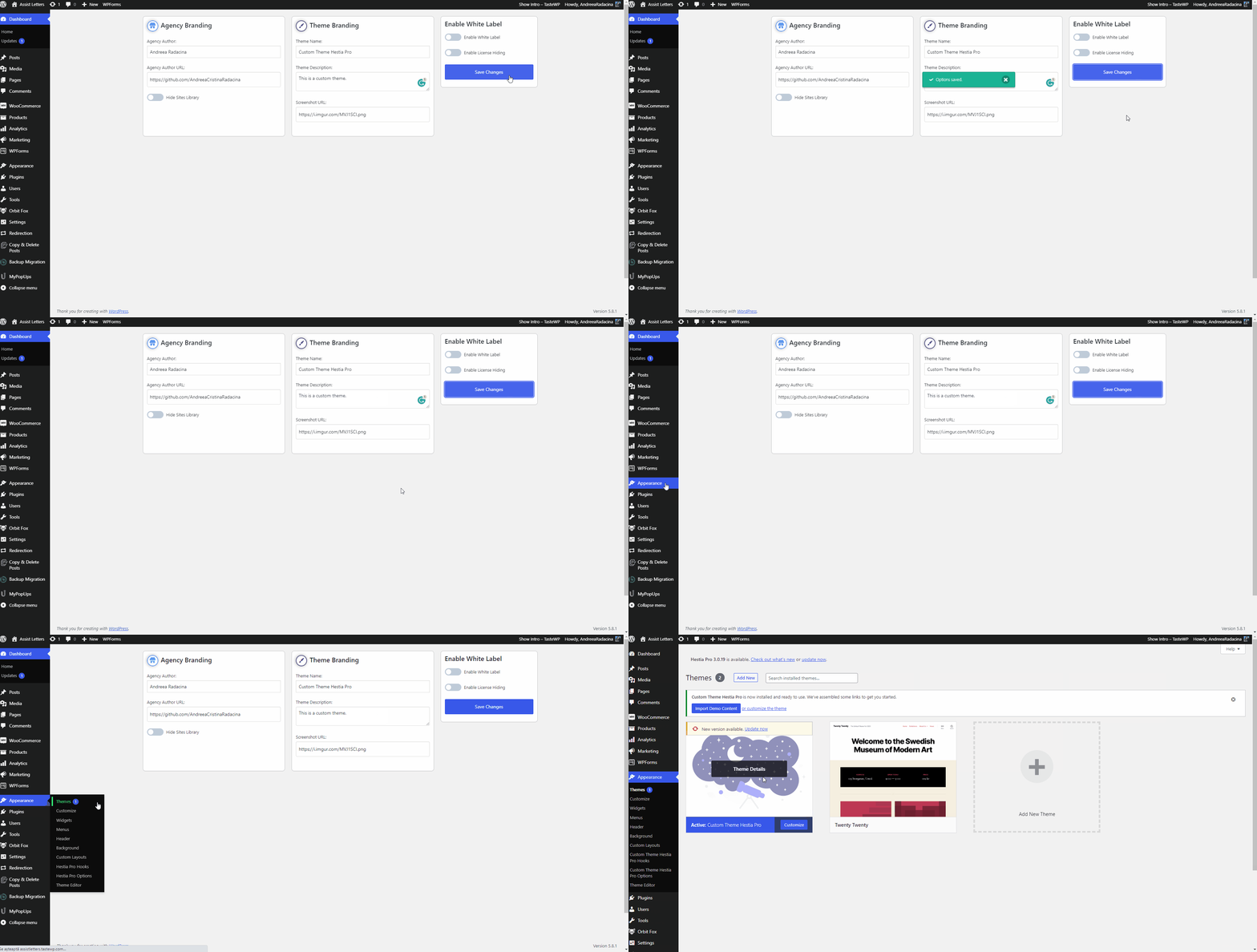
Check the Theme Details and see how the details were applied:
📍 Appearance > Themes
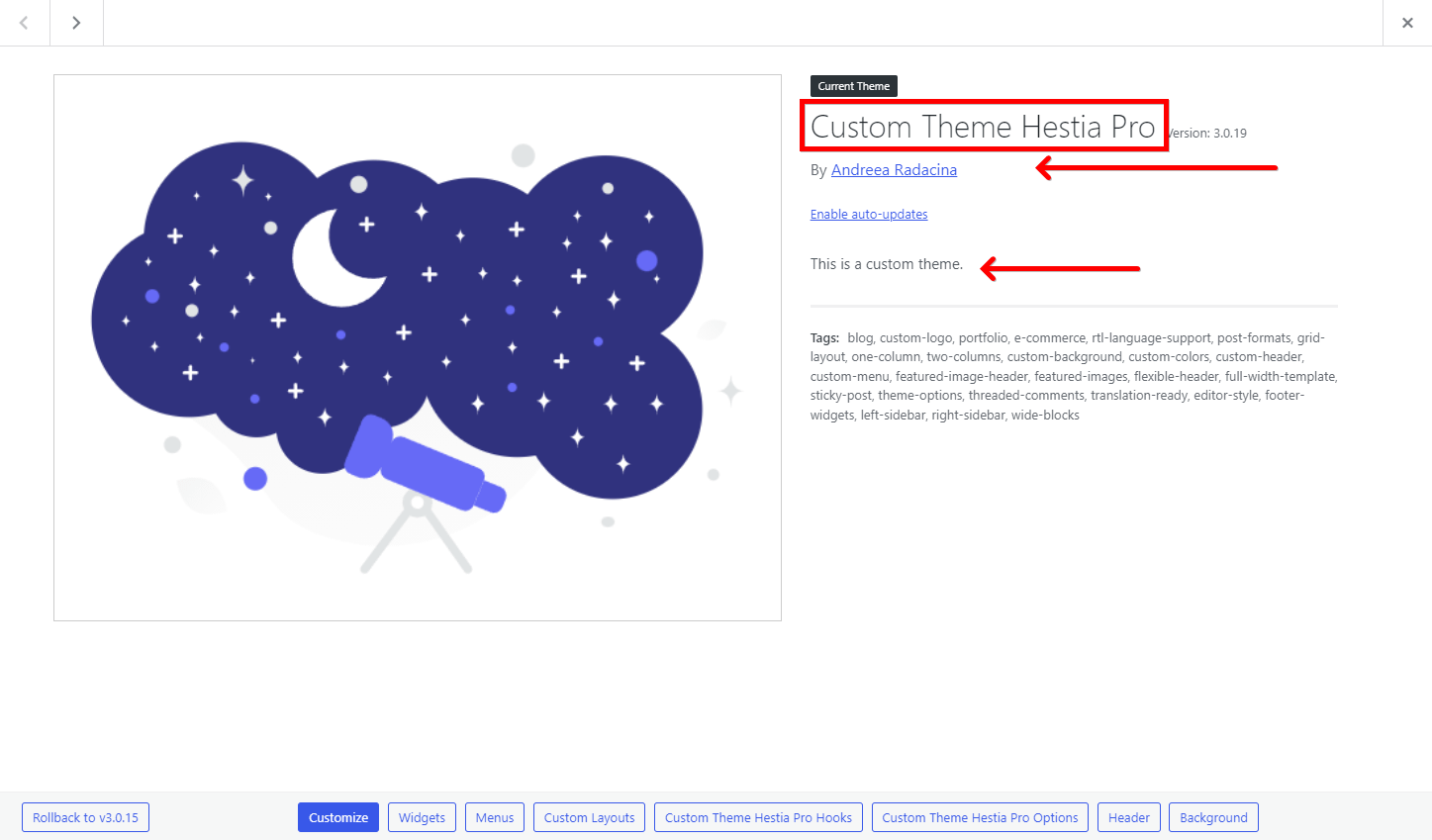
📝Note: For more details about it, check this doc.
13. Page/Post Components
| Components | Hestia | Hestia Pro |
|---|---|---|
| Disable Header | Yes | Yes |
| Disable Footer | Yes | Yes |
| Disable Title | - | Yes |
| Enable transparent header | - | Yes |
14. Support
Besides our infinite love and respect, Hestia Pro users get access to regular support and updates. Make sure you check out our pricing for more details on that.