
Connect an AI Agent to Hestia
Connect a compatible AI assistant to Hestia with Easy MCP AI. The Hestia abilities let your assistant read and update supported page layouts, front-page sections, and Pro Custom Layouts.
In this article
Requirements
- A release of Hestia or Hestia Pro that includes AI-agent support.
- WordPress 6.9 or later, where the WordPress Abilities API is available. Easy MCP AI cannot expose Hestia abilities if this API is unavailable.
- A WordPress site reachable over HTTPS, with an administrator account that can install and activate plugins.
- A connected WordPress user with the capability (permission) required for each requested operation.
Connect your AI client and enable Hestia's abilities
Hestia includes these abilities, but it does not connect your site to an AI service on its own. Updating Hestia does not give Claude, ChatGPT, or any other AI client access to your site. An AI client can use Hestia's abilities only after you install a connector such as Easy MCP AI, connect the client, and enable the abilities.
In your WordPress dashboard, open Easy MCP AI > Dashboard. In the Connect your AI client area, choose your AI client and follow the on-screen steps to connect it to your site. If you use another compatible connector, follow its connection instructions.
Open Easy MCP AI > Tools, then select Abilities.
All abilities are off by default. In the Hestia group, enable all abilities.
Click Save changes to make them available to connected clients.
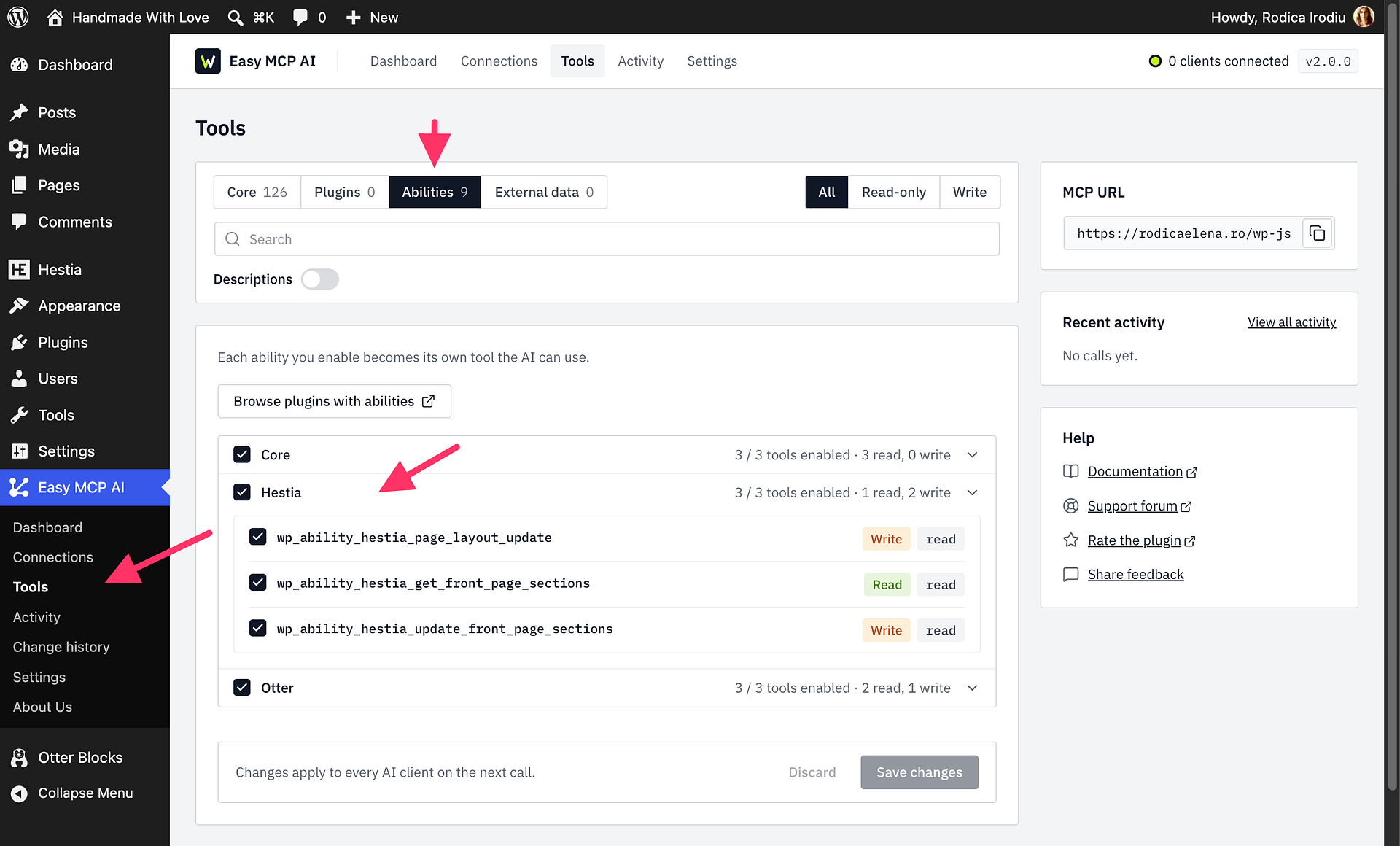
To stop AI clients from using Hestia's abilities, use one of these options:
- No AI connection at all: Do not install Easy MCP AI, or deactivate it in Plugins > Installed Plugins. Without a connector, AI clients cannot reach Hestia's abilities.
- Block only Hestia: Open Easy MCP AI > Tools, select Abilities, turn off every ability in the Hestia group, and click Save changes. Other tools you enabled stay available to connected clients.
- Block every tool temporarily: Open Easy MCP AI > Dashboard and click Pause AI access. Connected clients stay signed in, but every tool call is refused until you click Resume AI access. The button appears after at least one client is connected.
For help installing or setting up Easy MCP AI, see Getting Started with Easy MCP AI.
Available Hestia abilities
| Ability | Availability | What it does |
|---|---|---|
hestia/get-front-page-sections | Hestia free and Pro | Reads the front-page section order, visibility, fields, and items. |
hestia/update-front-page-sections | Hestia free and Pro | Updates supported front-page section order, visibility, and content. |
hestia/page-layout-update | Hestia free and Pro | Reads or updates supported page and post layout settings. Some settings require Hestia Pro and a valid license. |
hestia/list-custom-layouts | Hestia Pro | Lists Custom Layouts and their locations, hooks, priorities, and display conditions. |
hestia/upsert-custom-layout | Hestia Pro | Creates or updates a Custom Layout. Creating layouts requires a valid Hestia Pro license. |
Protect write operations
Read the current values before asking the assistant to change them. Use hestia/get-front-page-sections to inspect front-page sections before updating them. To inspect a page or post layout, call hestia/page-layout-update with only the post_id.
The hestia/page-layout-update ability supports dry_run. For a proposed change, set dry_run to true first. This checks the request and previews the resulting values without saving them. Review the preview, then run the change with dry_run turned off only when you are ready to save it. Use dry_run with other write abilities only if they support it.
WordPress checks the connected user's capabilities for each operation. The user must have permission to edit the requested post, change theme settings, or manage a Custom Layout. Easy MCP AI does not grant permissions the WordPress user does not have. The client's Easy MCP AI access must also allow write tools; a read-only connection can inspect data but cannot make changes.