
How to display posts by categories in Hestia
If you want to display posts from a particular category only in the Blog Section of Hestia, you can do it directly from the Customizer.
💡 Note: The category filter for the Blog Section is a Hestia Pro feature.
In this article
Step 1:
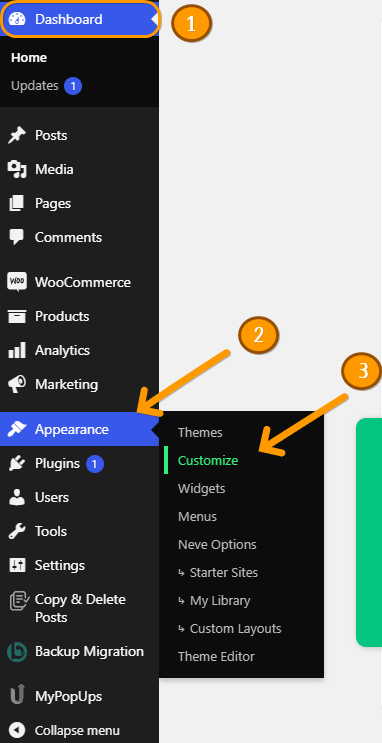
Go to Dashboard -> Appearance -> Customize.
Step 2:
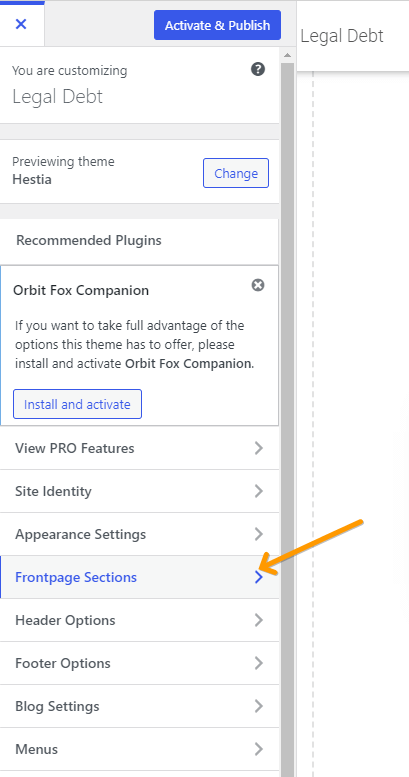
Select Frontpage Sections.
Step 3:
Select Blog and these options will appear:
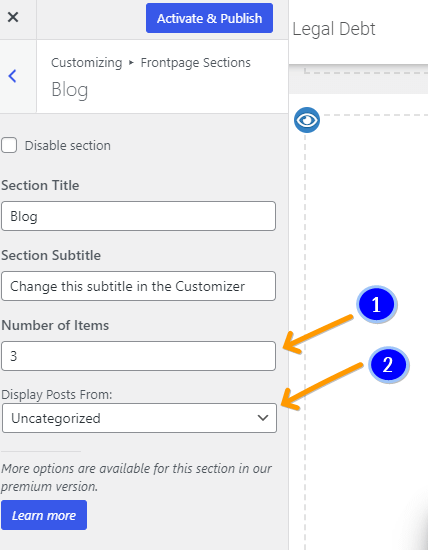
Number of Items (1) - is the number of items that will be displayed on the page.
Categories: (2) - is the field where you can choose the category that you want to be displayed, along with its posts (display posts by category).
Finally, click on the Publish button and you will be able to see the changes that you have made.