
How to change post meta data in Hestia
Hestia lets you customize the post meta on single posts and blog archive pages (author name, publish date, last updated date) using Hestia PRO's Customizer settings or PHP filters in your child theme.
In this article
On Single Post Page
In Hestia PRO
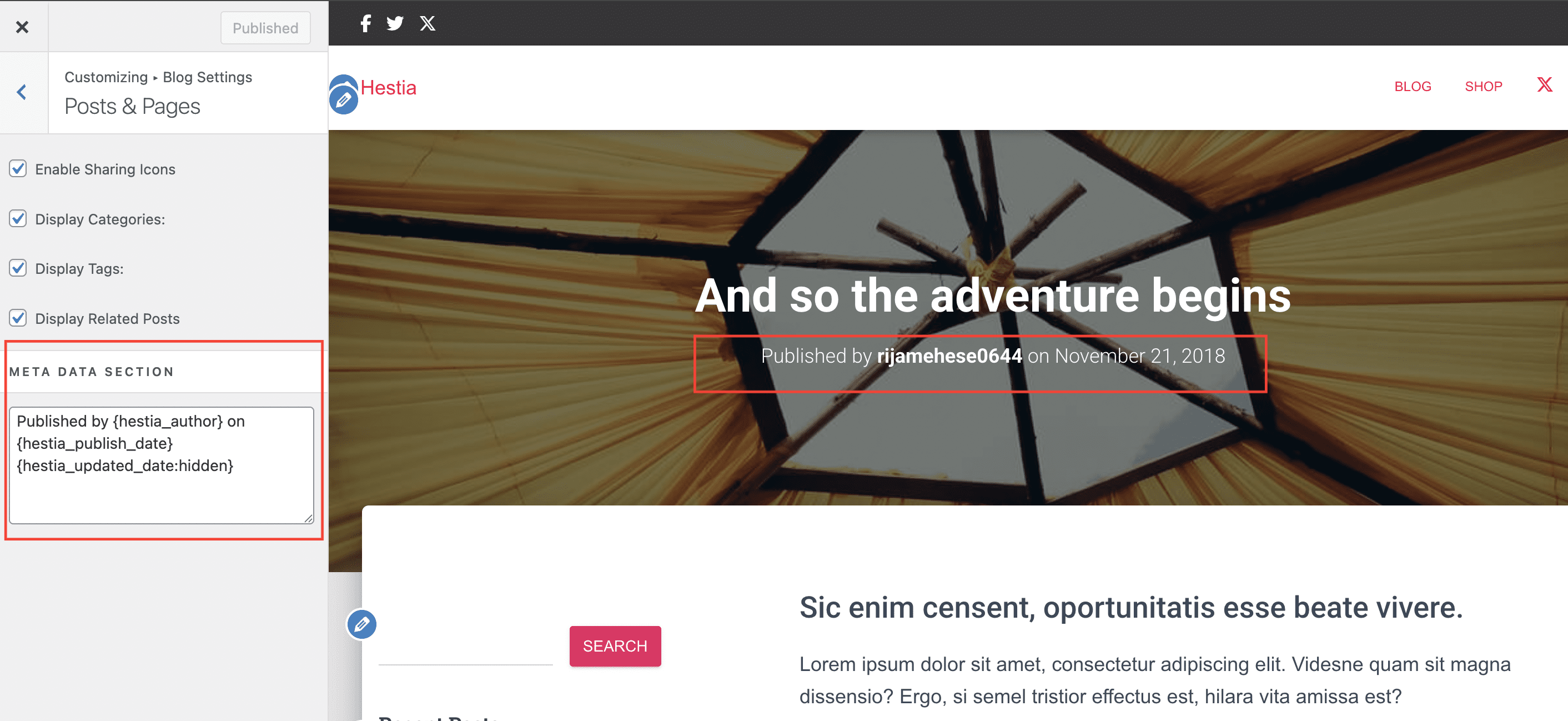
Using the Hestia PRO theme, changing the post meta can be easily done from Appearance > Customize > Blog Settings > Posts & Pages.
Available tags: {hestia_author}, {hestia_publish_date}, {hestia_updated_date}.
Each tag can also have the hidden attribute, which will make the tag visible just in the code, but not on the screen. For e.g {hestia_updated_date:hidden}
The {hestia_publish_date} tag must include a format specifier to ensure the correct date is displayed. You can use {hestia_updated_date} without a format specifier; add one if you want to control how the updated date appears. Use a PHP date format such as :Y-m-d, or the dedicated time_ago format. For example, {hestia_updated_date:Y-m-d} or {hestia_publish_date:time_ago}.
In Hestia free
How to change the subtitle text/information in Hestia?
1. First and most important, make sure you are using a child theme. Follow this doc to create a child theme for Hestia.
2. In your child theme's functions.php file, add one of the next pieces of code according to your preferences:
A. Default behaviour

add_filter( 'hestia_single_post_meta','child_hestia_single_post_meta_function' );

function child_hestia_single_post_meta_function() {
    return sprintf(
        /* translators: %1$s is Author name wrapped, %2$s is Date*/
        esc_html__( 'Published by %1$s on %2$s', 'hestia-pro' ),
        /* translators: %1$s is Author name, %2$s is Author link*/
        sprintf(
            '<a href="%2$s" class="vcard author"><strong class="fn">%1$s</strong></a>',
            esc_html( get_the_author_meta( 'display_name', get_post_field ('post_author') ) ),
            esc_url( get_author_posts_url( get_post_field ('post_author') ) )
        ),
        /* translators: %s is Date */
        sprintf(
            '<time class="date updated published" datetime="%2$s">%1$s</time>',
            esc_html( get_the_time( get_option( 'date_format' ) ) ), esc_html( get_the_date( DATE_W3C ) )
        )
    );
}
B. Change publish date with last updated date

add_filter( 'hestia_single_post_meta','child_hestia_single_post_meta_function' );

function child_hestia_single_post_meta_function() {
    return sprintf(
        /* translators: %1$s is Author name wrapped, %2$s is Date*/
        esc_html__( 'Published by %1$s updated on %2$s', 'hestia-pro' ),
        /* translators: %1$s is Author name, %2$s is Author link*/
        sprintf(
            '<a href="%2$s" class="vcard author"><strong class="fn">%1$s</strong></a>',
             esc_html( get_the_author_meta( 'display_name', get_post_field ('post_author') ) ),
             esc_url( get_author_posts_url( get_post_field ('post_author') ) )
        ),
        /* translators: %s is Date */
        sprintf(
            '<time class="date updated published" datetime="%2$s">%1$s</time>',
            esc_html( get_the_modified_time( get_option( 'date_format' ) ) ), esc_html( get_the_modified_date( DATE_W3C ) )
        )
    );
}
C. Have both publish date and last updated date

add_filter( 'hestia_single_post_meta','child_hestia_single_post_meta_function' );

 function child_hestia_single_post_meta_function() {
     return sprintf(
         /* translators: %1$s is Author name wrapped, %2$s is Date*/
         esc_html__( 'Published by %1$s on %2$s updated on %3$s', 'hestia-pro' ),
         /* translators: %1$s is Author name, %2$s is Author link*/
         sprintf(
             '<a href="%2$s" class="vcard author"><strong class="fn">%1$s</strong></a>',
             esc_html( get_the_author_meta( 'display_name', get_post_field ('post_author') ) ),
             esc_url( get_author_posts_url( get_post_field ('post_author') ) )
         ),
         /* translators: %s is Date */
         sprintf(
             '<time class="date updated published" datetime="%2$s">%1$s</time>',
             esc_html( get_the_time( get_option( 'date_format' ) ) ), esc_html( get_the_date( DATE_W3C ) )
         ),
         /* translators: %s is Date */
         sprintf(
             '<time class="date updated published" datetime="%2$s">%1$s</time>',
             esc_html( get_the_modified_time( get_option( 'date_format' ) ) ), esc_html( get_the_modified_date( DATE_W3C ) )
         )
     );
 }
On The Blog Page
In Hestia PRO
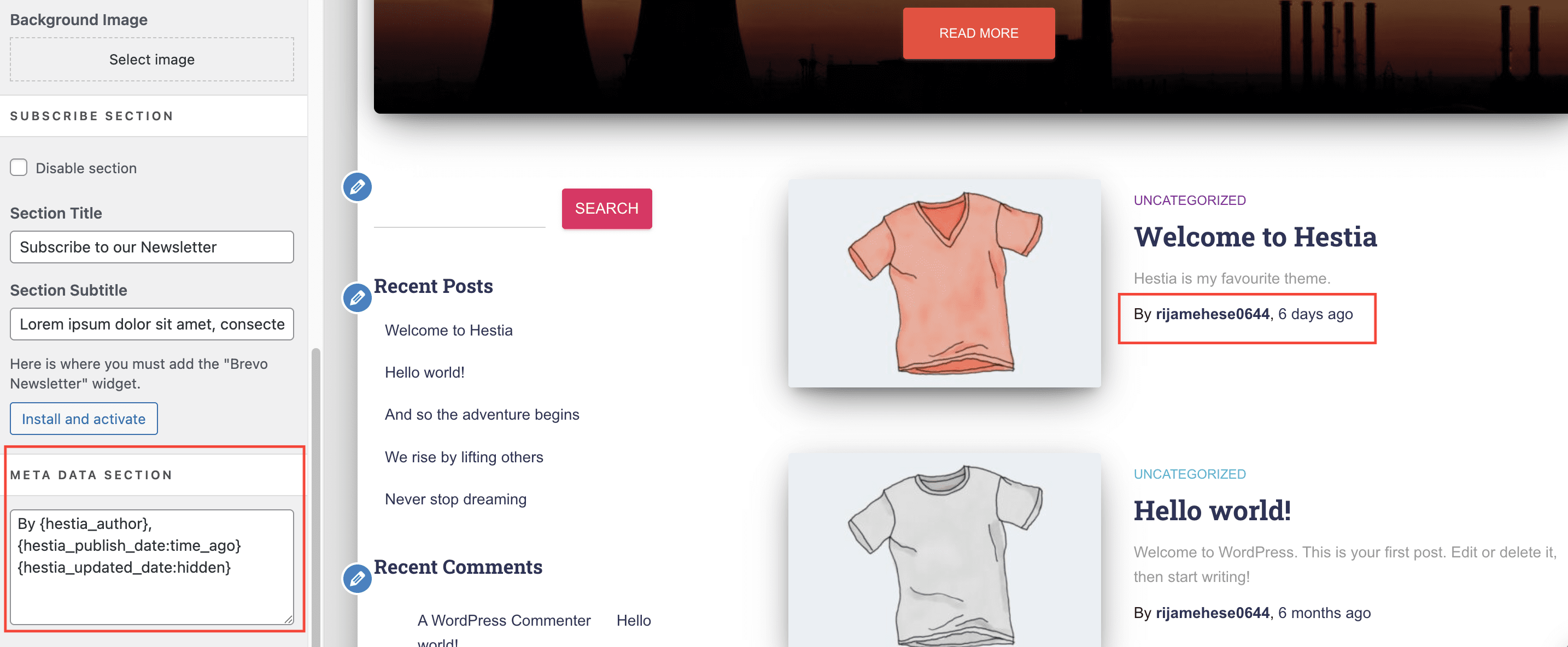
Using the Hestia PRO theme, changing the post meta can be easily done from Appearance > Customize > Blog Settings > Blog.
Available tags: {hestia_author}, {hestia_publish_date}, {hestia_updated_date}.
Each tag can also have the hidden attribute, which will make the tag visible just in the code, but not on the screen. For e.g {hestia_updated_date:hidden}
The {hestia_publish_date} tag must include a format specifier to ensure the correct date is displayed. You can use {hestia_updated_date} without a format specifier; add one if you want to control how the updated date appears. Use a PHP date format such as :Y-m-d, or the dedicated time_ago format. For example, {hestia_updated_date:Y-m-d} or {hestia_publish_date:time_ago}.
In Hestia free
How to change the subtitle text/information in Hestia?
1. First and most important, make sure you are using a child theme. Follow this doc to create a child theme for Hestia.
2. In your child theme's functions.php file, add one of the next pieces of code according to your preferences:
A. Default behaviour

add_filter( 'hestia_blog_post_meta','child_hestia_blog_post_meta_function' );

function child_hestia_blog_post_meta_function() {
    return sprintf(
        /* translators: %1$s is Author name wrapped, %2$s is Time */
        esc_html__( 'By %1$s, %2$s', 'hestia-pro' ),
        /* translators: %1$s is Author name, %2$s is author link */
        sprintf(
            '<a href="%2$s" title="%1$s" class="vcard author"><strong class="fn">%1$s</strong></a>',
            esc_html( get_the_author() ),
            esc_url( get_author_posts_url( get_the_author_meta( 'ID' ) ) )
        ),
        sprintf(
        /* translators: %1$s is Time since post, %2$s is author Close tag */
            esc_html__( '%1$s ago %2$s', 'hestia-pro' ),
            sprintf(
            /* translators: %1$s is Time since, %2$s is Link to post */
                '<a href="%2$s"><time>%1$s</time>',
                esc_html( human_time_diff( get_the_time( 'U' ), current_time( 'timestamp' ) ) ),
                esc_url( get_permalink() )
            ),
            '</a>'
        )
    );
}
B. Change publish date with last updated date
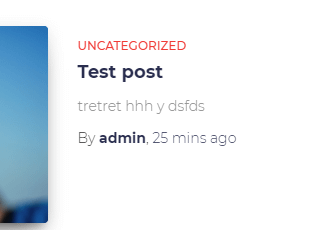
add_filter( 'hestia_blog_post_meta','child_hestia_blog_post_meta_function' );

function child_hestia_blog_post_meta_function() {
    return sprintf(
        /* translators: %1$s is Author name wrapped, %2$s is Time */
        esc_html__( 'By %1$s, %2$s', 'hestia-pro' ),
        /* translators: %1$s is Author name, %2$s is author link */
        sprintf(
            '<a href="%2$s" title="%1$s" class="vcard author"><strong class="fn">%1$s</strong></a>',
            esc_html( get_the_author() ),
            esc_url( get_author_posts_url( get_the_author_meta( 'ID' ) ) )
        ),
        sprintf(
        /* translators: %1$s is Time since post, %2$s is author Close tag */
            esc_html__( '%1$s ago %2$s', 'hestia-pro' ),
            sprintf(
            /* translators: %1$s is Time since, %2$s is Link to post */
                '<a href="%2$s"><time>%1$s</time>',
                esc_html( human_time_diff( get_the_modified_time( 'U' ), current_time( 'timestamp' ) ) ),
                esc_url( get_permalink() )
            ),
            '</a>'
        )
    );
}
This code can be adapted to match pretty much everything you may need. You can remove the author name, add another text, format the date, etc.
C. Change publish date format

add_filter( 'hestia_blog_post_meta','child_hestia_blog_post_meta_function' );

function child_hestia_blog_post_meta_function() {
    return sprintf(
        /* translators: %1$s is Author name wrapped, %2$s is Time */
        esc_html__( 'By %1$s, %2$s', 'hestia-pro' ),
        /* translators: %1$s is Author name, %2$s is author link */
        sprintf(
            '<a href="%2$s" title="%1$s" class="vcard author"><strong class="fn">%1$s</strong></a>',
            esc_html( get_the_author() ),
            esc_url( get_author_posts_url( get_the_author_meta( 'ID' ) ) )
        ),
        sprintf(
        /* translators: %1$s is Time since post, %2$s is author Close tag */
            esc_html__( '%1$s %2$s', 'hestia-pro' ),
            sprintf(
            /* translators: %1$s is Time since, %2$s is Link to post */
                '<a href="%2$s"><time>%1$s</time>',
                 get_the_date('F j, Y'),
                esc_url( get_permalink() )
            ),
            '</a>'
        )
    );
}
D. Change publish date format & remove the author

add_filter( 'hestia_blog_post_meta','child_hestia_blog_post_meta_function' );

function child_hestia_blog_post_meta_function() {
    return sprintf(
        /* translators: %1$s is Time since post */
            esc_html__( '%1$s', 'hestia-pro' ),
            sprintf(
            /* translators: %1$s is Time since, %2$s is Link to post */
                '<a href="%2$s"><time>%1$s</time>',
                 get_the_date('F j, Y'),
                esc_url( get_permalink() )
            )

    );
}
Troubleshooting incorrect dates
Dates showing a fixed or wrong value in Hestia PRO
If the date displayed in the post meta is incorrect — for example, showing a fixed date unrelated to the post — check the format specifier on the {hestia_publish_date} tag. This tag requires a format specifier; {hestia_updated_date} can display without one, but you can add a specifier to control its format.
To fix this:
- Go to Appearance > Customize > Blog Settings and locate the meta field where you entered the date tag.
- If you use
{hestia_publish_date}, include a PHP date format, such as{hestia_publish_date:Y-m-d}or{hestia_publish_date:time_ago}. For{hestia_updated_date}, a format is optional; add one only if you want to change how the updated date appears. - Click Publish to save the change.
- Visit the post on the frontend to confirm the date now displays correctly.
💡 Tip: Common format specifiers include :Y-m-d (e.g. 2025-04-17), :F j, Y (e.g. April 17, 2025), and :time_ago (e.g. 2 days ago). Any valid PHP date format string can be used.
If the date still displays incorrectly after adding a format specifier, check whether the Wordfence security plugin is active on your site. The Show last login column on WP Users page option in Wordfence > Login Security > Settings can occasionally interfere with date output. Try disabling this option and checking the frontend again.