
Fix Missing or Inconsistent Styles After Unused CSS Optimization
If your styles look correct on one URL but change on another (for example, on paginated blog pages), unused-CSS optimization is often the cause. This guide shows you how to confirm the conflict, rebuild optimized CSS, and safelist the selector that gets removed.
In this article
Why styles can differ between URLs
Unused-CSS tools often analyze and cache pages per URL. That means one URL can keep a required selector while another URL drops it, even when the markup is the same.
In a confirmed Orbit Fox Post Type Grid case, title colors were correct on the first blog page but changed on paginated pages because the generated CSS omitted the title selector on those URLs.
Confirm unused CSS optimization is the cause
- Open the affected URLs (for example,
/blog/and/blog/page/2/) and confirm the style difference. - Temporarily disable your optimizer's unused-CSS processing feature.
- Purge all active cache layers (plugin cache, server cache, CDN cache).
- Open the same URLs in a private/incognito window and test again.
- If the style becomes consistent when unused-CSS processing is off, the optimization layer is the cause.
For a broader plugin conflict workflow, follow Run a safe plugin and optimization conflict test.
Regenerate the optimized CSS first
Before adding permanent exclusions, clear your optimizer's generated "used CSS" files and let them rebuild.
- Remove the currently generated CSS profiles from your optimization plugin.
- Purge all cache layers again.
- Visit each affected URL (including paginated URLs) so the optimizer rebuilds CSS for each one.
- Re-test in a private/incognito window.
If the style is now consistent, no safelist entry is needed.
Safelist a missing selector when regeneration is not enough
If regeneration does not fix the issue, safelist the selector that controls the missing style and regenerate CSS again.
- Inspect the affected element in your browser and identify the selector that controls the missing style.
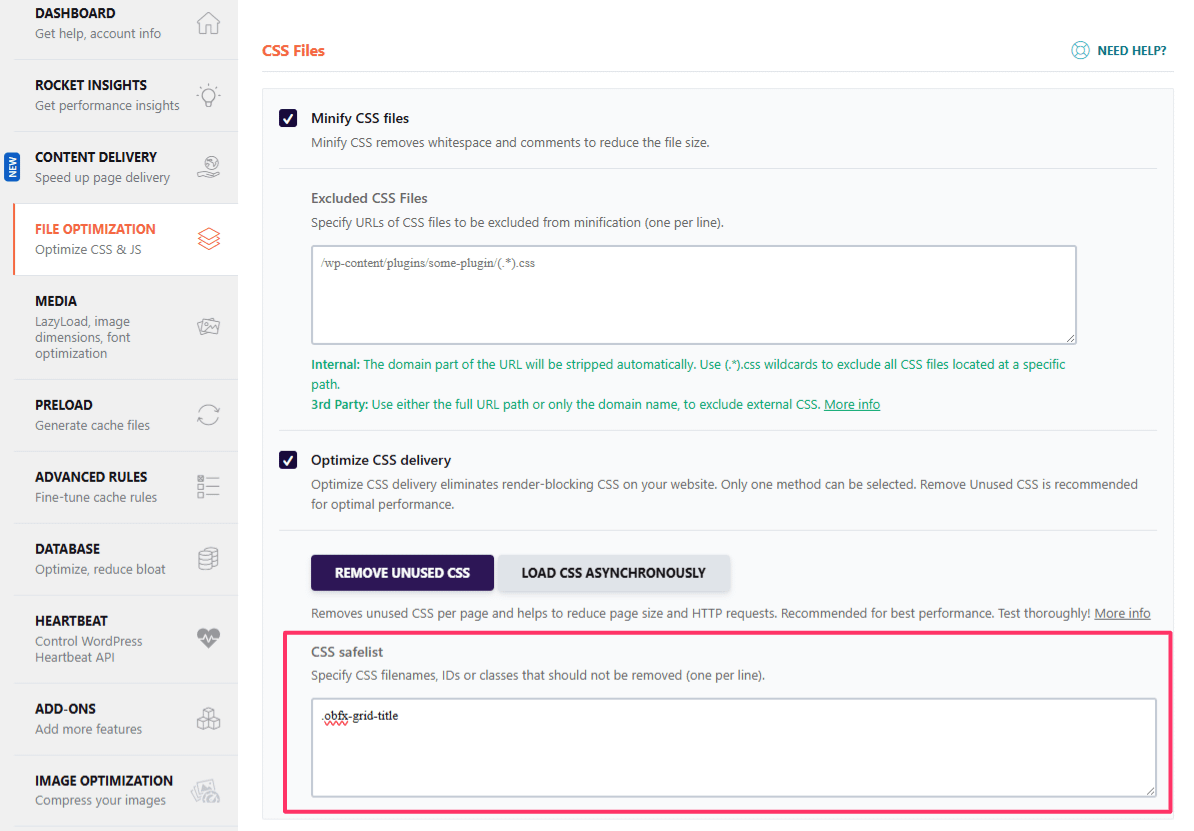
- Add that selector to your optimizer's unused-CSS safelist/allowlist field.
- Clear generated CSS profiles again, purge caches, and rebuild.
For the confirmed Orbit Fox Post Type Grid scenario, safelisting .obfx-grid-title restores the post title styling. Use this selector only for that specific widget case. For other elements, safelist the selector that controls the missing style on your site.
Verify the fix across paginated and cached URLs
- Open page one and multiple paginated URLs in a private/incognito window.
- Hard-refresh each page to avoid stale browser cache.
- Confirm title colors (or other previously missing styles) are consistent across URLs.
- Purge cache once more, then retest to confirm the rebuilt CSS profiles stay correct.
If you use Super Page Cache
If you also run Super Page Cache, use its product-specific optimization troubleshooting workflow: Troubleshoot File Optimization and PageSpeed Verification.