
What's the difference between Otter Free and Otter Pro?
Otter is a lightweight, dynamic collection of page-building blocks and templates for the WordPress block editor. You can access even more advanced blocks and features with the premium version.
In this article
Features of the Blocks
| Features | Otter | Otter Pro |
|---|---|---|
| Visibility Conditions The conditional loading is a feature that applies to all blocks within the Otter Library and is represented by the Visibility Condition, in the Settings panel. 📝Note: The PRO version offers more conditions for the blocks. Check this chapter to find out more about them. | Yes | Yes |
| Import and sync review data from Woo products feature This feature is related to the Product Review Block. It displays the review of a manually added product, but this process can be automated by using the details of a WooCommerce product. | - | Yes |
| Transform to Sticky This feature is very useful when you want to change your website's appearance while scrolling the page. 📝Note: The PRO version offers more options for the sticky blocks. Check this chapter to find out more about them. | Yes | Yes |
| Animations An animation can enliven the content of the block. It can be a loading animation, count animation, or typing animation. | Yes | Yes |
| WooCommerce Product Builder This feature allows you to design the product shop page as you wish, using the blocks available in the editor. | - | Yes |
| Local Fonts This feature will speed up your website by hosting Google Fonts locally. | - | Yes |
| Otter Patterns Library | Yes | Yes |
| Dynamic Values This feature allows you to insert dynamic values and automatically display updated information on your website. 📝Note: The PRO version offers more data types and dynamic values. Check this chapter to find out more about them. | Yes | Yes |
| Copy Paste Styles This feature allows you to copy the style of a certain block and paste it to another one | Yes | Yes |
| Dynamic Links This feature allows you to insert dynamic links that will be automatically imported. 📝Note: The PRO version offers more dynamic links data types. Check this chapter to find out more about them. | Yes | Yes |
| Live Search This feature allows you to convey an extended live search using the Search or Advanced Search blocks. | - | Yes |
Transform to Sticky
| Options | Otter | Otter Pro |
|---|---|---|
| Sticky to Set the parent element for the sticky block. By default, it is set to the screen so that the block will remain on the screen when you scroll down. | Yes | Yes |
| Position Pick the block's position in relation to the screen, top or bottom. This will influence the orientation of the block when you scroll. | Yes ( Top ) | Yes ( Top + Bottom ) |
| Offset Refers to the distance that remains between the block and the screen. | - | Yes |
| Closing the Sticky It appears after enabling the Float Mode. | - | Yes |
| Behaviour This option decides how the sticky blocks will behave when multiple sticky blocks with the same movement collide. The pro version also has Fade and Stack options. | Yes (Collapse) | Yes (3 options) |
| Enable on Mobile Decide if you want this feature to be displayed on Mobile too. | - | Yes |
📝 Note: More details about the Sticky feature can be found here.
Visibility Conditions
The Conditional Loading feature is a powerful tool of the Otter blocks, that allows you to control the visibility of the blocks contained by your website, based on conditions from different fields, like User, Posts, URL, or even Date & Time constraints.
| Conditions | Otter | Otter Pro |
|---|---|---|
| Users The Users' conditions refer to the user status, such as Logged In Users, Logged Out Users, User Roles, and Screen Size. | Yes | Yes + Logged-in User Meta |
| Posts The Posts' conditions refer to the post-related elements, such as Post Author, Post Category, Post Type. | Yes | Yes + Post Meta |
| Date & Time The Date & Time conditions include constraints like Date Range, Date Recurring, and Time Recurring. | - | Yes |
| Advance The Advance conditions include constraints like Query String, Country, and Cookies. | - | Yes |
| WooCommerce This includes Products in Cart, Total Cart Value, Purchase History, and Total Spent conditions. | - | Yes |
| LearnDash This includes Purchase History and Course Status conditions. | - | Yes |
📝 Note: Here is a dedicated doc about the Visibility Conditions.
Dynamic Values
The Dynamic Values feature is a freemium feature available in Otter free and Otter Pro. This table presents the number of values available in both plans through the "%" symbol. The preview of the dynamic value is available in both free and pro version.
| Dynamic Values | Otter | Otter Pro |
|---|---|---|
| Post ID | Yes | Yes |
| Post Title | Yes | Yes |
| Post Excerpt | Yes | Yes |
| Post Date | - | Yes |
| Post Time | - | Yes |
| Post Terms | - | Yes |
| Post Custom Field Available through the ACF plugin integration. | - | Yes |
| Post Type | Yes | Yes |
| Post Status | Yes | Yes |
| Site Title | Yes | Yes |
Apart from this inserting method, you can select a word or a phrase and attach a dynamic value to it. The Data Type list available is different according to the plan.
| Conditions | Otter | Otter Pro |
|---|---|---|
| Post ID | Yes | Yes |
| Post Title | Yes | Yes |
| Post Content | Yes | Yes |
| Post Excerpt | Yes | Yes |
| Post Date | - | Yes |
| Post Time | - | Yes |
| Post Terms | - | Yes |
| Post Custom Field Available through the ACF plugin integration. | - | Yes |
| Post Type | Yes | Yes |
| Post Status | Yes | Yes |
| Site This section includes the Site Title and Site Tagline. | Yes | Yes |
| Author Name | Yes | Yes |
| Author Description | Yes | Yes |
| Author Meta | - | Yes |
| Logged-in User Name | Yes | Yes |
| Logged-in User Description | Yes | Yes |
| Logged-in User Email | Yes | Yes |
| Logged-in User Meta | - | Yes |
| Miscellaneous This section includes the Archive Title, Archive Description, Current Date, and Current Time. | Yes | Yes |
| Miscellaneous This section includes the pro data types, URL Parameter, and Country. | - | Yes |
📝 Note: Here is a dedicated section about the Dynamic Values in Otter.
Dynamic Images
The Dynamic Images feature is a freemium feature available in Otter free and Otter Pro.
| Dynamic Images | Otter | Otter Pro |
|---|---|---|
| Featured Image | Yes | Yes |
| Author Image | Yes | Yes |
| User Image | Yes | Yes |
| Website Logo | Yes | Yes |
| Post Meta | - | Yes |
| Woo Product | - | Yes |
| ACF Image Available through the ACF plugin integration. | - | Yes |
📝 Note: Here is a dedicated section about the Dynamic Images in Otter.
Dynamic Links
The Dynamic Link feature is a freemium feature available in Otter free and Otter Pro.
| Data Types | Otter | Otter Pro |
|---|---|---|
| Site URL | - | Yes |
| Post URL | Yes | Yes |
| Featured Image URL | Yes | Yes |
| Author URL | Yes | Yes |
| Author Website | Yes | Yes |
| Post Custom Field | - | Yes |
| ACF Available through the ACF plugin integration. | - | Yes |
📝 Note: Here is a dedicated doc about the Dynamic Links in Otter.
Form Submissions
The Form Submissions feature is available to all users. Otter stores every valid form submission in the WordPress database, in both the free and Pro versions, so you can review the submissions you receive using the Form blocks.
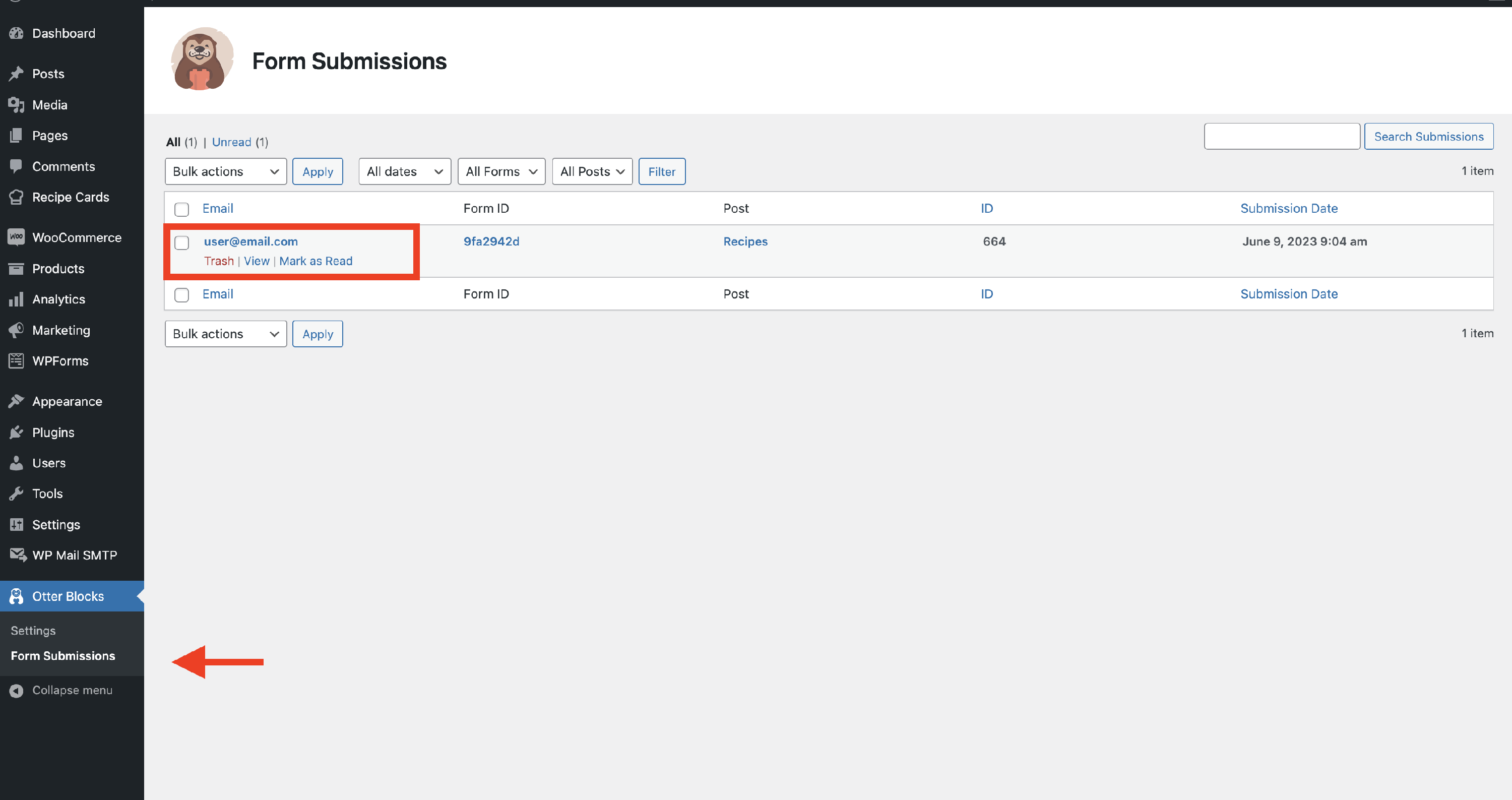
📝 Note: Learn more about the form submissions from this doc.
Free VS Premium Blocks
In this section, you will find all the Otter and Otter Pro blocks listed to better highlight the differences between them.
| Image / Animation Related Blocks | Otter | Otter Pro |
|---|---|---|
| Slider Enhance your website's appearance with a minimal image slider to showcase beautiful images. | Yes | Yes |
| Lottie Animation The Lottie animation attracts the attention of your website's visitors. | Yes | Yes |
Feel free to find out more about these blocks from here.
| Layout Blocks | Otter | Otter Pro |
|---|---|---|
| Accordion The accordion helps save space on the website, collapsing the content and is perfect for displaying FAQs. | Yes | Yes |
| Section The section block is a very important feature of this plugin because it allows the creation of more pleasing content by combining different blocks in multiple columns. | Yes | Yes |
| Tabs Using tabs optimizes navigation between groups of content. | Yes | Yes |
Feel free to find out more about these blocks from here.
| Form Blocks | Otter | Otter Pro |
|---|---|---|
| Form The forms are really helpful for having evidence of the information. | Yes | Yes |
| Contact Form Make sure that your visitors remain up to date using a contact form that makes them agree to receive email communication. | Yes | Yes |
| Subscribe Form Allow your visitors to remain up to date using a subscribe form that ensures their engagement. | Yes | Yes |
| Save Location | Otter | Otter Pro |
| --- | --- | --- |
| Database | Yes | Yes |
| Email Only | Yes | Yes |
| Database and Email | Yes | Yes |
| Field Types for Form Blocks | Otter | Otter Pro |
| --- | --- | --- |
| Checkbox | Yes | Yes |
| Date | Yes | Yes |
| Yes | Yes | |
| File | - | Yes |
| Hidden | - | Yes |
| Stripe | - | Yes |
| Number | Yes | Yes |
| Radio | Yes | Yes |
| Select | Yes | Yes |
| Text | Yes | Yes |
| Textarea | Yes | Yes |
| URL | Yes | Yes |
| Form Options | Otter | Otter Pro |
| --- | --- | --- |
| Email To | Yes | Yes |
| Email Subject | Yes | Yes |
| Submissions | Yes | Yes |
| CC | Yes | Yes |
| BCC | Yes | Yes |
| From Name | Yes | Yes |
| Redirect on Submit | Yes | Yes |
| Enable reCaptcha | Yes | Yes |
| Autoresponder | - | Yes |
| Webhook | - | Yes |
The Pro version of the Otter Blocks unlocks additional form features, such as the Autoresponder, Webhooks, and extra field types.
Feel free to find out more about these blocks from here.
| HTML Related Blocks | Otter | Otter Pro |
|---|---|---|
| Advanced Heading Advanced Heading gives a spin to the editor's Heading block with much-needed customization options | Yes | Yes |
| Button Group Enhance your website's interaction, prompting visitors to take action with a button group. | Yes | Yes |
| Timeline The timeline block allows you to display structured content using vertical timeline items. | Yes | Yes |
Feel free to find out more about these blocks from here.
| Animated / Dynamic Blocks | Otter | Otter Pro |
|---|---|---|
| Sharing Icons Ensure your website's popularity by using share buttons with a suitable social sharing service. | Yes | Yes |
| Flip Card This block allows you to create an animated block that will display different information on the front side and backside. | Yes | Yes |
| Modal The modal block is an interactive element that overlays the page, covering the content underneath until it is closed by the user. | - | Yes |
| Popup The popup is a notice that appears suddenly on the screen over another window or display. 📝Note: The PRO version offers two more options for this block: Close on Anchor Click and Dismiss for Recurring Visitors. | Yes | Yes |
Feel free to find out more about these blocks from here.
| Icon Related Blocks | Otter | Otter Pro |
|---|---|---|
| Icon Something more suggestive than a text or a button is an icon, and with the Icon block, you can easily add it to your website. | Yes | Yes |
| Icon List Create an interesting layout for the icons using the Icon List block. | Yes | Yes |
Feel free to find out more about these blocks from here.
| Posts Related Blocks | Otter | Otter Pro |
|---|---|---|
| Posts You can make the posts of your website even more accessible with the Posts block. 📝Note: The PRO version allows you to add more fields for the posts using the Advanced Custom Fields plugin. | Yes | Yes |
Feel free to find out more about these blocks from here.
| Shop Related Blocks | Otter | Otter Pro |
|---|---|---|
| Product Review Transform your products into ingenious reviews with ratings and generate edges with a fulfilling product review block. | Yes | Yes |
| Review Comparison Table It is a special component that can be used only if the Comparison Table module is enabled in the WooCommerce Booster module. | - | Yes |
| Stripe Block This block might be handy if you want to sell a couple of products without setting up a whole store, such as ebooks, some licenses, etc. More details about it can be found in this doc. | Yes | Yes |
| Add to Cart Button The add to cart button represents the button that stays somewhere around the product, to ensure the sale process. | - | Yes |
Feel free to find out more about these blocks from here.
| Maps Related Blocks | Otter | Otter Pro |
|---|---|---|
| Maps As expected from the name, this block generates a map on your website. | Yes | Yes |
| Google Maps Create a more interactive website using Google Maps. | Yes | Yes |
Feel free to find out more about these blocks from here.
| Tracking Blocks | Otter | Otter Pro |
|---|---|---|
| Circle Counter As expected from the name, this block highlights the progress through an animated circle counter. | Yes | Yes |
| Progress Bar Similar to the Circle Counter block, this one also showcases the progress within a beautifully animated progress bar. | Yes | Yes |
| Countdown As expected from the name, this block is perfect for keeping the evidence of the time until a certain date. | Yes | Yes |
Feel free to find out more about these blocks from here.
| Business Related Blocks | Otter | Otter Pro |
|---|---|---|
| Business Hours As expected from the name, the block is handy when it comes to creating a schedule for a business. | - | Yes |
Feel free to find out more about these blocks from here.
Support and Integrated Services
| Integrations | Otter | Otter Personal | Otter Business | Otter Agency |
|---|---|---|---|---|
| Supported Sites | - | 1 | 5 | Unlimited |
| Priority Support | - | - | Yes | Yes |
| Live Chat & VIP Support | - | - | - | Yes |
| Templates Cloud | - | - | - | Yes |
| Extended Live Search | - | - | Yes | Yes |
📝 Note: More details about the Block Editor Booster can be found here, and you can get the module on this page.
📝 Note: More details about the blocks can be found here.