
Theme Setup wizard
Otter includes an onboarding wizard that offers a streamlined theme setup experience for users of our Raft FSE theme.
In order to experience the onboarding wizard, you need to have the Raft theme installed and activated.
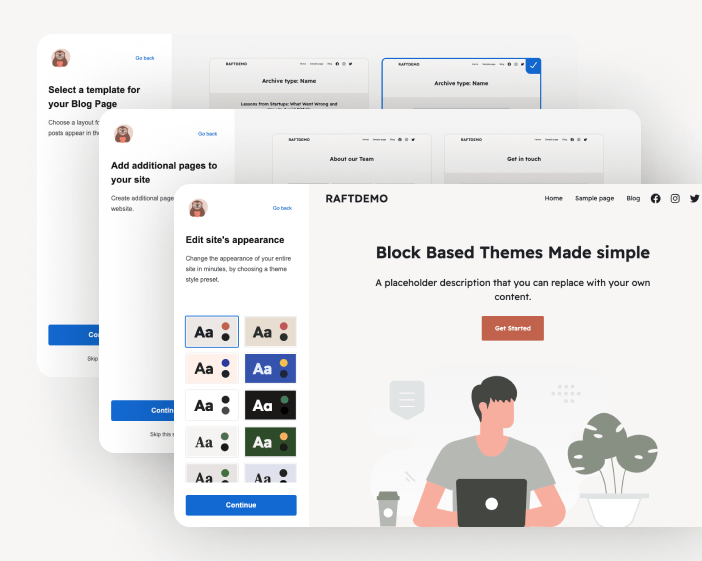
Wizard steps
The wizard will guide you through a series of steps, that allow you to define the style and layout of your new theme. This process is optional, but facilitates an intuitive initial setup of the most important templates of your site. The series of steps are as follows:
- Add your site's info
- Theme Style preset
- Homepage layout
- Template for Single Post
- Select a template for your Blog Page (Post Archive)
- Additional full-page layouts that you can import as new pages
Questions
Does the Setup Wizard work with any theme?
The wizard works with any FSE (block) theme that declares support for it. Our Raft theme supports it out of the box. If you are a theme developer, you can make your own block theme compatible by adding add_theme_support( 'otter-onboarding' ) in your theme.
How can I trigger the Theme Setup wizard?
You can easily trigger the onboarding using the Theme Setup menu link under the appearance menu in the admin sidebar.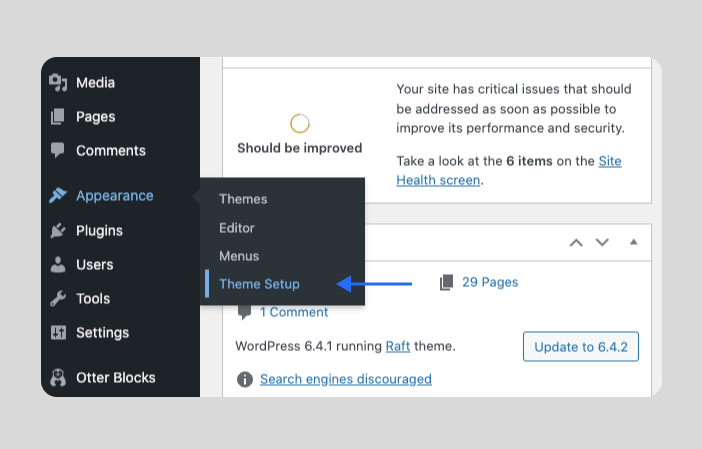
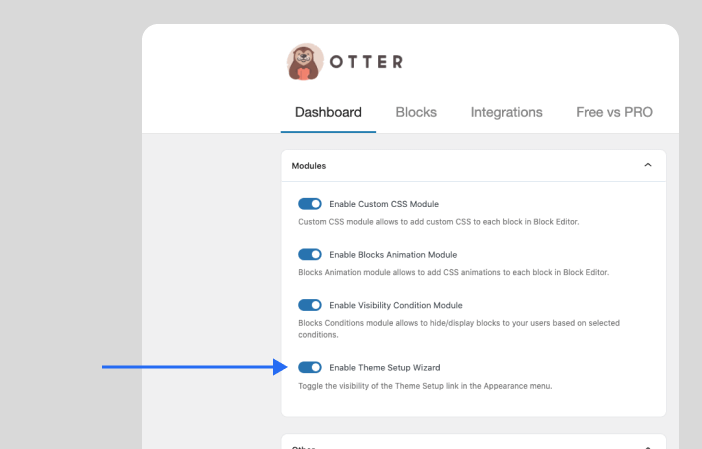
Can I hide the Theme Setup menu link if I don't need it anymore?
Yes, you can easily disable the related toggle in Otter Settings.
Can I still edit my theme in Site Editor?
Yes, absolutely, you can work in the Site editor as usual. The onboarding wizard just gives you additional layout options for your most important templates, and facilitates a more streamlined setup. But you still maintain the flexibility to work in the site editor if you choose.