
How to use Themeisle-managed AI and AI Quota in Feedzy
This guide explains how to power Feedzy's AI actions with Themeisle-managed credits instead of your own OpenAI key, and how to monitor your usage from the AI Quota tab.
📝 Note: Themeisle-managed AI works with Feedzy's AI actions (rewriting, summaries, and generated featured images), which are part of the Developer and Agency plans.
In this article
What Managed AI does
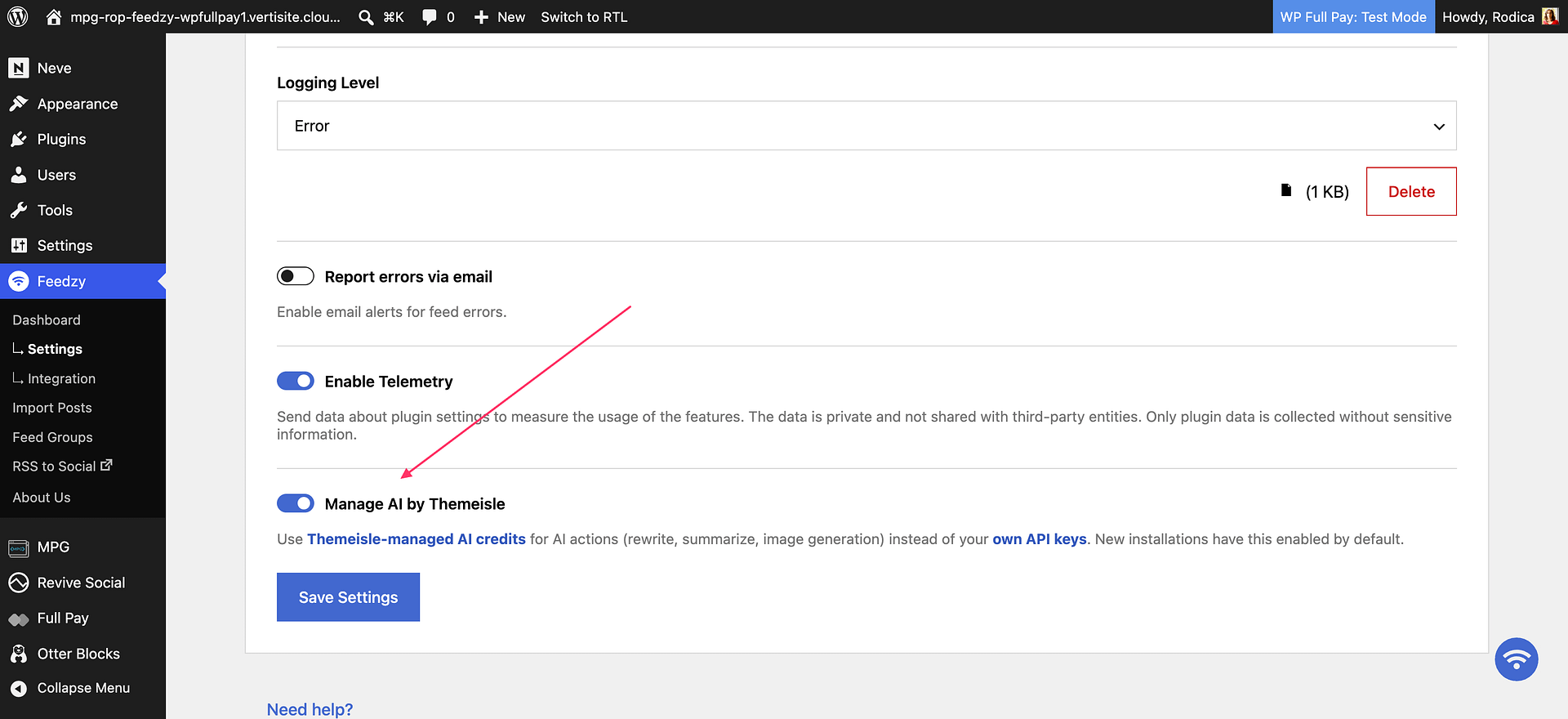
When Manage AI by Themeisle is enabled, Feedzy uses Themeisle-managed AI credits for its supported AI actions, including rewrite and summarize actions and generated featured images. You do not need to configure your own OpenAI or OpenRouter API key while this option is on.
New installations have Managed AI enabled by default. Existing installations keep using their own API keys until you enable the option, so upgrading does not change how your current import jobs run.
Enable or disable Managed AI
- Go to Feedzy > Settings.
- Find Manage AI by Themeisle.
- Enable the toggle to use Feedzy's managed AI credits, or disable it to use your own API keys.
- Save the settings.
Check your AI Quota
When Managed AI is active, you can track how many credits you have used in the current period.
- Go to Feedzy > Integration.
- Open the AI Quota tab.
- Review the current-period quota, the credits remaining, and the Next Reset date.
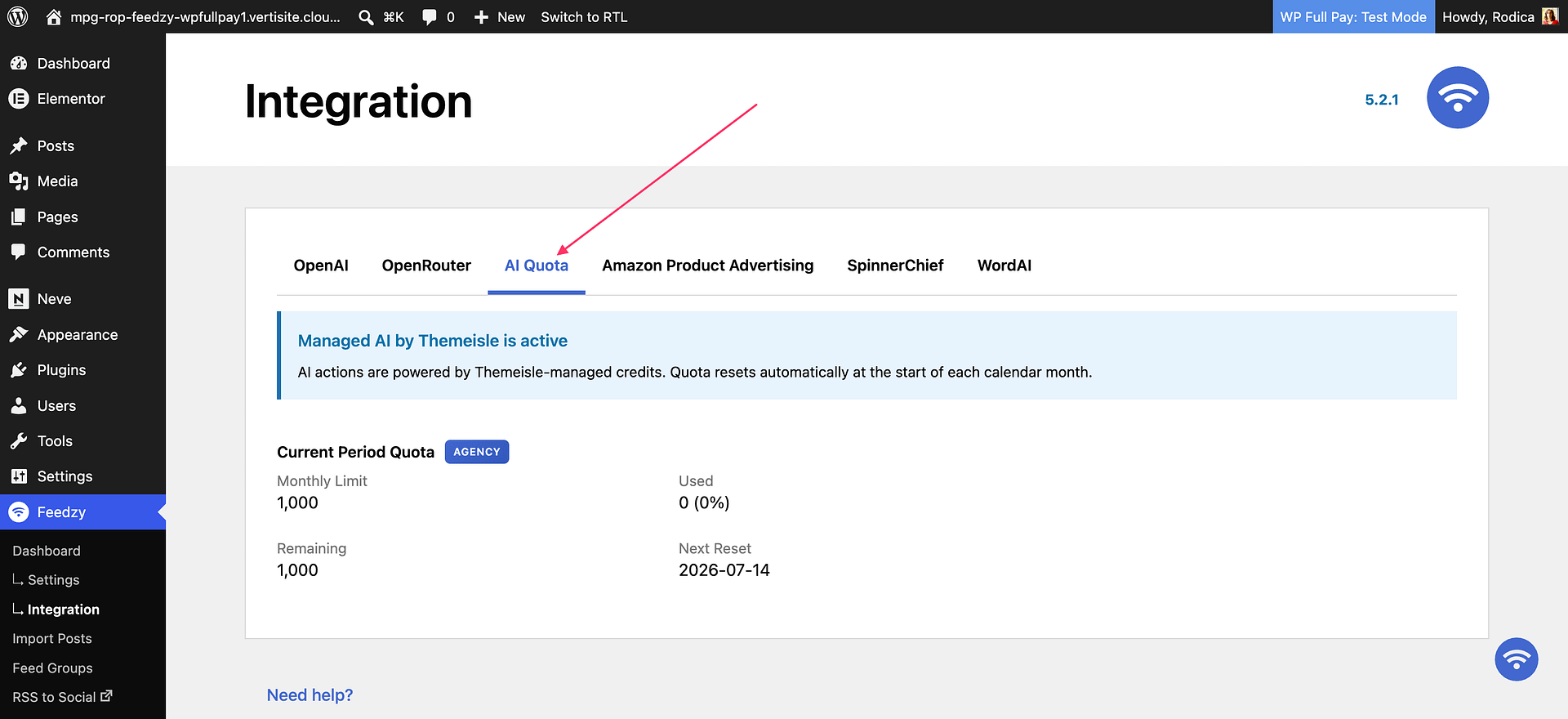
⚠️ Important: The AI Quota tab is labeled PRO and appears on the Feedzy > Integration page. The managed AI credits shown there depend on your plan, so check your plan on the Feedzy pricing page.
How credits are counted
All AI actions draw on the same quota, but they do not cost the same:
- Rewrite, paraphrase, and summarize actions cost 1 credit each time they run.
- A generated featured image costs 5 credits.
Credits are counted per action, not per imported item, so a job that rewrites the title, rewrites the content, and generates an image uses 7 credits for every item it imports. High-volume jobs that generate images therefore use up an allowance much faster than the number of imported posts suggests.
Use the Next Reset date shown on the tab to see when your credits become available again, rather than assuming that the quota resets on the first of the month.
When your AI quota runs out
Managed AI actions stop running as soon as your remaining credits are fewer than the action needs. Feedzy still imports the feed item, so the import itself looks successful:
- Rewrite, paraphrase, and summarize actions import the original feed content unchanged, without applying your prompt.
- A generated featured image falls back to the image supplied by the feed, or to no image if the feed does not provide one.
No error is shown on the import job or on the imported post. This is why an exhausted quota usually looks like Feedzy ignored your prompt rather than like a quota problem.
⚠️ Important: Editing or rewording your prompt does not restore AI processing while no credits remain. Check your quota first whenever a prompt that used to work stops being applied.
Confirm that the quota is the cause
- Go to Feedzy > Integration and open the AI Quota tab.
- Check whether the remaining credits reached
0, and note the Next Reset date. - Confirm that Manage AI by Themeisle is still enabled under Feedzy > Settings > General. If it is disabled, Feedzy uses your own API key and the managed quota does not apply.
- To see the reason recorded for each skipped action, set Logging Level to Debug under Feedzy > Settings > General, run the import again, then open Feedzy > Settings > Logs. Lower the logging level again once you are done, so the log file stays small.
- Test with a fresh feed item after any change, so you are checking the current configuration instead of an older import result.
Use your own API keys instead
If you disable Managed AI, configure your provider under Feedzy > Integration > OpenAI or Feedzy > Integration > OpenRouter. While your own keys are active, individual import actions can use provider and model selection where supported. If Managed AI is enabled, Feedzy uses the managed credits instead of any keys you add on these tabs.
Switch to your own provider before the next reset
If you need to keep importing before your credits reset, move the site to your own provider credentials:
- Go to Feedzy > Settings > General, disable Manage AI by Themeisle, and save the settings.
- Go to Feedzy > Integration and open the OpenAI or OpenRouter tab.
- Paste your API key and click Validate & Save. Check the status shown beneath the field to confirm that the key is valid.
- Run the import again with a fresh feed item and confirm that your prompt was applied.
Adding a key without disabling Manage AI by Themeisle does not help, because Feedzy keeps using the managed credits while that option is on. Usage on your own key is billed by your provider and is not tracked on the AI Quota tab.