All subscription plans disappear when going live
Description: Everything is fine in test mode but none of the forms work in live mode.
In this article
What happened?
When switching the plugin to live mode, all subscription plans disappear, and forms don’t work.
Why is it happening?
In Stripe, API modes (test and live) are two different worlds, with different set of objects (like subscriptions plans, coupon codes, etc).
Most probably, you’ve created subscription plans in test mode, but you haven’t created them in live mode as well, or vice versa.
What is the solution?
You can either:
Recreate the plans in live mode
Make sure to use the same plan/price IDs as in test mode, otherwise your forms won’t find them.
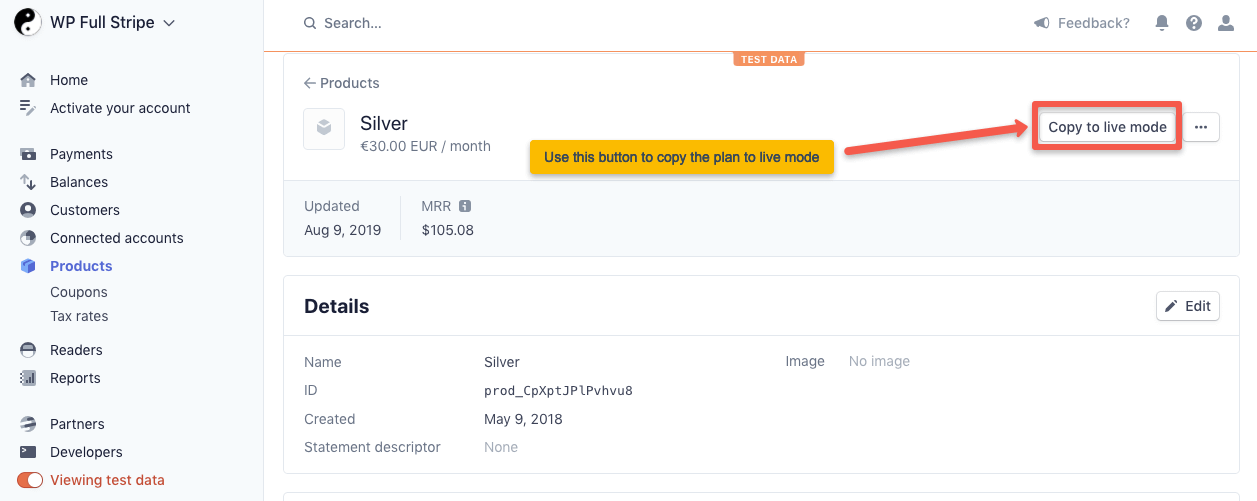
Copy the plans to live mode
If you choose to copy plans to live mode, then:
- Go to the Products page on the Stripe Dashboard.
- Select the plan you’d like to copy.
- Press the “Copy to live mode” button, see screenshot: