
CSS Optimizations
The Unused CSS Removal feature automatically optimizes your website's CSS by identifying and removing styles that aren't actually used on each page. This significantly reduces the amount of CSS that browsers need to download and process, resulting in faster page load times and improved Core Web Vitals scores.
Key Benefits:
- 🚀 50-85% faster initial page load - Critical CSS only for instant rendering
- 🎯 Protects dynamic content - Full CSS restored on first user interaction
- ✅ Works with dropdowns, modals, AJAX - Smart lazy loading handles everything
- 📱 Device-specific optimization - Separate profiles for mobile and desktop
- 🔄 Fully automatic - No manual intervention after initial setup
In this article
How It Works
The plugin uses an intelligent multi-step process to optimize your CSS:
- Analysis Phase: When a visitor first accesses a page, a lightweight JavaScript analyzer runs in the background to scan all CSS stylesheets and identify which selectors are actually used on the page.
- Device-Specific Profiling: The analysis runs separately for mobile and desktop devices, ensuring that responsive styles are properly handled for each viewport.
- Critical CSS Extraction: Once analysis is complete for all device types, the plugin extracts only the CSS that's actually needed and stores it as "critical CSS."
- Cache Optimization: The page cache is automatically rebuilt with the critical CSS inlined in the `` section, while all original stylesheets are kept but marked for lazy loading.
- Automatic Delivery: Subsequent visitors receive the optimized version with critical CSS loaded instantly. The full original CSS is automatically restored on first user interaction (mouseover, touch, keyboard input, or scrolling) to ensure perfect rendering of hidden elements, dropdowns, modals, and AJAX-loaded content.
Key Features
Device-Specific Optimization
- Separate analysis for mobile and desktop viewports
- Respects responsive design breakpoints
- Merges profiles intelligently to cover all device types
CSS Variables Support
- Automatically detects and includes CSS custom properties (
--variable-name) - Tracks variable usage across the entire stylesheet
- Ensures variable definitions are preserved when referenced
Automatic Cache Management
- Rebuilds page cache automatically after analysis completion
- Purges affected URLs intelligently
- No manual intervention required
Admin Bar Profile Status
- Shows the current Unused CSS profile status from the Super Page Cache admin bar menu on frontend pages
- Helps you confirm whether the current page profile is generated, pending, excluded, or already applied
- Links to this guide for setup and troubleshooting
Smart CSS Lazy Loading
- Critical CSS inlined for instant above-the-fold rendering
- Full original CSS preserved and restored on first user interaction
- Triggers on: mouseover, touchstart, touchmove, keydown, or wheel events
- Ensures perfect rendering of hidden elements, dropdowns, modals, and AJAX content
- Greatly reduces the chance of styling issues with dynamic content
Getting Started
Enabling the Feature
- Navigate to Super Page Cache → Settings → Files
- Scroll to the CSS Optimizations section
- Toggle "Remove Unused CSS" to ON
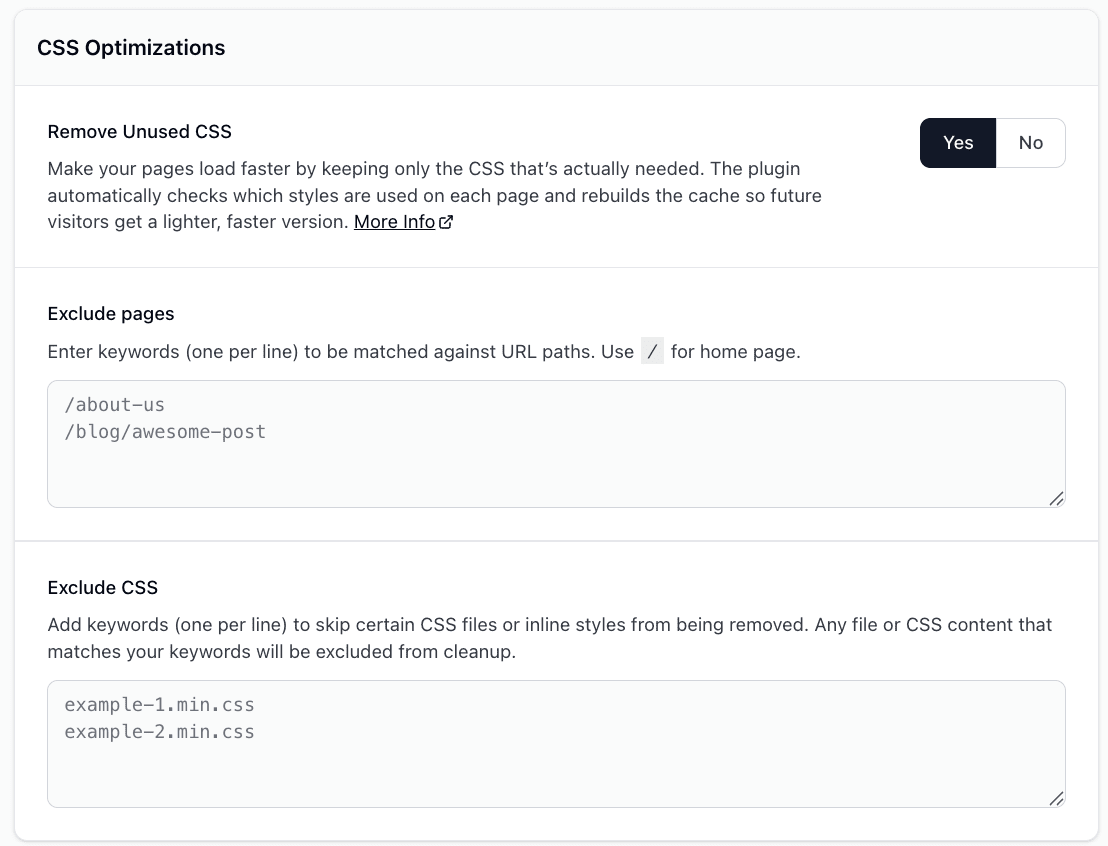
⚠️ Important: Removing unused CSS is an aggressive optimization. On most sites the lazy-loading process restores the full stylesheet on the first interaction, but the analyzer can occasionally miss styles that a theme, page builder, animation library, or third-party widget needs for the initial render. If your layout, fonts, or colors look broken after enabling the feature, use Exclude CSS or Exclude Pages below to exempt the affected file or page, then purge the cache. For a step-by-step recovery workflow, see Troubleshoot File Optimization and PageSpeed Verification.
Checking the CSS Profile Status
When you are logged in and viewing a frontend page, open the Super Page Cache item in the WordPress admin bar. The Unused CSS profile entry shows whether the current page already has an optimized profile or still needs profiling.
Common statuses include:
- Not generated — no profile exists yet for the current page.
- Pending — one or more device profiles are still being generated.
- Applied — optimized CSS has been generated and is active for the page.
- Excluded — the current URL matches your unused CSS exclusion rules.
- Page too large to optimize — the page profile is retained, but the critical CSS is too large to inline, so Remove Unused CSS is not applied to that page.
- Frontend pages only — profile status is only available while viewing frontend pages, not inside wp-admin.
If the status is Not generated or Pending, load the page on the frontend and allow the analysis process to complete. Then purge or rebuild cache if needed.
If the status stays Not generated after the page has been visited, the profiling request may be blocked before it reaches WordPress. The analyzer sends its results in a background POST request to /wp-json/spc/v1/optimizations. If that request fails, for example with an HTTP 406 response, the profile cannot be saved and the status does not change. To check this:
- Open the page in a new private or incognito window. The analyzer sends its request only once per browser tab session, so reloading a tab where the page was already analyzed does not send it again.
- Open your browser's developer tools, switch to the Network tab, and reload the page.
- Wait a few seconds after the page finishes loading, then look for a request to
/wp-json/spc/v1/optimizationsand check its status code.
If the request returns 406 or another error status, a security plugin, server firewall, ModSecurity rule, or CDN is likely rejecting it. Send your security plugin provider or hosting provider the route (/wp-json/spc/v1/optimizations), the request method (POST), the status code, and the time of the failed request. Ask them to check their firewall or WAF logs and allow that specific request. Don't disable the whole firewall or all REST API protection. For more on how a single REST API route can be blocked while the rest of the REST API works, see Check Security and Hosting Restrictions.
After the request is allowed, confirm that profiling works again:
- While logged in, open the Super Page Cache admin bar menu on the affected page and click Purge cache for this page only.
- Open the page in a new private or incognito window and wait a few seconds after it loads.
- Back in your logged-in window, reload the page and check the Unused CSS profile entry in the Super Page Cache admin bar menu. It should change from Not generated to Pending or Applied.
Configuration Options
Exclude Pages
You can exclude specific pages or URL patterns from unused CSS processing:
/about-us
/contact
/blog/special-page
When to use: Pages with dynamic content, JavaScript-rendered content, or third-party widgets that may not be properly detected during analysis.
Exclude CSS
You can exclude specific CSS files or inline styles from being processed:
example-1.min.css
example-2.min.css
my-custom-styles
When to use:
- Third-party CSS that causes issues when optimized
- Critical animation libraries
- CSS that's loaded conditionally via JavaScript
Note: The plugin automatically excludes common font services like Google Fonts, TypeKit, and Font Awesome.
HTML Attributes & Markers
Skip Unused CSS Processing
You can mark specific elements to skip unused CSS processing using the data-spc-skip-ucss attribute:
<!-- Skip processing for a specific stylesheet -->
<link rel="stylesheet" href="important-styles.css" data-spc-skip-ucss>

<!-- Skip processing for an inline style block -->
<style id="custom-animations" data-spc-skip-ucss>
  @keyframes slide {
    from { transform: translateX(-100%); }
    to { transform: translateX(0); }
  }
</style>
Use cases:
- Animation libraries that need to be fully loaded
- Third-party widgets with dynamic styling
- CSS that's manipulated by JavaScript
Internal Markers (Generated by Plugin)
These attributes are added by the plugin during optimization:
<!-- Critical CSS injected in head -->
<style data-critical-css>
  /* Critical above-the-fold styles */
</style>

<!-- Lazy-loaded stylesheets -->
<link rel="lazy-stylesheet" href="...">
<link rel="lazy-preload" as="style" href="...">

<!-- Lazy-loaded inline styles -->
<style type="text/lazy-css">
  /* Non-critical styles */
</style>
WordPress Filters
Change the Critical CSS Payload Limit
Encoded critical CSS is limited to 256 KB per page by default. When a page's critical CSS exceeds this limit, the rest of the optimization profile is kept but the oversized critical CSS is skipped, so Remove Unused CSS is not applied to that page (the admin bar shows Page too large to optimize). You can change the byte limit with the spc_max_critical_css_payload_bytes filter:
add_filter( 'spc_max_critical_css_payload_bytes', function( $max_payload_bytes ) {
    return 300000;
} );
⚠️ Warning: Raising the limit inlines larger CSS blocks into every cached response, which increases HTML size and transfer cost. Increase it only after measuring the affected pages.
Customize Storage Backend
Change where profile data is stored:
/**
 * Use custom storage class for page profiles
 *
 * @param string $storage_class Default storage class
 * @return string Custom storage class
 */
add_filter( 'spc_page_profiler_storage', function( $storage_class ) {
    // Return your custom storage class (must extend Storage\Base)
    return 'My_Custom_Storage_Class';
} );
Available storage classes:
Storage\ObjectCache- Uses WordPress object cache (default if available)Storage\Transients- Uses WordPress transients (default fallback)- Custom class - Must extend
SPC_Pro\Modules\PageProfiler\Storage\Base