
Use Multiple Pages Generator with AI Assistants
Connect a compatible AI assistant to your WordPress site to manage MPG projects through the WordPress Abilities API, which lets connected tools use plugin features.
In this article
Requirements
- MPG installed and active with support for the WordPress Abilities API.
- WordPress 6.9 or later, which includes the Abilities API.
- A compatible connector, such as Easy MCP AI, and an AI client connected to your WordPress site.
- A connected WordPress user who can manage MPG projects.
Connect your AI client and enable MPG's abilities
- In your WordPress dashboard, open Easy MCP AI > Dashboard. Under Connect your AI client, choose your AI client and follow the on-screen steps to connect it to your site. If you use another compatible connector, follow its connection instructions.
- Open Easy MCP AI > Tools, then select Abilities. Find the group containing the
mpgabilities and enable the ones you want your AI client to use. - Click Save changes to make the selected abilities available to connected clients.
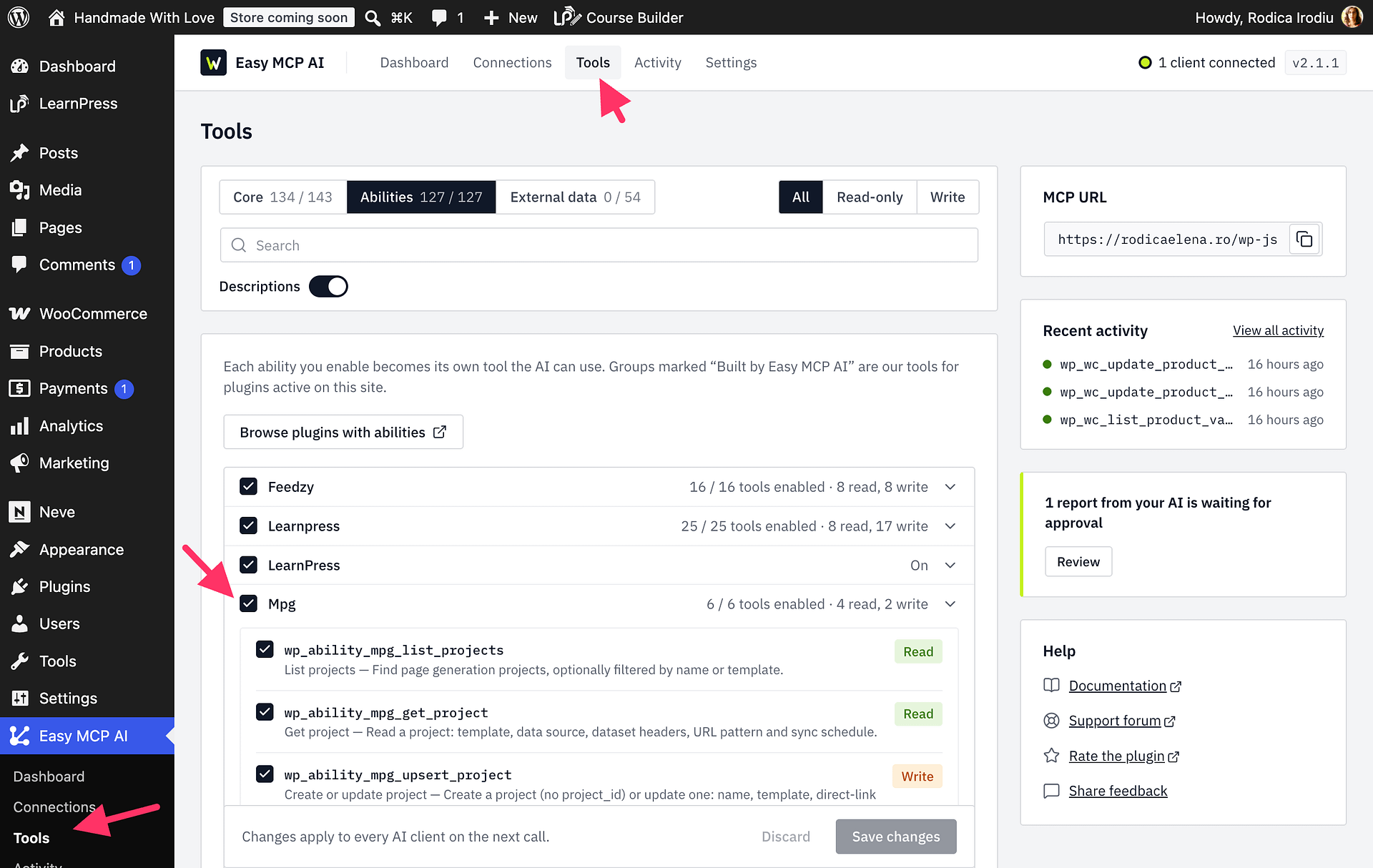
Available abilities
mpg/list-projectslists projects and can filter results by project name or template. Each request returns at most 100 projects.mpg/get-projectreads a project's template, source, headers, URL pattern, and schedule.mpg/upsert-projectcreates or updates a project. It supports direct-link sources only; to use an uploaded file, configure the source in the MPG project builder. Changing a project's source or URL pattern rebuilds its URLs.mpg/preview-rowspreviews substitutions, generated URLs, conflicts, and invalid values for up to 50 rows.mpg/rebuild-projectrebuilds a project's URL index and can optionally fetch its source again. The rebuild runs synchronously and replaces the project's generated URLs.mpg/get-project-statusreads a project's build state, counts, next scheduled sync, and recent logs. It returns at most 50 log entries.
Example prompts
Ask your AI client to:
- “List my MPG projects and show their names and IDs.”
- “Show me the settings for my [project name] project.”
- “Preview the first 10 rows of my [project name] project and flag URL conflicts.”
- “Show the build status and recent logs for my [project name] project.”
- “Rebuild the URL index for my [project name] project, and tell me before refreshing its source.”
Permissions
The connected WordPress user must have permission to manage MPG projects. Enabling an ability in Easy MCP AI does not give the connected user access they do not already have.