
How to Randomize Content Using Spintax and Nested Spintax in MPG?
MPG supports spintax, a syntax for randomizing text, so you can generate unique page variations from a single template.
📝 Note: This feature is available in both MPG Free and MPG Premium. You can get this feature and many more with MPG PRO.
In this article
What is randomized content otherwise known as Spintax?
The term Spintax comes from merging two words: Spinning and Syntax. The concept is to take an article and create original content by giving that article multiple options. Every time someone opens the article, they see different content (phrasing) with the same idea.
As a quick example, consider the following sentence: Would you like to see a lion at the zoo?
With randomized content, you can create multiple phrases from this one by writing it as follows: Would you like to see a {lion|tiger|zebra} at the zoo?
If you write it like this, the plugin "spins" the content based on what you wrote and returns one of the following phrases:
- Would you like to see a lion at the zoo?
- Would you like to see a tiger at the zoo?
- Would you like to see a zebra at the zoo?
The resulting spun articles have text from the original article randomly changed while retaining the overall meaning that the search engine will consider unique, thus helping in improving your SEO.
What is Nested Spintax?
Nested Spintax applies the same concept as normal Spintax, but it gives you even more possibilities. You can think of it as increasing the spinning level by one. The more Spintax you nest, the more possibilities are spun.
As an example, you can continue nesting in the phrase used before. If you also have animals that start with a vowel, you need to replace the "a" with an "an" to respect grammar. The previous phrase would be written like this: Would you like {a {lion|tiger|zebra}|an {ostrich|emu|iguana}}?
Now the possibilities are multiplied by two:
- Would you like a lion?
- Would you like a tiger?
- Would you like an iguana?
- Would you like an emu?
- Would you like a zebra?
- Would you like an ostrich?
How to use Nested Spintax/Spintax in MPG?
Using MPG Spintax to generate random text is easy, and it improves your SEO efforts.
Open your MPG project and go to the Spintax tab.
Type in a spintax expression, such as {a|the|one} {quick|fast} {brown|silver} {fox|dog|wolf}, or paste an entire section from your website.
Click Spin! to test the spinning.
If all looks good, click Copy expression and insert it where applicable on your MPG template page.
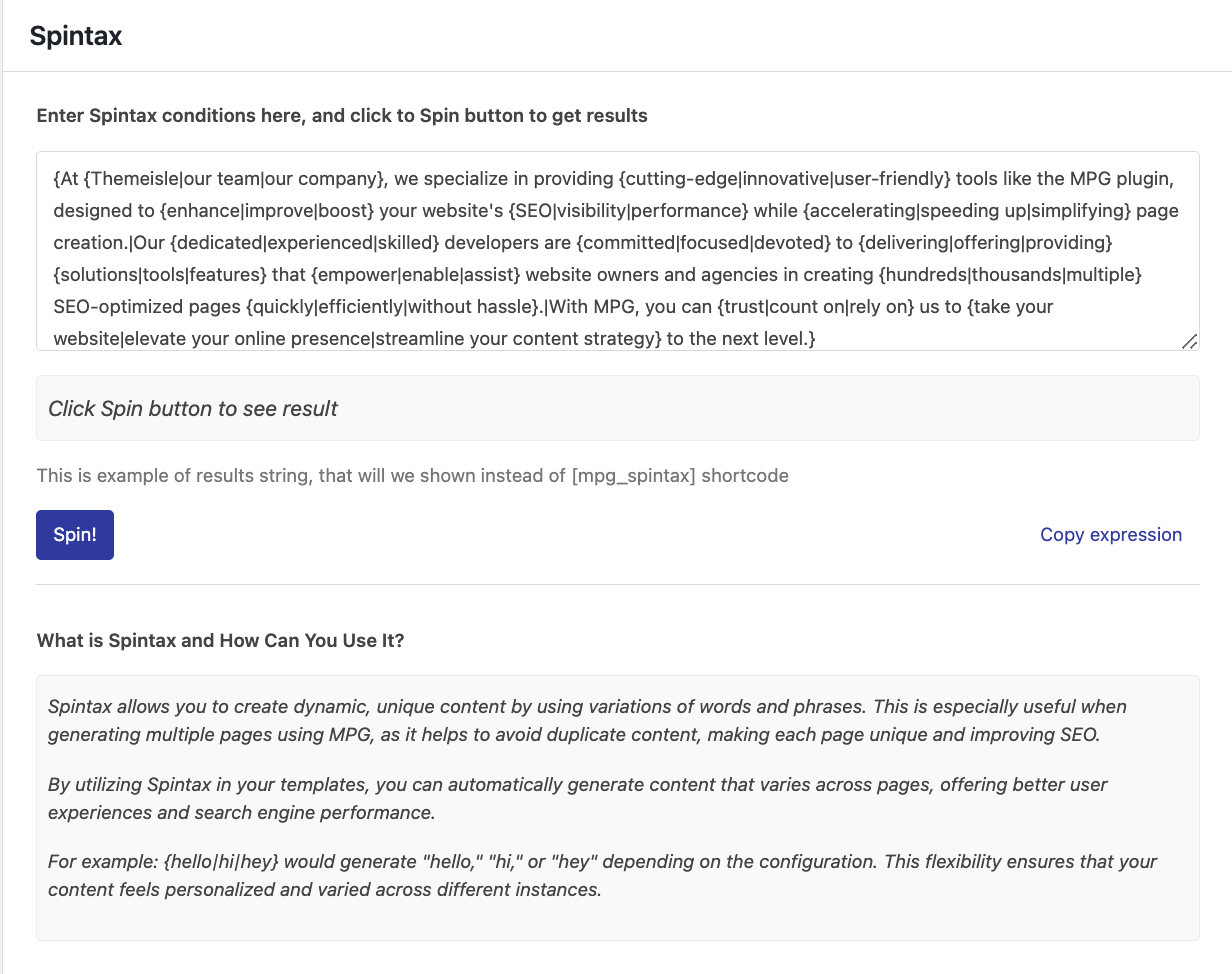
Each generated page remembers its Spintax when the expression contains plain text options. If you need to reset cached plain-text results, click Flush cache at the bottom of the Spintax tab in your MPG project.
MPG placeholders inside spintax
MPG keeps cached spintax stable even when the selected text contains MPG placeholders like {{mpg_city}} or {{mpg_state}}. MPG reuses the stored variation for the generated URL instead of regenerating the cache only because an mpg_ placeholder is present.
You can place MPG placeholders inside or outside the {option1|option2} choices. For predictable output, keep the same project_id and block_id values for each spintax block after publishing it.
You can copy the spintax expression using the Copy expression button, and paste it into a template page or into a regular WordPress page or post.
The shortcode will look like:
[mpg_spintax project_id="7" block_id="203"]{At {Themeisle|our team|our company}, we specialize in providing {cutting-edge|innovative|user-friendly} tools like the MPG plugin, designed to {enhance|improve|boost} your website's {SEO|visibility|performance} while {accelerating|speeding up|simplifying} page creation.|Our {dedicated|experienced|skilled} developers are {committed|focused|devoted} to {delivering|offering|providing} {solutions|tools|features} that {empower|enable|assist} website owners and agencies in creating {hundreds|thousands|multiple} SEO-optimized pages {quickly|efficiently|without hassle}.|With MPG, you can {trust|count on|rely on} us to {take your website|elevate your online presence|streamline your content strategy} to the next level.}{Feel free to {contact|reach out to|get in touch with} us today to {learn more|discover|find out} how MPG can {support|help|enhance} your website's {growth|SEO efforts|page creation process}.|We {encourage|invite|welcome} you to {connect with us|contact us|reach out} to {explore|discuss|learn about} the benefits of using MPG for {your projects|client websites|business needs}.|Don't hesitate to {contact|reach out|get in touch} for a {consultation|detailed discussion|demo} on how MPG can {revolutionize|transform|improve} your {SEO strategy|page building process|website management}.} [/mpg_spintax]For the project_id attribute, set the ID of the project the spintax shortcode relates to.
If you use several spintax shortcodes on the same page, set a unique value in the block_id attribute for each block, such as 1, 2, and so on.
You can use the spintax shortcode on any page by keeping the same structure and unique identifying parameters as explained above. Make sure an MPG project is deployed so its ID can be used in the spintax shortcode.
Troubleshooting: Spintax changes on every refresh
If your generated page still shows different spintax output every time you refresh it, check the cache and shortcode setup.
To resolve it:
- Update MPG to the latest available version.
- Confirm the
[mpg_spintax]shortcode keeps the sameproject_idandblock_idvalues for that content block. - Click Flush cache once after changing old spintax content so MPG can store a fresh variation for each generated URL.
Flushing cache resets stored spintax results. After the next visit, MPG stores the new selected variation for that generated URL.
Randomizing Links with Spintax
The Spintax editor doesn't natively support creating or randomizing hyperlinks through a visual interface. It processes plain text expressions like {option1|option2}. You can manually input full HTML like this:
{ <a href="https://www.youtube.com/">Text1</a> | <a href="https://themeisle.com/">Text2</a> }When rendered via the MPG shortcode on a page (e.g., https://themeisle.com/wordpress-themes/), the href values don't function as absolute external links. Instead, WordPress/MPG relative URL resolution appends the domain/path to the current page, resulting in links like https://themeisle.com/wordpress-themes/youtube.com.
This approach works reliably only for internal relative URLs within your site (e.g., { <a href="neve">Link1</a> | <a href="hestia">Link2</a> }), which resolve correctly as:
To see Spintax in action, watch this short video.