
Use PPOM with AI Assistants
Connect a compatible AI assistant to PPOM to review field groups, create or update groups, assign them to products, and read PPOM selections from WooCommerce orders. PPOM makes these actions available through the WordPress Abilities API, which is available in WordPress 6.9 or later and in other environments that provide the API.
In this article
Requirements
- WordPress 6.9 or later, or another environment where the WordPress Abilities API is available.
- An authenticated, compatible connector that can expose WordPress abilities to your AI assistant, such as Easy MCP AI.
- A connected WordPress user with the permission required for each PPOM ability.
PPOM does not register these abilities when the WordPress Abilities API is unavailable.
Connect your AI assistant and enable PPOM abilities
If you have not connected an AI client yet, follow Getting Started with Easy MCP AI to connect one to your WordPress site. The instructions below enable PPOM abilities for clients connected through Easy MCP AI.
- In your WordPress dashboard, open Easy MCP AI > Dashboard. In the Connect your AI client area, choose your AI client and follow the on-screen instructions to authenticate and connect it to your site.
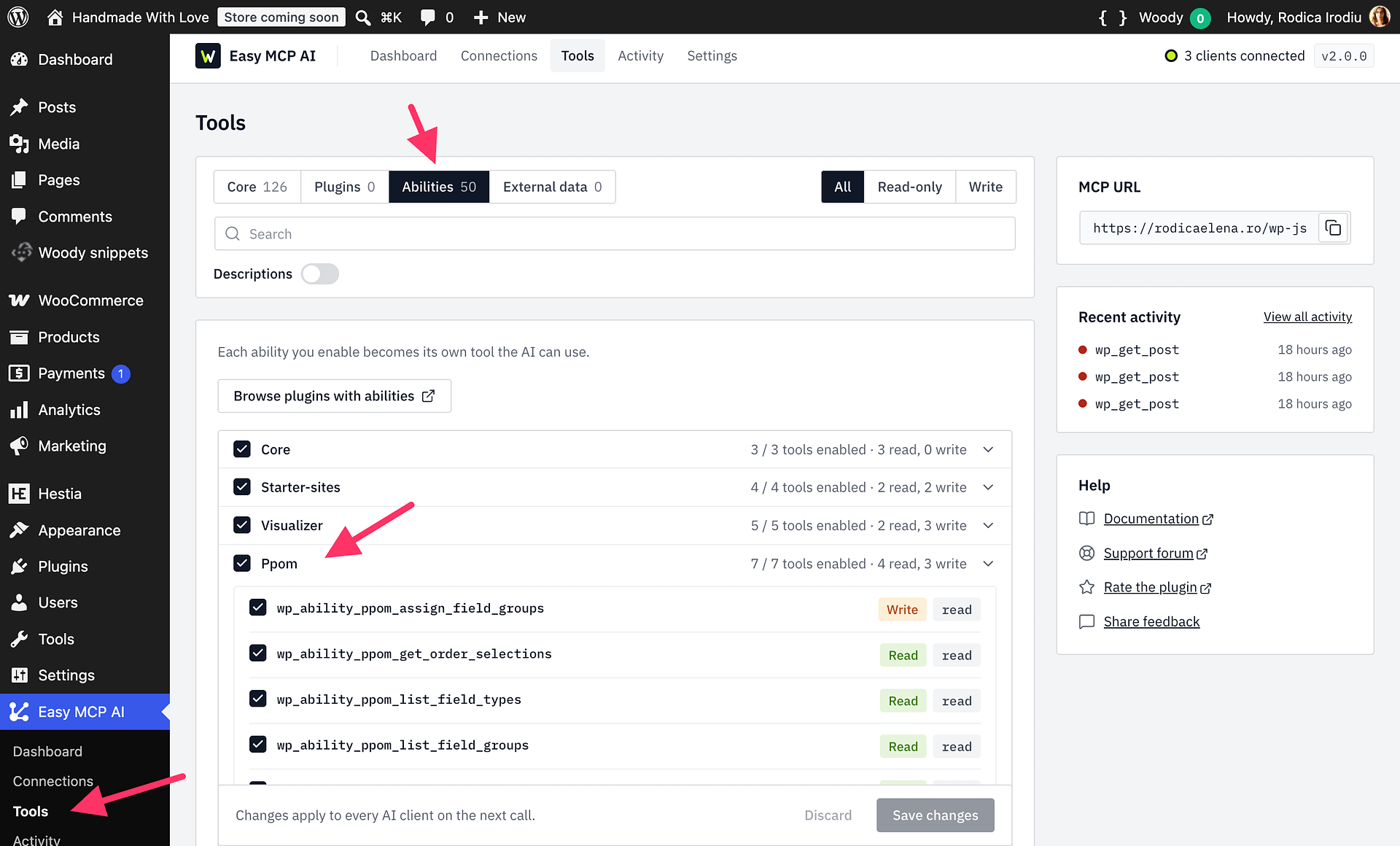
- Open Easy MCP AI > Tools, then select Abilities.
- In the PPOM group, enable all seven abilities:
ppom/list-field-typesppom/list-field-groupsppom/get-field-groupppom/upsert-field-groupppom/assign-field-groupsppom/get-order-selectionsppom/delete-field-group
- Click Save changes. The enabled abilities become available to connected clients, subject to each user's permissions.
Available abilities
| Ability | Purpose and important inputs | Required permission | Access |
|---|---|---|---|
ppom/list-field-types | Lists available field types. You can request the settings schema for a field type to see which options it accepts. | Permission to manage PPOM field groups. | Read-only |
ppom/list-field-groups | Lists field groups. Use the optional title search and pagination inputs to narrow the results. | Permission to manage PPOM field groups. | Read-only |
ppom/get-field-group | Reads one field group, including its fields, option prices, and conditional logic. Provide the field-group ID. | Permission to manage PPOM field groups. | Read-only |
ppom/upsert-field-group | Creates a field group or updates an existing one. Provide the group details and fields. For an update, the submitted fields replace the fields already stored in that group. Set dry_run to true to validate the changes without saving them. | Permission to manage PPOM field groups. | Writes when saved; dry_run validates without saving |
ppom/assign-field-groups | Reads the field groups assigned directly to a product, or replaces those assignments when you provide the product and group_ids. An empty group_ids list detaches all directly assigned groups. | Permission to edit the target product. | Read-only when checking assignments; writes when replacing them |
ppom/get-order-selections | Reads PPOM selections from a WooCommerce order. Provide the order ID. The results can include values entered by the customer and uploaded filenames. | Permission to manage WooCommerce. | Read-only; returns customer-submitted data |
ppom/delete-field-group | Permanently deletes the field group identified by its ID and removes that group from its product assignments. | Permission to manage PPOM field groups. | Destructive; deletion cannot be undone |
Recommended workflow
- Use
ppom/list-field-typesto discover the available field types and, when needed, the settings schema for a type. - Use
ppom/list-field-groupsto find existing groups, thenppom/get-field-groupto review a group before changing it. - Send the proposed changes to
ppom/upsert-field-groupwithdry_runset totrue. Review the validation result before saving. - When the proposed fields and settings are correct, submit the upsert without
dry_runto save the group. Updating a group replaces its submitted fields, so include every field you want the group to contain. - Use
ppom/assign-field-groupsto attach the saved group to a product. Check the current assignments first if you want to preserve other groups.
Permissions and customer privacy
Each ability checks the connected WordPress user's permissions. PPOM field type and field-group abilities require permission to manage PPOM field groups, order selections require permission to manage WooCommerce, and product assignments require permission to edit the target product. Connecting an AI assistant or enabling an ability does not bypass these checks.
ppom/get-order-selections can return customer-entered values and the filenames of uploaded files. Enable this ability only for trusted users and AI connections that should have access to this information.
Deleting a field group is permanent. ppom/delete-field-group removes the group and its product assignments. Confirm that the group is no longer needed before asking an AI assistant to delete it.