
PPOM API Documentation
The PPOM REST API lets you programmatically retrieve and manage product fields and order metadata.
In this article
Enable the REST API
Go to WooCommerce > Settings > PPOM Settings > Integrations and enable PPOM REST API.
The Integrations tab shows the REST API Base URL for your store, a masked Secret Key field, copy buttons for the URL and key, and an Available Endpoints panel. Use the displayed base URL as the prefix for the operations listed below.
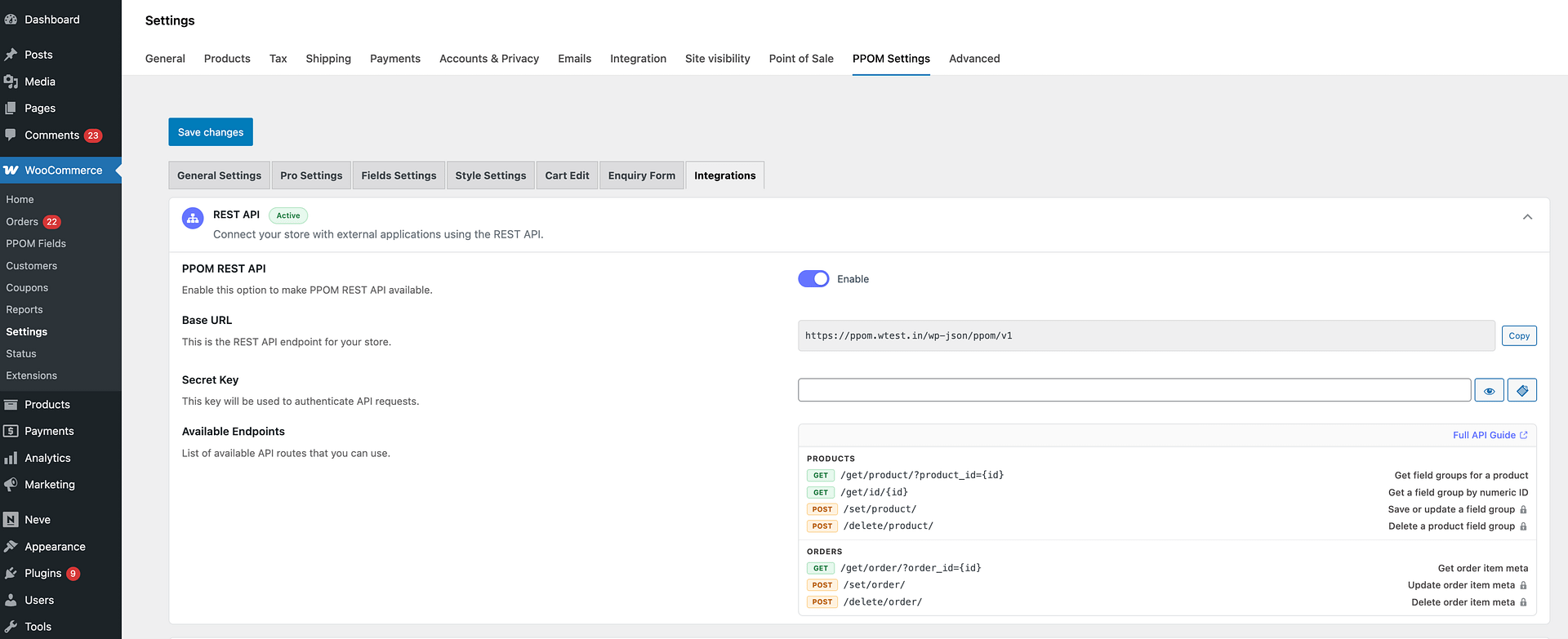
Endpoint
Base URL: siteurl/wp-json/ppom/v1
Operation paths are appended to the base URL. For example, the product fields endpoint becomes siteurl/wp-json/ppom/v1/get/product/?product_id=238&secret_key=11122.
⚠️ Important: POST operations that create, update, or delete data require the configured Secret Key. Keep this key private and share it only with trusted integrations.
Products - Operations
1 - Get all PPOM fields attached with product
| 1.1 Operation | get/product/?product_id=238&secret_key=11122 | ||
| 1.2 Method | GET | ||
| 1.3 Parameters | Key | Type | Detail |
| product_id | integer | mandatory | |
| secret_key | string | not required (this GET endpoint is public) |
2 - Set/Update PPOM Fields
If requested fields are exists, it will update otherwise add them to product. If no PPOM meta is attached to product then it will create a new meta group with same name as of Product title in WooCommerce and add these fields.
| 2.1 Operation | set/product/ | ||
| 2.2 Method | POST | ||
| 2.3 Parameters | Key | Type | Detail |
| product_id | integer | mandatory | |
| secret_key | string | mandatory | |
| fields | Array (see section 3.0) (json_encode) | mandatory |
3 - Delete Fields
| 3.1 Operation | delete/product/ | ||
| 3.2 Method | POST | ||
| 3.3 Parameters | Key | Type | Detail |
| product_id | integer | mandatory | |
| secret_key | string | mandatory | |
| fields | Array (only data_name) | mandatory |
Order - Operations
1 - Get all meta data information attached with Order
| 1.1 Operation | get/order/?order_id=2141&secret_key=11122 | ||
| 1.2 Method | GET | ||
| 1.3 Parameters | Key | Type | Detail |
| order_id | integer | mandatory | |
| secret_key | string | not required (this GET endpoint is public) |
2 - Set/Update Meta/Fields against order
If requested fields are exists, it will update otherwise add them to order.
Return: All meta fields attached to order
| 2.1 Operation | set/order/ | ||
| 2.2 Method | POST | ||
| 2.3 Parameters | Key | Type | Detail |
| order_id | integer | mandatory | |
| secret_key | string | mandatory | |
| fields | Array (see section 2.4)(json_encode) Example: {product_id:{ppom_field_1:new_value_1, ppom_field_2:new_value_2}} | mandatory |
3 - Delete Meta/Fields in Order
Return: All meta fields attached to order
| 3.1 Operation | delete/order/ | ||
| 3.2 Method | POST | ||
| 3.3 Parameters | Key | Type | Detail |
| order_id | integer | mandatory | |
| secret_key | string | mandatory | |
| fields | Array (see section 2.4) (json_encode) | mandatory |
3 - Field Types Table
| Field | type | data_name | title | description | required | options |
| Text | text | unique | ANY | ANY | true:1,false: 0 | N/A |
| unique | ANY | ANY | true:1,false: 0 | N/A | ||
| Date | date | unique | ANY | ANY | true:1,false: 0 | N/A |
| Number | number | unique | ANY | ANY | true:1,false: 0 | N/A |
| Textarea | textarea | unique | ANY | ANY | true:1,false: 0 | N/A |
| Date Range | daterange | unique | ANY | ANY | true:1,false: 0 | N/A |
| Timezone | timezone | unique | ANY | ANY | true:1,false: 0 | N/A |
| Color Picker | color | unique | ANY | ANY | true:1,false: 0 | N/A |
| Select | select | unique | ANY | ANY | true:1,false: 0 | See section 3.1 |
| Radio | radio | unique | ANY | ANY | true:1,false: 0 | See section 3.1 |
| Checkbox | checkbox | unique | ANY | ANY | true:1,false: 0 | See section 3.1 |
3.1 - Options
Options is an array with following keys:
'options' => array(
 array('option'=>"Basic",'price'=>''),
 array('option'=>"Student",'price'=>'5.20'),
 array('option'=>"Super",'price'=>'5%'),
Meta - Operations
1 - Get a PPOM meta group by ID
Retrieves a PPOM meta group by its group ID.
| 1.1 Operation | get/id/ | ||
| 1.2 Method | GET | ||
| 1.3 Parameters | Key | Type | Detail |
| id | integer | mandatory (part of the URL path) |