
Automating Featured Images with Image Generation Schedule
Learn how to set up automated, scheduled featured image generation that runs in the background. Perfect for hands-off operation and large sites.
In this article
Overview
CRON automation allows featured images to be generated in the background without manual intervention. Ideal for:
✓ Large sites with frequent content updates ✓ Multiple authors/contributors ✓ Automated content imports ✓ Hands-off maintenance ✓ Distributed processing over time
Understanding the feature
How Scheduling Works
Auto Featured Image processes scheduled generation using Action Scheduler, a queue-based background processing library (the same one WooCommerce uses).
- Posts are added to a queue and processed in batches in the background
- Processing does not require you to keep a browser tab open
- Suitable for sites of any size, including large content libraries
Setting Up Scheduled Generation
Step 1: Enable in Plugin Settings
Go to **Auto Featured Image > Settings > General tab > Add featured image on a schedule
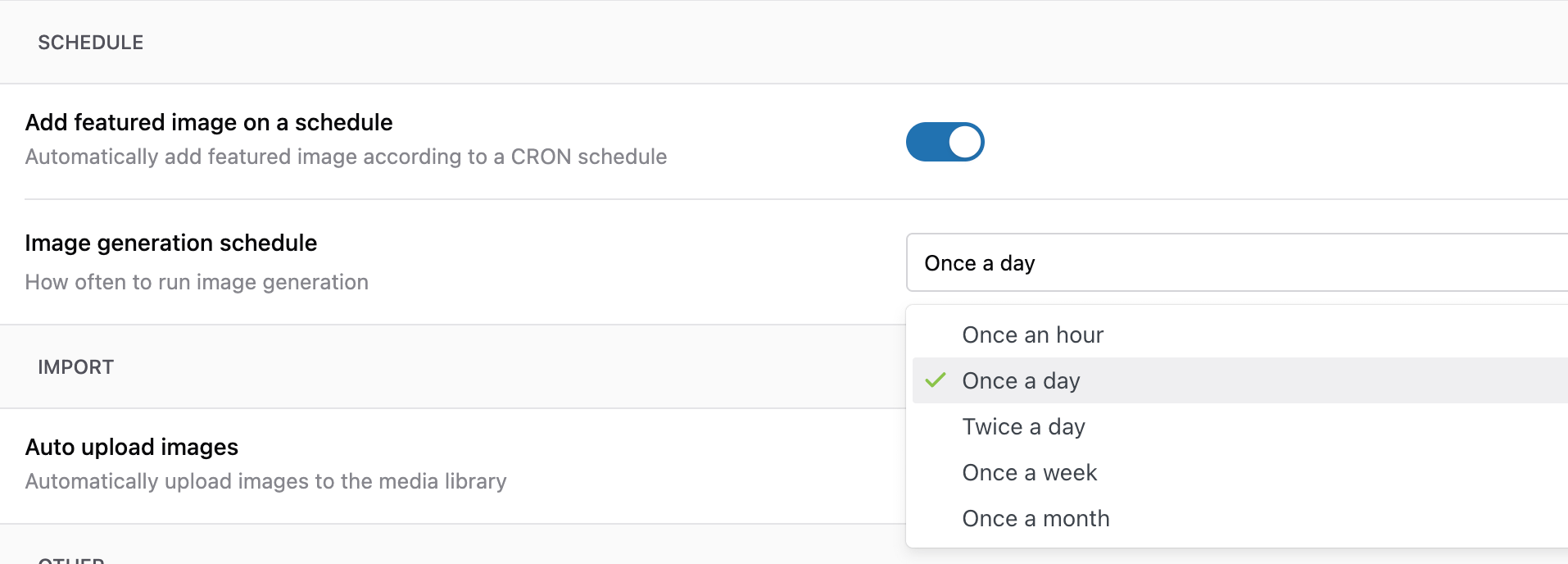
Step 2: Set Image generation Schedule
Select a option from the dropdown i.e Once a day
How It Works
Post is queued for processing
→ Action Scheduler picks up queued tasks in batches
→ AFI generates featured images in the background
→ Progress is recorded in the plugin logs
→ Remaining posts wait in the queue for the next batch
Advantages: ✓ Easy setup (no server access required) ✓ Runs in the background without manual intervention ✓ Works on shared hosting ✓ Processes large numbers of posts in batches
Considerations: ✗ Queued tasks may process slowly on very low-traffic sites ✗ May add background load while generation is running
Related Articles
- Bulk Generation: Processing Existing Posts
- Settings Explained: Complete Reference
- Working with Custom Post Types
Additional Resources
- WP-Cron Documentation
- Crontab Guru - CRON schedule tester
- WP Crontrol Plugin