
Getting Started with Titan Anti-Spam & Security
Titan Anti-Spam & Security is a complete protection solution designed to secure your website against spam, login attacks, and unauthorized access.
In this article
What is Titan Anti-Spam & Security?
Titan Anti-Spam & Security combines anti-spam and account security tools into a single WordPress plugin to keep your site safe. It blocks spam comments, helps protect against login attacks, and hardens your WordPress installation against common vulnerabilities.
The plugin works automatically in the background while you focus on running your website. It doesn't require coding knowledge and is designed specifically for WordPress users of all technical levels.
Key Features
Anti-Spam & Anti-Bot Protection
Stop spam comments before they reach your site. The plugin uses advanced algorithms to identify and block malicious comment traffic automatically.
Security Tweaks & Hardening
Access built-in hardening features that automatically secure common WordPress vulnerabilities. These include protecting your wp-config.php file, disabling file editing, and more.
Two Factor Authentication
Add an extra layer of login security by requiring a time-based code from an authenticator app in addition to your password. This protects your site even if passwords are compromised. This is a Pro feature.
Backup
Create and manage full backups of your WordPress site including the database, files, and uploads. Easily restore your site to a previous state if anything goes wrong. This is a Pro feature.
How to Install Titan Anti-Spam & Security
You can install the plugin in two ways:
Method 1: Install from WordPress.org
- Log in to your WordPress dashboard
- Navigate to Plugins > Add New
- Search for "Titan Anti-Spam & Security"
- Click the Install Now button on the official plugin
- Click Activate once installation completes
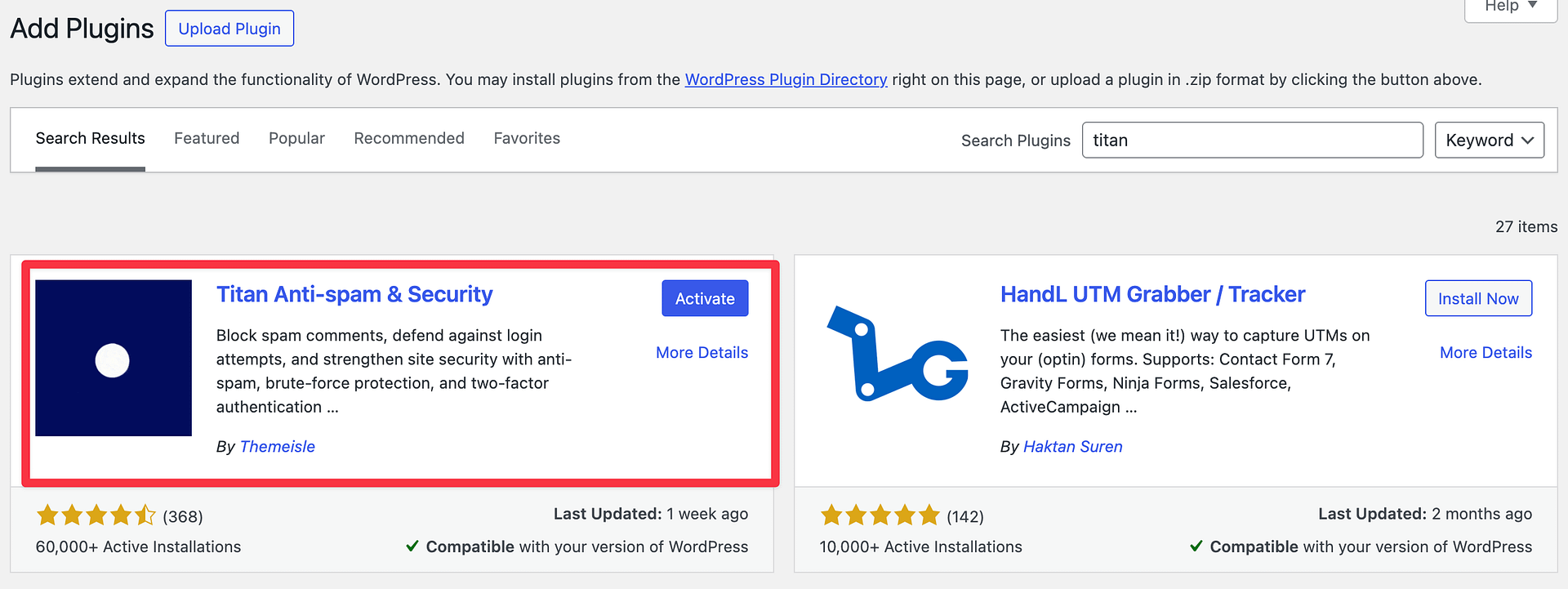
Method 2: Upload ZIP File
- Download the Titan Anti-Spam & Security plugin ZIP file from here - https://wordpress.org/plugins/anti-spam/
- Go to Plugins > Add New in your WordPress dashboard
- Click Upload Plugin
- Select the ZIP file from your computer
- Click Install Now and then Activate
Make sure you're downloading the plugin from the official WordPress.org plugin directory or from the official Titan Anti-Spam website to ensure you get the legitimate, secure version.
Install Titan Pro
Titan Pro is an add-on that runs on top of the free plugin. It is not a standalone replacement for it, so install and activate the free Titan Anti-Spam & Security plugin using one of the methods above before you install Titan Pro.
- Download the Titan Pro ZIP file from your account on the Themeisle store
- Go to Plugins > Add New in your WordPress dashboard
- Click Upload Plugin
- Select the ZIP file from your computer
- Click Install Now and then Activate
Keep both plugins active. If you activate Titan Pro while the free plugin is missing or inactive, Titan Pro stops loading and WordPress displays a notice asking you to install and activate the free plugin. The Pro features become available again as soon as the free plugin is active.
⚠️ Important: Update both plugins together. If the free plugin is older than the version Titan Pro requires, Titan Pro deactivates itself and displays a notice asking you to update the free plugin.
Once both plugins are active, add your license key to unlock the Pro features. See Advanced Settings for license management.
Activating and Accessing the Plugin
Once activated, you'll see a new Titan Security menu item in your WordPress dashboard sidebar on the left. Click on it to access the plugin's main dashboard and settings.
The plugin begins protecting your site immediately upon activation with default protection settings. All your security data and logs are available in the plugin dashboard.
Initial Setup Recommendations
After installing Titan Anti-Spam & Security, we recommend:
- Review Anti-Spam Settings: Ensure spam protection is enabled for comments on your site
- Apply Recommended Tweaks: Review the security hardening suggestions in the Tweaks section and apply the ones appropriate for your site
- Enable Two Factor Authentication: Set up 2FA for all administrator accounts to protect against unauthorized logins. Two-factor authentication is a Pro feature.
- Create a Backup: Make an initial backup of your site so you have a restore point
Free vs Pro Version
Titan Anti-Spam & Security offers a free plugin and a Pro add-on that extends it. The Pro add-on is installed alongside the free plugin, and both need to stay active:
Free Version includes:
- Basic anti-spam protection
- Security hardening tools
- Activity monitoring
Pro Version adds:
- Machine Learning spam detection
- Two factor authentication
- Scheduled automatic backups & external storage
- Advanced account security
- Priority support
- Scan existing comments & users for spam
You can start with the free plugin and add Pro anytime as your security needs grow. Both the free plugin on its own and the free plugin with the Pro add-on provide strong protection for WordPress websites.
Next Steps
Now that you've installed and activated Titan Anti-Spam & Security, explore the plugin dashboard to familiarize yourself with available features and settings. Check the other documentation pages to learn about specific features and how to configure them for your website's unique needs.