
Using AI Assistants with Woody Code Snippets
You can connect an AI assistant to inspect your Woody snippets. If you explicitly allow write access, it can also create or update snippets and change their activation state.
In this article
Before You Start
Install an AI connector that exposes WordPress abilities (actions a plugin makes available to connected assistants). For example, follow the Easy MCP AI getting started guide to connect your assistant to your WordPress site.
The connected WordPress user must have administrator-level permission to manage Woody snippets and permission to edit the snippet post type. Creating a snippet also requires permission to create snippets; reading the code of, updating, or activating an existing snippet requires permission to edit that particular snippet. Connecting an assistant does not bypass the permissions used by Woody's snippet editor.
Enable Woody Abilities in Easy MCP AI
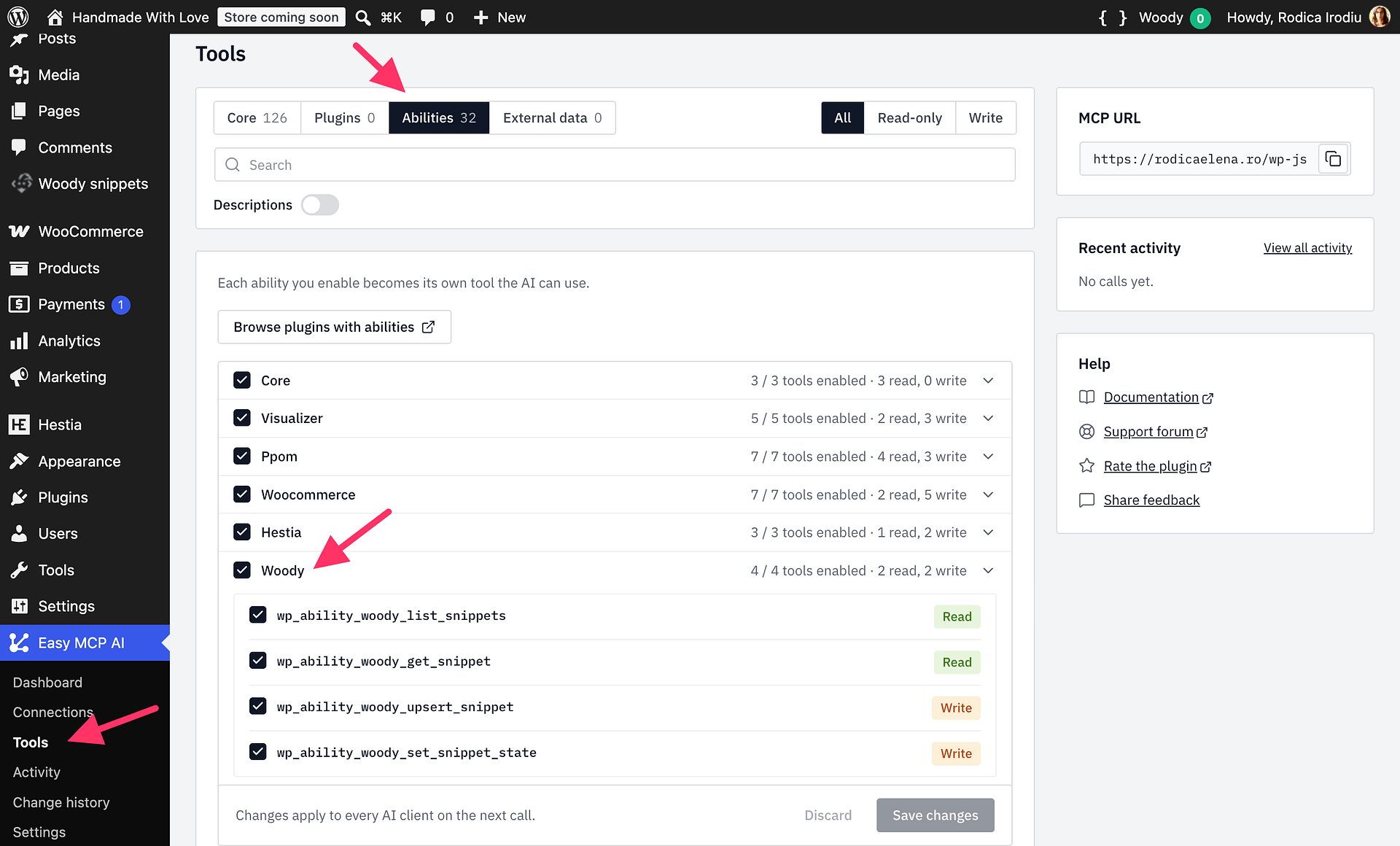
- In Easy MCP AI, go to Easy MCP AI > Tools > Abilities.
- Find and expand the Woody category.
- Turn on the read abilities if you want your assistant to inspect snippets.
- Turn on either write ability only when you want the assistant to change or activate snippets, then click Save changes in Easy MCP AI.
| Ability | What it does | AI Connect enable flow |
|---|---|---|
woody/list-snippets | Finds snippets and returns their type, scope, insertion location, status, and activation state without returning code. | Included |
woody/get-snippet | Reads one snippet, including its code and display conditions. | Included |
woody/upsert-snippet | Creates an inactive snippet or updates supported code and execution settings. | Disabled until explicitly enabled |
woody/set-snippet-state | Activates or deactivates a snippet. | Disabled until explicitly enabled |
Here, “settings” means a snippet's execution settings, such as Snippet Scope, Location, display conditions, description, and activation state. These abilities do not change Woody's global plugin settings.
Safety Behavior
- New snippets created through the AI ability start inactive.
- Saving new or changed PHP and Universal code through
woody/upsert-snippetnever runs it. Woody checks its syntax and, for inactive snippets, checks for top-level declarations whose names are already in use. Adry_runperforms the same checks without saving. A successful check does not guarantee that code is safe. - Changing the code or scope of an active PHP or Universal snippet saves it inactive. Activate it again separately with
woody/set-snippet-stateafter reviewing the change. - Activating an automatically running PHP or Universal snippet runs its code once with output discarded. Activation is refused if the code raises an error or warning or returns
false. - CSS and JavaScript snippet code cannot be written through the AI ability; save those changes in Woody's snippet editor instead.
- Premium display-condition parameters can only be saved when Woody Code Snippets Premium is installed.
Activating a PHP or Universal snippet can execute code that affects your site. Review proposed code before activation, and leave write abilities disabled when you do not need them.
Example Prompts
- “Which active Woody snippets run PHP on every page?”
- “Find the snippet that loads
gtagand tell me where it is inserted.” - “Show me the code of my header scripts snippet and explain it without changing anything.”
- “Check this PHP change with a dry run, but do not save or activate it.”