
Use Hyve Skills for WooCommerce product and order answers
Skills let Hyve Pro look things up on your site while a conversation is happening, instead of answering only from the Knowledge Base. With WooCommerce active, Hyve can search your live catalog and tell a signed-in customer the status of their own orders.
⚠️ Important: Skills is an experimental feature. Hyve's own skills are built for visitor chat, but abilities registered by other plugins are usually designed for admin and AI tooling, so they may not return anything useful to your visitors. Test in the chat before relying on them.
In this article
What you need
- Hyve Pro, active with a valid license. In the free plugin the Skills panel is a locked preview.
- A WordPress version that includes the Abilities API. Skills is built on it, so on older versions the panel shows a Skills need a newer WordPress notice and nothing can be enabled.
- WooCommerce, installed and active. The WooCommerce lookups only exist while WooCommerce is running.
- An AI provider connected, either your own OpenAI API key or Hyve Connect. Until Hyve has one, the Skills entry in the settings sidebar stays inactive.
Turn Skills on
- In your WordPress dashboard, go to Hyve > Settings.
- In the settings sidebar, under Integrations, select Skills.
- Turn on Enable Skills.
- Click Save changes.
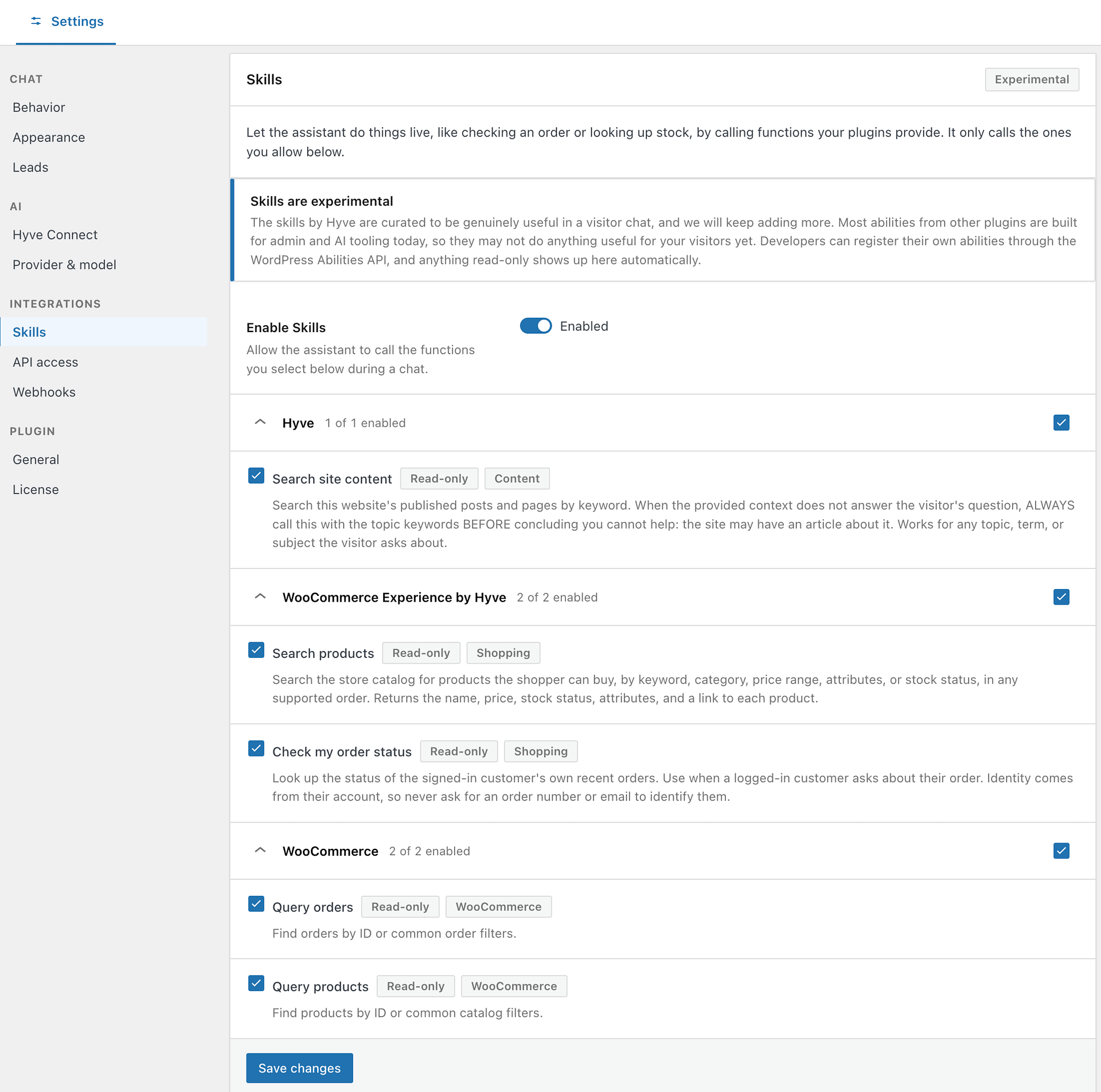
⚠️ Pay attention: Both WooCommerce lookups that Hyve provides are already allowed the moment you enable Skills. You do not have to select them, and enabling Skills is enough to make them available to visitors in chat. If you do not want one of them, clear its checkbox and save.
Choose which skills are available
Once Skills is on, the panel lists eligible read-only abilities from your active plugins that can be used in visitor chat, grouped by the plugin that registered them. Select a whole group with the checkbox next to its name, or expand the group and select individual rows. Nothing in this panel can change or delete data. Hyve administration abilities in the hyve-admin category are excluded, even when they are read-only. They are for authenticated AI-assistant administration, not visitor chat, and cannot be enabled for visitors through this panel.
Two groups matter for a WooCommerce store:
- WooCommerce Experience by Hyve contains the two lookups described below. Hyve writes and maintains these specifically for visitor chat, and both are allowed by default.
- WooCommerce contains abilities that WooCommerce itself registers. These require shop-manager permissions, so they return nothing for a visitor in a chat. Leave them switched off.
You may also see a Hyve group with Search site content, which lets the assistant search your published posts and pages when the Knowledge Base has no answer. Unlike the WooCommerce lookups, it is off until you select it.
📝 Note: If the panel says No skills available yet, none of your active plugins expose abilities the assistant can call. Confirm WooCommerce is active and that your WordPress version includes the Abilities API.
What Hyve can look up
Products
Hyve can search your catalog by keyword, product category, price range, product attributes such as colour or size, and stock status (in stock, out of stock, or on backorder). It can order the results by cheapest first, most expensive first, newest, best selling, top rated, or name from A to Z, and returns up to ten products in a single answer.
For each product the visitor sees the name, price, product image, a short description, and a link to the product page. Hyve can then answer follow-up questions about those same products, such as their price, stock, or attributes, without listing them again.
Only products that are published and visible in your storefront are returned. Drafts, private products, and products hidden from the catalog are never included.
Orders
Check my order status works only for a visitor who is signed in to your site, and returns only that customer's own orders, up to their ten most recent. Each result shows the order number, the items, the order status, the order date, the total, and a link to view the order.
The customer's identity comes from their WordPress session, never from the conversation, so Hyve does not ask for an order number or an email address to identify them. A visitor who is not signed in gets nothing from this lookup.
⚠️ Important: This lookup exposes order details in chat to whoever is signed in to the customer's account. If you would rather handle order enquiries through support only, clear Check my order status in the WooCommerce Experience by Hyve group and save.
What Hyve will not do in chat
- Add products to the cart, place an order, or take payment. When a visitor asks for any of these, Hyve says so and shares the product link instead.
- Change, cancel, or refund an order.
- Show products that are not published or that are hidden from your storefront.
- Look up another customer's orders.
- Write, edit, or delete anything. Only eligible read-only abilities are offered in the Skills panel.
Check that it works
- Open your site in a new tab and start a chat.
- Ask a product question, such as a request for items in a category under a certain price. Hyve should reply with product cards showing prices and links.
- Sign in as a customer with a past order and ask about the order status. Hyve should return that customer's recent orders.
Troubleshooting
The Skills entry in the settings sidebar is inactive. Hyve has no AI provider yet. Connect an OpenAI API key or Hyve Connect first.
The panel says Skills need a newer WordPress. Update WordPress to a version that includes the Abilities API, then reload the page.
Hyve does not mention products that should match. Confirm the products are published and visible in the catalog rather than hidden, and check that the price range and attributes in the question really match them.
Hyve says none of the products exactly match. The attribute the visitor asked for is worded differently from the attribute on your products, for example a size stored as L against a request for "large". Hyve offers the closest products it found rather than claiming nothing exists. Align your attribute values with the wording your customers use.
Hyve says a category does not exist. The category name in the question does not match any of your product categories, and searching for it as a keyword found nothing either. Hyve says so rather than falling back to your whole catalog.