
Managing WP Landing Kit Domains with AI Assistants
Connect a compatible AI client to WordPress to inspect, create, update, and test WP Landing Kit mapped domains through the WordPress Abilities API. WordPress 6.9 or later is required.
In this article
Requirements
- WP Landing Kit must be installed and active.
- WordPress 6.9 or later. On older WordPress versions, WP Landing Kit does not register these abilities.
- An AI connection that supports the WordPress Abilities API.
- A connected WordPress user with permission to perform the requested domain operation.
The abilities register automatically when the WordPress Abilities API is available. Your AI connection must also be connected to the site and allowed to use the abilities.
Connect your AI client and enable WP Landing Kit's abilities
- In your WordPress dashboard, open Easy MCP AI > Dashboard. In the Connect your AI client area, choose your AI client and follow the on-screen steps to connect it to your site. If you use another compatible connector, follow its connection instructions.
- Open Easy MCP AI > Tools, then select Abilities.
- All abilities are off by default. In the Landing Kit group, enable all abilities.
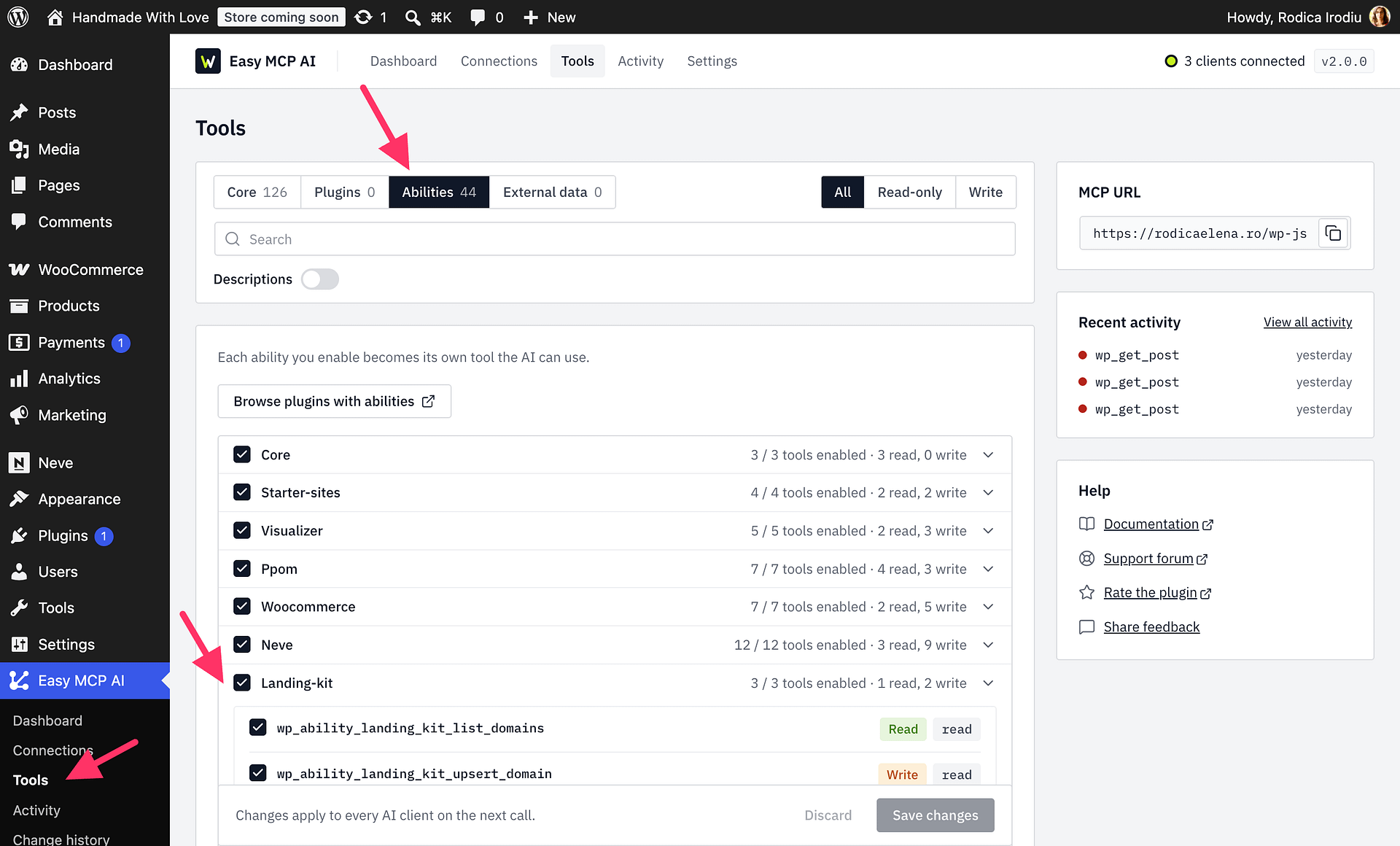
Available abilities
| Ability | What it does |
|---|---|
landing-kit/list-domains | Lists mapped domains, their mappings, active state, and last known connection state. Optionally filter by domain ID or mapped post ID. Results start on page 1 by default and contain up to 50 domains per page. |
landing-kit/upsert-domain | Creates a domain or updates an existing domain's host, mappings, and active state. Supply a domain ID to update an existing domain; omit it to create one. Each call accepts up to 50 mappings. New domains are inactive by default, and a domain needs a root mapping before it can be activated. Set dry_run to true to validate a proposed change without saving it. |
landing-kit/check-domain-connection | Checks the mapped domain identified by its domain ID over HTTP and HTTPS, reports whether it reaches this WordPress site, and saves the resulting connection state. |
The write ability changes properties of an individual mapped domain; it does not change arbitrary WP Landing Kit global settings. Mapping targets must be published content of a post type allowed by Mappable Post Types under WP Landing Kit > Settings. Only Pages are enabled there by default.
These abilities do not configure DNS records or issue or manage SSL certificates. Configure DNS and certificates separately with your domain provider and hosting provider.
Example prompts
After connecting your AI client, ask it to:
- List my mapped domains and show which ones are inactive.
- Prepare a dry run to map
example.comto post ID 123. Do not activate the domain or save any changes. - Check whether domain ID 45 is reaching this site.
- Show me the proposed changes to pause domain ID 45, but do not save them yet.
For any write operation, review the proposed host, mappings, and active state before asking the AI client to apply it. Explicitly request a dry run when you want to review a change without saving it.
Permissions and privacy
The AI client acts with the connected WordPress user's permissions. WP Landing Kit checks the user's permissions to create or edit domains, publish a domain for activation, and access each domain. Connecting an AI client does not bypass those checks.