Web Search Feature
GPT-5's web search feature allows FreshRank to verify facts in real-time during content analysis. This guide explains what web search does, when to use it, and how to enable it.
Pro Feature: Web search feature for real-time fact verification requires FreshRank Pro.
In this article
What is Web Search?
Web search is an optional feature available exclusively with OpenAI's GPT-5 models. When enabled, the AI can access current information from the internet while analyzing your content.
What Web Search Does
When analyzing your blog post, GPT-5 with web search can:
- Verify statistics and data against current sources
- Check if information is outdated by comparing with recent publications
- Validate facts and claims in real-time
- Identify broken or obsolete references to tools, products, or services
- Find more recent alternatives to outdated recommendations
What Web Search Doesn't Do
Web search is only used during analysis - it does NOT:
- Generate new content for your drafts
- Replace the information in your posts automatically
- Search while creating draft updates
- Work with models other than GPT-5
💡 Important: Web search extends analysis time but provides more accurate identification of outdated information.
When to Use Web Search
Enable Web Search For:
Time-Sensitive Content:
- News articles and current events
- Technology reviews and comparisons
- Market analysis and trends
- Legislative or regulatory updates
- Statistical reports and data-driven content
Fact-Heavy Content:
- Research-based articles with citations
- Product comparisons with pricing
- Technical tutorials referencing specific versions
- Industry reports with numerical data
- Historical articles that need fact-checking
Evergreen Content Updates:
- Older posts (1+ years) that need freshness checks
- Articles with statistics from previous years
- Content mentioning tools or services that may have changed
- Posts with external links that might be broken
Skip Web Search For:
Opinion & Creative Content:
- Personal essays and stories
- Creative writing and fiction
- Opinion pieces and commentary
- How-to guides based on personal experience
Recently Published Content:
- Posts published within the last 30 days
- Content you've already verified manually
- Articles without time-sensitive information
Simple Updates:
- Grammar and clarity improvements only
- Structural reorganization
- Style and tone adjustments
- Content that doesn't rely on external facts
💡 Cost Tip: Web search uses more tokens and takes longer. Only enable it when you genuinely need real-time fact verification.
How to Enable Web Search
Requirements
Before you can use web search, make sure:
- You're using OpenAI as your AI provider (not OpenRouter)
- You've selected a GPT-5 model (GPT-5, GPT-5 Mini, GPT-5 Nano, or GPT-5 Pro)
- Your OpenAI API key is configured and working
Step-by-Step Setup
- Open FreshRank Settings
- In your WordPress admin panel, go to FreshRank AI → Settings
- You'll land on the Settings tab by default
- Locate the AI Configuration Card
- On the Settings page, find the AI Configuration card (first card on the left)
- Verify Your Model Selection
- Make sure OpenAI is selected as your provider
- Choose a GPT-5 model from the Analysis Model dropdown:
- GPT-5 (recommended)
- GPT-5 Mini
- GPT-5 Nano
- GPT-5 Pro
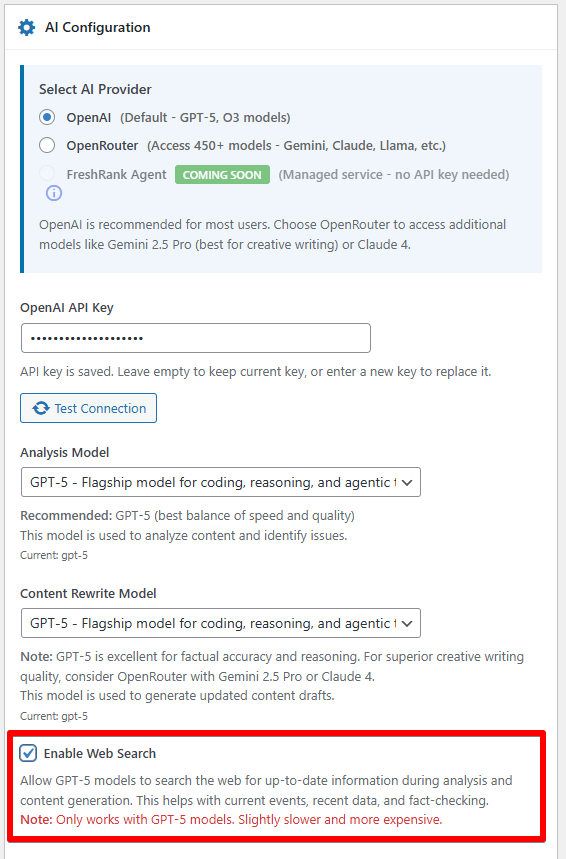
- Enable Web Search
- Look for the "Enable Web Search" checkbox below the model selection
- Click the checkbox to turn it ON
- Save Your Settings
- Click the "Save Changes" button at the bottom of the page
- You'll see a confirmation message when settings are saved
That's it! Web search is now enabled for all future analyses.
Understanding the Impact on Analysis
Analysis Time
Without Web Search:
- Typical: 30 seconds - 3 minutes
- Depends on: Content length, model selected
With Web Search:
- Typical: 2-15 minutes
- Depends on: Content length, number of facts to verify, web search depth
Analysis Quality
Without Web Search:
- Identifies issues based on the AI model's training data
- May miss very recent changes or updates
- Still highly accurate for most content
With Web Search:
- Identifies issues with real-time verification
- Catches outdated information that the AI's training data does not reflect
- More confident in "Factual Updates" category
- Better at finding current alternatives to discontinued tools
Token Usage & Cost
Without Web Search:
- Standard token usage
- Predictable costs
With Web Search:
- Uses 2-4x more tokens (for search queries and results)
- Analysis costs more per post
- Exact cost depends on how much verification is needed
💡 Cost Example: A standard analysis might use 5,000 tokens. The same analysis with web search might use 15,000-20,000 tokens.
📚 Learn more: Token usage directly affects how much you'll spend on AI-assisted content updates. Our guide on token usage explains what tokens are, what influences token consumption, and how to understand the costs involved.
When Web Search Makes the Biggest Difference
Web search has the highest impact on these categories in your analysis:
1. Factual Updates ( Maximum Impact)
- Outdated statistics → Verified with current data
- Discontinued products → Confirmed current status
- Changed pricing → Updated with actual prices
- Obsolete technology → Identified with current alternatives
2. Search Optimization ( Moderate Impact)
- Validates that recommended practices are still current
- Confirms technical specifications are accurate
3. User Experience ( Low Impact)
- May identify if linked resources no longer exist
- Generally doesn't affect UX recommendations much
4. AI Visibility ( Low Impact)
- Web search doesn't significantly impact GEO recommendations
5. Opportunities ( Low Impact)
- May suggest current trending topics
- Generally doesn't change opportunity identification
Monitoring Web Search Usage
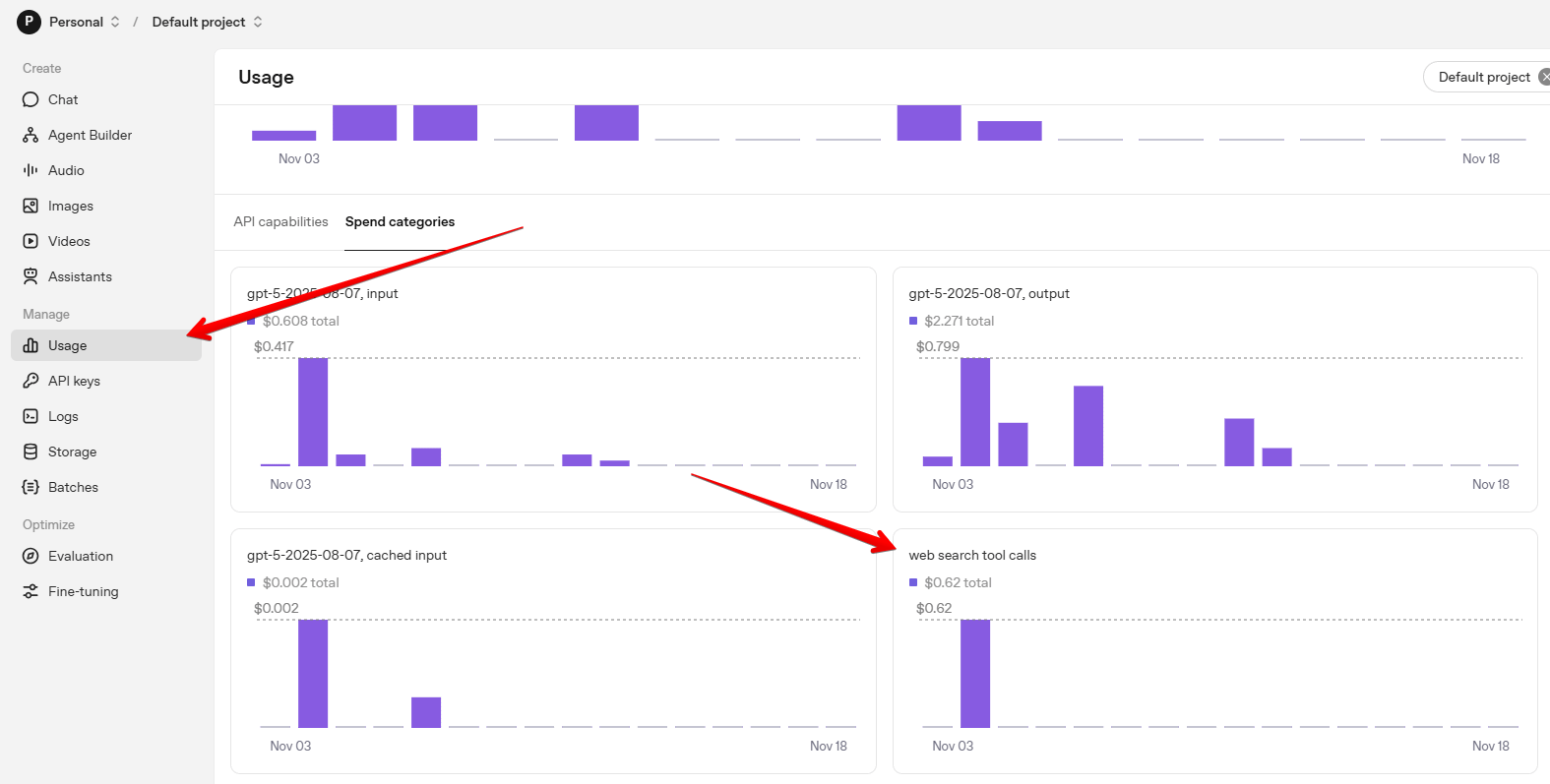
- Visit platform.openai.com/usage
- Click on the Spend categories tab
- Look for the chart titled web search tool calls