
Manage Orbit Fox with AI Assistants
Orbit Fox is compatible with AI assistants that can inspect and configure Orbit Fox through the WordPress Abilities API, which lets connected software discover and use specific site capabilities.
In this article
Requirements
Latest version of Orbit Fox and WordPress 6.9 or later. Orbit Fox's abilities are available only when the WordPress Abilities API is available.
You also need a compatible connector, such as Easy MCP AI, and an AI client connected to your WordPress site. For setup instructions, see Getting Started with Easy MCP AI.
Connect your AI client and enable Orbit Fox's abilities
- In your WordPress dashboard, open Easy MCP AI > Dashboard. In the Connect your AI client area, choose your AI client and follow the on-screen steps to connect it to your site. If you use another compatible connector, follow its connection instructions.
- Open Easy MCP AI > Tools, then select Abilities.
- All abilities are off by default. In the Orbit Fox group, enable all abilities:
orbit-fox/list-modulesorbit-fox/configure-module
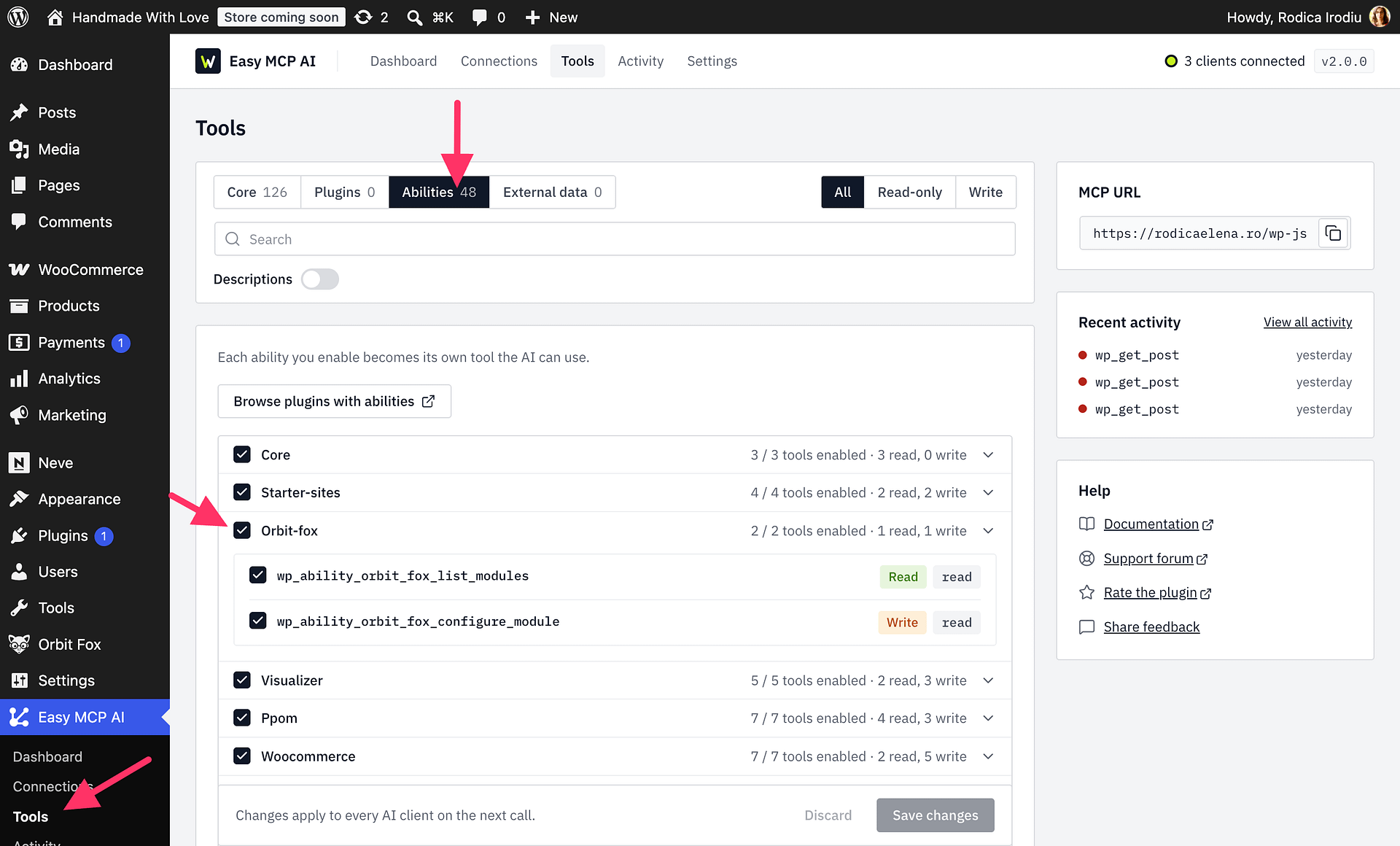
Available abilities
| Ability | What it does | Inputs |
|---|---|---|
orbit-fox/list-modules | Lists modules available on the site, their active state, and the editable settings with their current values and allowed choices. | Optionally provide module_id (a module slug) to inspect only one module. Omit it to list all available modules. |
orbit-fox/configure-module | Activates or deactivates a module and/or changes its editable settings. | Requires module_id and at least one of active (true or false) or settings (an array of {name, value} objects). dry_run is optional and defaults to false. |
For each settings item, use the setting name returned by orbit-fox/list-modules and provide its new value. Toggle and checkbox values use 1 or 0; radio and select values must match one of the returned choices. Use a numeric value for number settings and a hex or RGB(A) value for color settings.
Recommended workflow
- Ask your assistant to call
orbit-fox/list-modules. Review the returned module IDs, active states, setting names, types, current values, and allowed choices. - Ask it to call
orbit-fox/configure-modulewithdry_runset totrueand the changes you want to make. A dry run validates the request and returns the proposed changes without saving them. - Review the dry-run result. If it is correct, ask the assistant to repeat the request with
dry_runset tofalseto save the changes. If you omitdry_run, its default isfalse, so the changes are saved.
Permissions and safeguards
- The connected WordPress user must have the
manage_optionscapability for both abilities. This normally means an Administrator, and connecting an assistant does not grant additional permissions. - Orbit Fox exposes only modules available in the current environment, based on the active theme and plugins. Modules that load automatically cannot be activated or deactivated.
- Only submit editable setting names and allowed values returned by
orbit-fox/list-modules. - A single configure request accepts at most 100 settings.
- If any submitted setting is unknown or invalid, Orbit Fox rejects the entire request and saves nothing.