
How to prevent EXIF data from being removed from optimization
This article explains how to keep EXIF data when optimizing images using the Robin Image Optimizer plugin.
What is EXIF data
EXIF data is metadata embedded in images. It can include camera information, orientation, date, and other technical details. By default, many image optimizers remove EXIF data to reduce file size.
Keep EXIF data during optimization
To prevent EXIF data from being removed:
1. Go to WordPress Dashboard > Robin Image Optimizer > Settings
2. Scroll to the Leave EXIF data option
3. Toggle Leave EXIF data to On
4. Save the settings
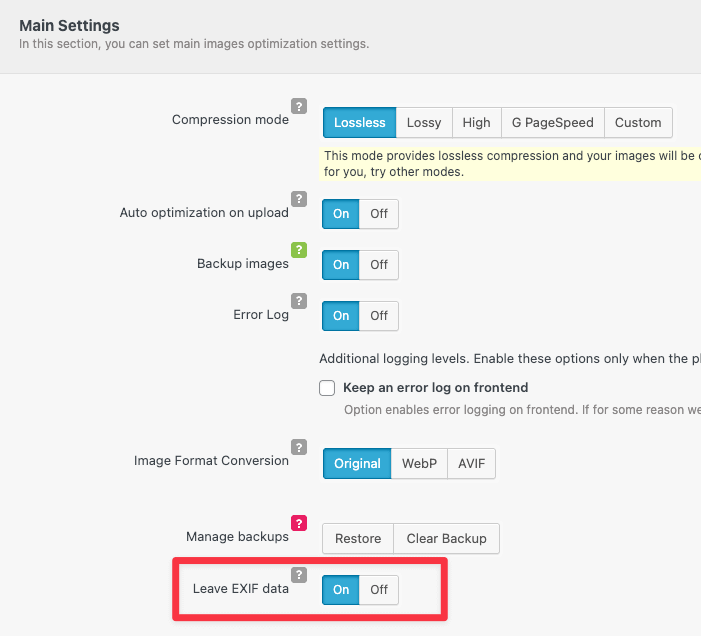
Once enabled, Robin Image Optimizer will preserve EXIF metadata when optimizing images.
Important notes
• Keeping EXIF data slightly increases image file size
• Existing images optimized without EXIF data cannot have metadata restored
• This setting only affects images optimized after the option is enabled
When should you keep EXIF data
You may want to keep EXIF data if:
• Your site relies on image orientation metadata
• You need camera or copyright information preserved
• You use plugins or workflows that read EXIF metadata
Troubleshooting
If EXIF data is still missing:
• Confirm the setting was enabled before optimization
• Reupload the image and optimize again
• Check if another plugin is stripping metadata
This ensures image optimization runs without removing required EXIF information.