
Getting Started with Cyrlitera
Cyrlitera converts Cyrillic and Georgian URLs and file names to Latin characters. This helps keep WordPress permalinks and uploaded media file names readable and compatible across browsers, plugins, and external services.
Cyrlitera requires WordPress 5.6 or newer, is tested up to WordPress 7.0, and requires PHP 7.4 or newer.
In this article
What Cyrlitera Does
Cyrlitera can automatically transliterate new slugs for posts, pages, categories, tags, custom post types, and taxonomies. It can also transliterate attachment file names during upload.
The plugin includes options for custom character mappings, automatic redirects from old URLs to new transliterated URLs, converting existing slugs, preserving original permalinks, and rolling back converted URLs when needed.
Use Cyrlitera with an AI assistant
The AI integration uses the WordPress Abilities API and requires WordPress 6.9 or later.
You also need a compatible connector, such as Easy MCP AI, and an AI client connected to your WordPress site. For setup instructions, see Getting Started with Easy MCP AI.
- In your WordPress dashboard, open Easy MCP AI > Dashboard. In the Connect your AI client area, choose your AI client and follow the on-screen steps to connect it to your site. If you use another compatible connector, follow its connection instructions.
- Open Easy MCP AI > Tools, then select Abilities.
- All abilities are off by default. In the Slugs group, enable all abilities.
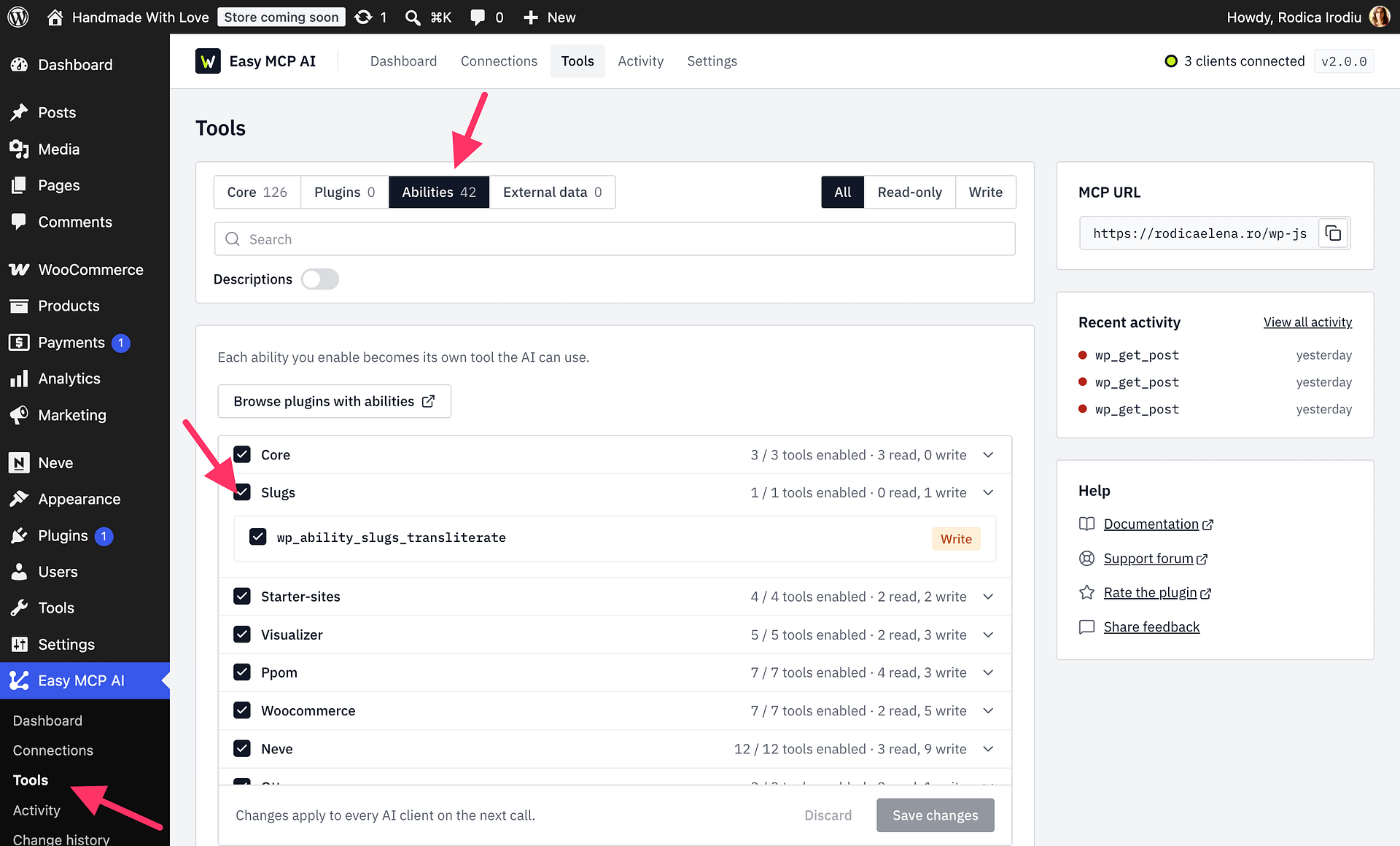
The assistant can transliterate existing post and term slugs. You can scope a request to posts, pages, custom post types, categories, tags, and other taxonomy terms, and narrow it further by post type, taxonomy, post ID, or term ID.
Preview (dry-run) mode is the default, so the assistant shows the proposed Latin slugs and any collisions without changing your site. Ask it to preview the changes first, then review the results before requesting an update. Cyrlitera processes large requests in batches. When you apply the changes, it saves the original slugs for rollback and skips collisions rather than assigning a different slug.
For example, ask: “Preview the slug transliteration for my posts and pages and show me every proposed change.” After reviewing the results, ask the assistant to apply the changes.
Install and Activate Cyrlitera
- Log in to your WordPress dashboard.
- Go to Plugins > Add New.
- Search for Cyrlitera.
- Click Install Now on the Cyrlitera plugin by Themeisle.
- Click Activate.
- Open the Cyrlitera settings page in your dashboard to configure the plugin.
Basic Setup
After activation, review the Cyrlitera settings before converting existing content:
- Enable transliteration for new URLs and uploaded file names if you want Cyrlitera to handle new content automatically.
- Add custom character mappings if any characters need a site-specific Latin replacement.
- Enable redirects if you want old slugs to redirect to the newly transliterated URLs.
- Use the existing slug conversion tool only after confirming the settings match the output you want.
Important Notes
Cyrlitera changes URLs and file names, not the text inside posts or pages. The rollback tool applies only to URLs converted by Cyrlitera and does not roll back file name changes.