
Prioritizing Articles
FreshRank helps you identify which blog posts need attention most by calculating a Priority Score for each article.
Before You Start: Priority scoring requires traffic data from GSC. See our Google Search Console guide if you haven't set this up yet.
Running Prioritization
Once you've connected Google Search Console and configured your settings:
- Go to: FreshRank AI → Dashboard
- Click the "Prioritize" button in the Bulk Actions section at the top
- FreshRank will fetch your traffic data from Google Search Console and calculate scores for all your articles
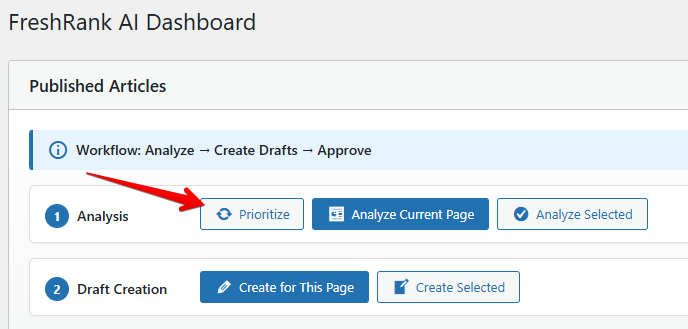
Note: The "Prioritize" button only appears when Google Search Console is connected.
⏰ How long does it take?
The prioritization process time depends on how many articles you have.
As a rough guide:
- 15 articles takes about 2 minutes
- 1,000 articles can take 40 minutes or more
Understanding Your Results
After prioritization completes, you'll see a Priority Score column in your dashboard with scores ranging from 0 to 90 points.
Tip: Sort your dashboard by Priority Score (click the column header) to see your most urgent articles at the top. This helps you focus your efforts on the articles that will give you the biggest SEO impact.
Learn more: See our guide on Understanding Priority Scores for details on how to interpret these numbers and prioritize your content update strategy.
What Happens After Prioritization
Priority scores help you decide which articles to analyze first, but they don't automatically trigger any changes. Your workflow looks like this:
- Prioritize articles (using Google Search Console data)
- Analyze high-priority articles to find specific issues
- Create drafts to fix those issues
- Review and approve changes when you're ready
Important Notes
- GSC data refreshes every 24 hours. Priority scores use cached data, so you won't see real-time changes.
- GSC data has a 2-3 day delay. Google Search Console doesn't provide immediate traffic data, so your scores reflect performance from a few days ago.
- Articles without traffic won't have scores. If an article isn't indexed or gets no search impressions, it may show a score of 0.
- Priority scores aren't affected by approving drafts. When you approve an updated article, its analysis data resets (so you can re-analyze it later), but the priority score stays the same since it comes from Google Search Console.
Troubleshooting
My priority scores aren't showing
- Make sure Google Search Console is properly connected (Settings → Google Search Console → check Connection Status)
- Click "Prioritize" in the dashboard to run the calculation
- Verify your site is added to Google Search Console and has traffic data
All my scores are 0
- Your site might not have enough traffic history yet
- Check that your site URL in WordPress matches exactly what's in Google Search Console (http vs https matters)