
How to manually renew your plan or subscription?
Thank you for using our products!
This article explains how to manually renew your Themeisle subscription. It covers two scenarios: renewing by preference (if you disabled auto-renewal) and reactivating a subscription after a failed automatic payment.
Renewal steps
- Log in to your Themeisle account.
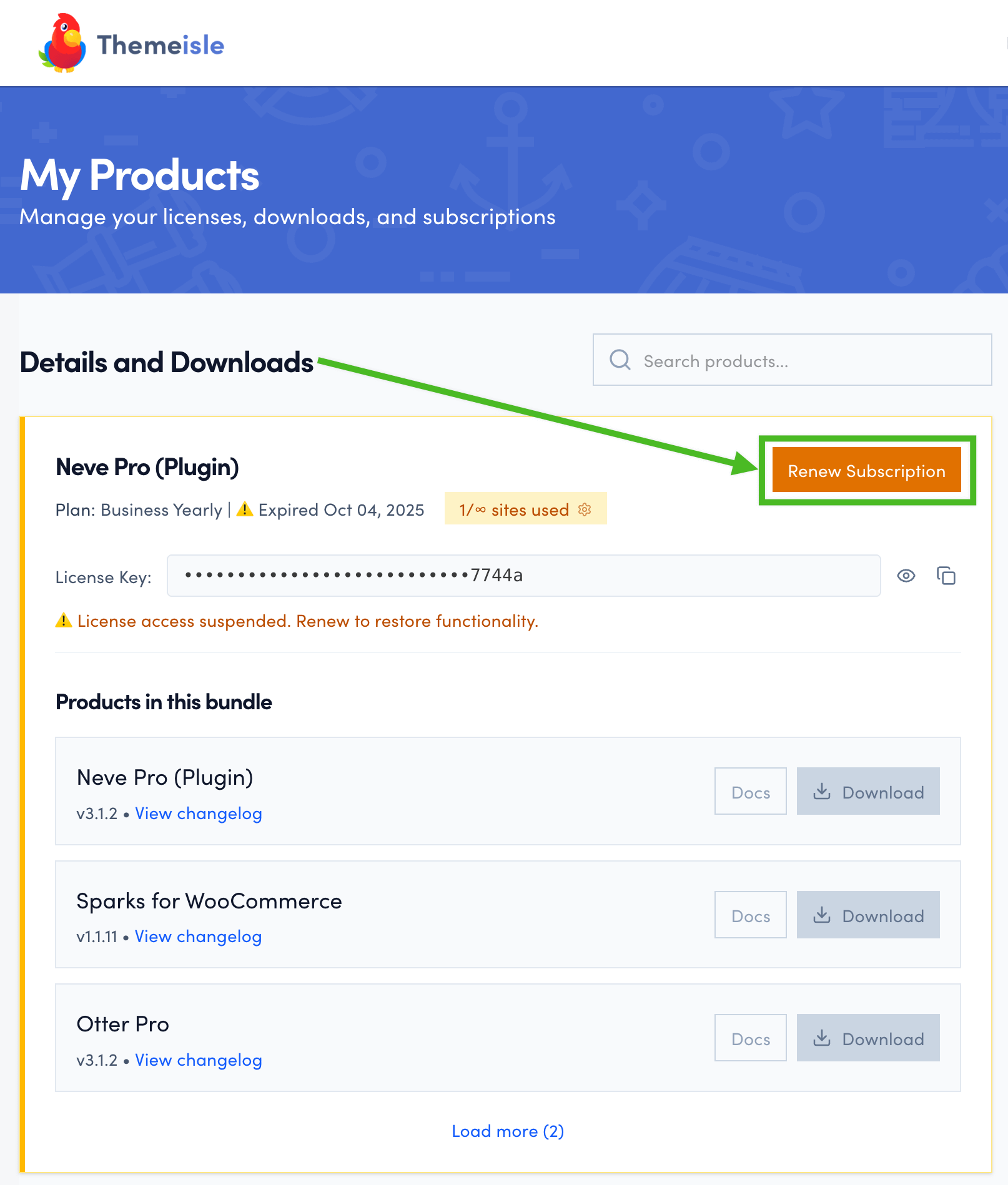
If you have any expired subscriptions, they will be highlighted, and a Renew Subscription button will appear next to each one.
Click Renew Subscription.
- The Stripe checkout page will open, showing the renewal amount for your subscription.
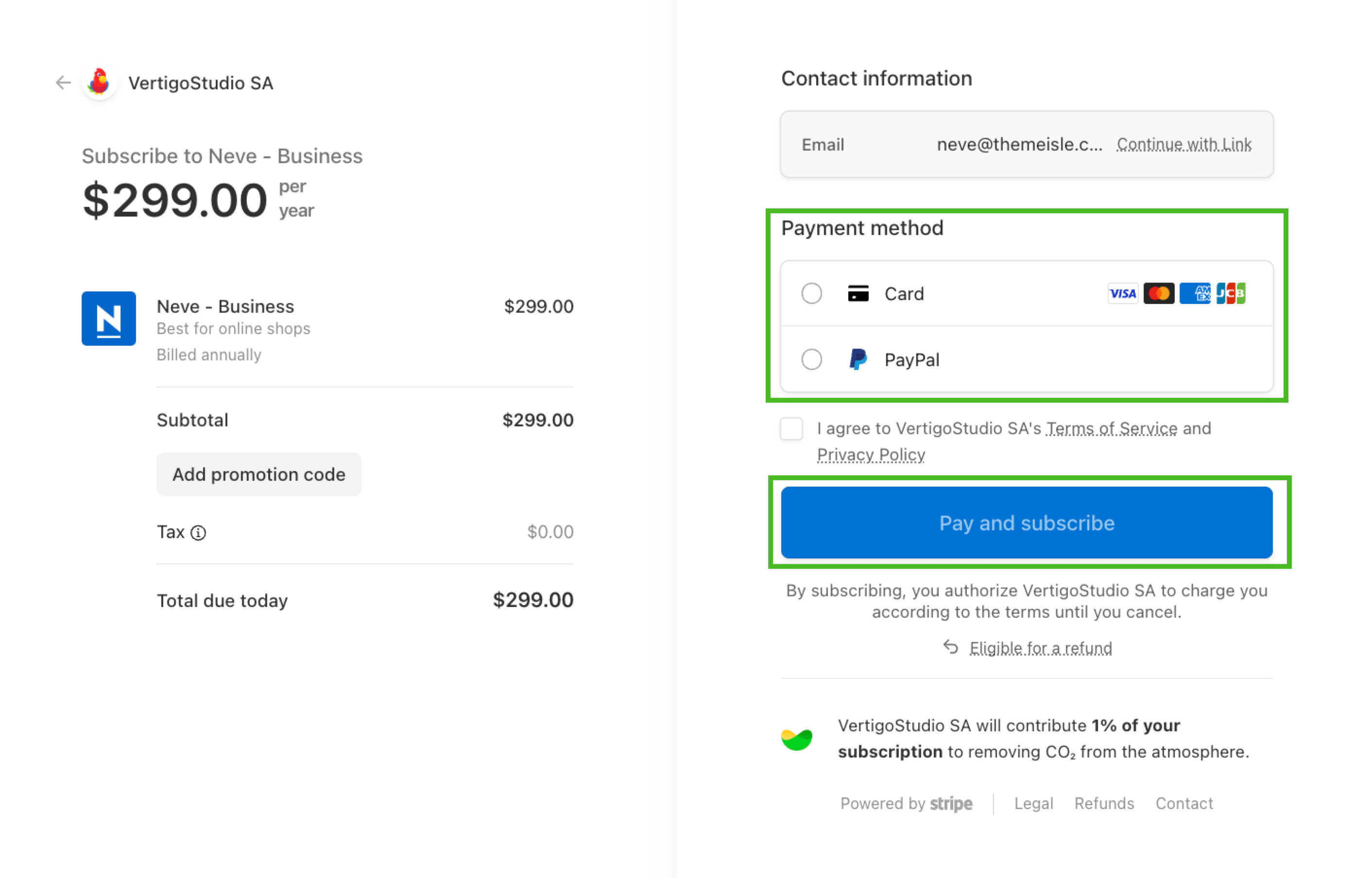
Add your preferred payment method and click Pay and Subscribe.
Once the payment is successfully processed, your license key will be renewed immediately.
If automatic renewal failed
If your subscription lapsed because automatic payment failed — for example, because your saved card had expired or was declined — follow these steps to reactivate it.
Update your payment details first. Before renewing, update your expired or invalid card in the Stripe or FastSpring portal. See How to update or remove payment details for instructions.
Find the renewal invoice. When an automatic payment fails, Stripe or FastSpring sends a failed-payment email with a payment link to your account email address. If you do not see this email, check your spam or junk folder and search for messages from ThemeIsle, VertigoStudio, or Stripe.
Renew through your account or the original invoice. Log in to your ThemeIsle account and click Renew Subscription next to the expired product. Alternatively, use the payment link in the original renewal invoice email.
Confirm the renewal amount before paying. When the Stripe checkout opens, verify the amount matches your expected renewal price before completing the payment. If the amount is higher than expected, do not pay yet — see Understanding Renewal Pricing or contact support to review the price first.
⚠️ Warning: Do not purchase a new subscription from the pricing page to restore an expired one. Buying a new license instead of renewing may not preserve a legacy or loyalty renewal rate. Always use the Renew Subscription button in your account or the payment link from the original renewal invoice.
📝 Note: A successful card payment reactivates your license immediately. If you paid by SEPA Direct Debit, see SEPA Direct Debit payments may not activate immediately below.
SEPA Direct Debit payments may not activate immediately
SEPA Direct Debit is a bank-based payment method used by many customers in Europe. Unlike card payments, SEPA debits are not confirmed instantly — the bank processing can take up to 5 business days.
During this processing window:
- Your subscription or license may still appear inactive in your Themeisle account.
- The message "License access suspended. Renew to restore functionality." may appear even after a successful renewal.
- An invoice or receipt may not be generated yet.
- Your license key may not function until the payment is confirmed.
This is expected behavior and does not mean the payment failed. Your subscription status, license access, and invoice will update automatically once the payment processor confirms the debit.
If your subscription still shows inactive after payment
Follow these steps before renewing again:
- Check your payment method. If you paid by SEPA Direct Debit or another bank-based method, the payment may still be processing.
- Wait for processing. SEPA payments typically take up to 5 business days to clear. Your subscription will activate automatically once the payment is confirmed.
- Check your email. You may receive a payment confirmation or invoice by email once processing is complete.
- Contact support if access is urgent or you are unsure. Reach out via Pre-Sales and include your account email and the product name so the team can check the payment status.
📝 Note: Do not submit a new renewal while waiting for a pending payment to clear. Doing so may result in a duplicate charge.
If you accidentally renewed twice
If you submitted a second renewal while a previous payment was still pending, contact support as soon as possible. To help the team investigate, provide:
- Your account email address
- The product name (for example, Hestia Pro)
- The payment methods used for each transaction (for example, SEPA and PayPal)
- The transaction dates and amounts for both payments
The billing team will review the payments and process a refund for the duplicate charge where applicable.
If you encounter any other issues during renewal, feel free to contact us via Pre-Sales.